Hough Circle Detection
Extend the vote from lines to rings: every edge pixel nominates candidate centers along its gradient, and the busiest candidates win their radii too.
Why Does This Exist?
Coins, cells, irises, and traffic signs are circles, but the line machinery from Hough lines cannot describe them: a circle needs a center plus a radius, three numbers instead of two. The parent Hough transform voting idea extends directly, except the accumulator gains a dimension and naive voting gets a hundred times hungrier. This page covers the gradient shortcut that makes circles practical and the five parameters that control it.
Broken or partial rings that voting cannot close may trace better as contours instead.
Think of It Like This
Triangulating a bell by ear
Three listeners hear a bell from different spots and each points along the direction the sound came from. Their pointing lines cross at the bell, and the loudness hints at the distance. Gradient direction is the pointing finger, vote count is the loudness, and the crossing is the center no single listener could locate alone.
It stops holding in an echo chamber. Reflections point everywhere at once, the same way textured interiors spray gradient votes across the accumulator until the true crossing drowns. Clean ring edges in, true centers out; clutter in, fog out.
How It Actually Works
One dimension more, one hundred times hungrier
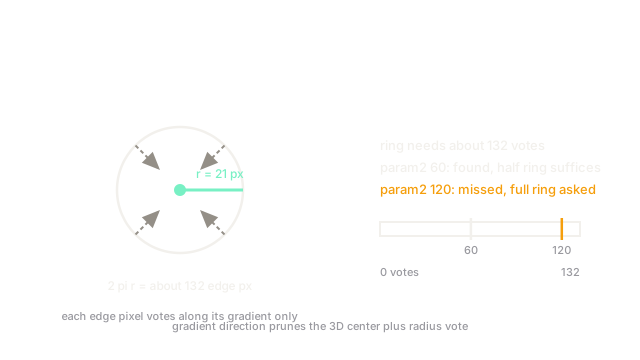
A circle needs center plus radius , a 3D accumulator. If every edge pixel voted for every plausible center and radius, a image with radii would cast over a billion votes. The gradient method (Yuen and co.) cuts this down: each edge pixel votes only along its gradient direction, since the center must lie perpendicular to the edge, collapsing most of the search before radius voting begins.
The five parameters that matter
dp downsamples the accumulator (1 keeps full resolution, 2 halves it). minDist separates centers so one coin yields one detection instead of five. param1 is the upper Canny threshold guarding edge quality. param2 is the accumulator threshold: votes needed to declare a circle. minRadius and maxRadius bound the search and are the cheapest speedup available.
Work the coin numbers: radius pixels gives circumference edge pixels. Setting param2 near demands under half the ring visible, which survives overlap and shadow; setting it near demands the near-impossible full ring and misses occluded coins entirely.
Code
The canonical coin-counting call shape:
import cv2
blurred = cv2.medianBlur(gray, 5)circles = cv2.HoughCircles( blurred, cv2.HOUGH_GRADIENT, 1, 40, param1=100, param2=60, minRadius=15, maxRadius=30,)# circles holds (x, y, r) rows; None means nothing cleared 60 votesBlur first to calm texture, centers at least pixels apart, radii confined to - where the coins actually live.
Watch Out For
Five detections per coin from minDist neglect
Symptom: every coin reports a cluster of overlapping circles with slightly different centers and radii. Each strong ring feeds several neighbouring accumulator cells past threshold. Set minDist near the smallest expected center separation (about one diameter for packed coins) so only the strongest candidate per neighbourhood survives.
Phantom circles from a low param2
Symptom: background texture returns dozens of confident-looking circles that vanish when the threshold rises slightly. Random texture crossings routinely collect modest votes. Raise param2 until phantoms die, then recover missed true circles by tightening the radius range and improving edges, never by lowering the threshold back down.
The Quick Version
- Circles need a 3D center-plus-radius vote, so gradient direction prunes the search to stay affordable.
minRadiusandmaxRadiusare the cheapest speedup: bound them to the objects you actually expect.param2sets the votes a circle needs; under half the circumference survives occlusion.minDistnear one diameter stops one coin reporting as five overlapping circles.- Texture-heavy interiors spray false votes, so blur and edge quality decide success before parameters do.