CVAT Vision Annotation Guide
An open annotation tool for boxes, masks and tracks across images and video, with interpolation doing the in-between frames.
Why Does This Exist?
Video labeling frame by frame is slow enough to kill datasets. CVAT cuts the labor: draw boxes on keyframes, and interpolation fills the gaps; draw masks and skeletons where boxes fall short; review, export to YOLO, COCO and friends, and loop models back in for pre-labels. It feeds tracking and dataset preparation with honest tracks instead of shaky ones.
This page covers the annotation contract, one interpolation fixture, and appropriate use. Version 2.17.0 was the live line verified in-session.
Think of It Like This
A flipbook with key drawings
An animator draws every tenth page in full and assistants fill the nine between by sliding lines evenly. The motion stays smooth because the keys anchor it.
CVAT keys are the drawn frames, interpolation is the assistant. The analogy stops at trust: assistants follow lines, while interpolation follows math, so fast or occluded motion still needs human keys closer together.
How It Actually Works
Input is images or video plus a task with labels and shapes. Output is boxes, polygons, masks and tracks with review states, exportable to standard formats. Purpose is efficient manual labeling with interpolation and model assistance. Appropriate use is detection, segmentation and tracking datasets with quality review. Place keyframes where motion changes, not on a fixed grid, because evenly spaced keys waste effort on still scenes and starve fast ones.
Interpolation fixture
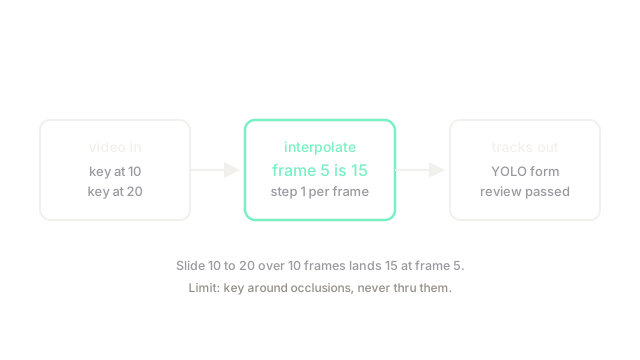
Take a box edge sliding from to over frames. The per-frame step is . At frame the edge sits at . The diagram marks that middle landing, the linearity interpolation promises.
Code
Interpolation in plain Python:
def interp(start: float, end: float, frames: int, at: int) -> float: step = (end - start) / frames # even slide per frame return start + step * at
print(interp(10.0, 20.0, 10, 5)) # -> 15.0Frame 5 lands exactly at 15.0.
Watch Out For
Trusting long interpolations through occlusions
A box sliding behind a pole keeps gliding mathematically while the object hides. The symptom is ghost labels on empty frames that teach detectors to fire on poles. Fix it by keying around occlusions and marking hidden frames explicitly.
The Quick Version
- CVAT maps images and video to boxes, masks and tracks with review states.
- Sliding 10 to 20 over 10 frames lands at 15 on frame 5.
- Place keyframes where motion changes, not on a fixed grid.
- Use it for detection, segmentation and tracking datasets.
- Key around occlusions or interpolation draws ghosts.