Spatial Filtering and Edge Detection
Sliding a small kernel across an image rewrites each pixel from its neighbors, so one pass can blur noise, sharpen detail, or expose edges as high gradient responses.
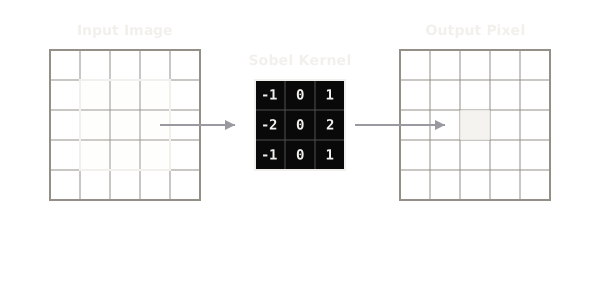
Why Does This Exist?
Raw pixels carry no notion of boundaries: a detector staring at one pixel cannot tell whether it sits inside a wall or on the outline of a door. Looking at each pixel together with its neighbors fixes that, because edges are exactly the places where a neighborhood changes fast. Spatial filtering makes the neighborhood the unit of work: center a small matrix called a kernel over each pixel, multiply overlapping values, and sum them into the output pixel.
That one operation covers blurring, sharpening, and edge finding, and it is the direct ancestor of the convolutional layer. The Sobel operator page isolates the gradient kernels, Gaussian smoothing covers the blur-first step edges depend on, and Canny chains these pieces into a full detector. This page covers the shared sliding mechanism, the Sobel gradient math with a hand-scored example, and the two traps that ruin first attempts.
Think of It Like This
Rubbing a coin through paper with a pencil
Lay a coin under paper and rub a pencil over it: flat paper stays faint, while the coin's raised rim catches dark lead exactly where the height changes. The pencil is the kernel, the rubbing motion is the slide, and the dark rim lines are the edge map. Flat regions score near zero just as flat paper stays blank.
The analogy stops at the paper. A rubbing keeps only one fixed pattern, while a filter bank swaps kernels per task: averaging kernels blur, Sobel kernels differentiate, and learned kernels in a network do both at once.
How It Actually Works
The sliding weighted sum
Filtering is cross-correlation: for a kernel centered on pixel of image , the output is . Here is the kernel weight at offset and is the covered pixel. Every output pixel is a weighted vote of its nine neighbors. At image borders part of the kernel hangs off the edge, so implementations pad the frame, usually with zeros, to keep the output the same size. A stride of 1 slides pixel by pixel; larger strides downsample.
Sobel gradients
Edges are rapid intensity change, which is a derivative, so edge kernels approximate derivatives. The Sobel operator pairs two kernels, for horizontal change and for vertical change:
The center column of zeros with doubled middle weights smooths along the edge direction while differencing across it, which is why Sobel tolerates noise slightly better than a bare difference. Strength and direction combine both responses: magnitude and direction , where and are the two kernel responses at that pixel.
Worked example: scoring one step edge
Take a patch with a dark-to-bright vertical step, columns of 10, 10, and 90:
Apply row by row. Top row: . Middle row: . Bottom row: same as the top, . Total . Apply : the top row contributes , the middle row contributes , and the bottom row contributes , so . Magnitude is at direction degrees, a strong vertical edge. On a flat patch of all 10s both kernels sum to exactly , which is the point: uniform regions vanish and only change survives.
Code
patch = [[10, 10, 90], [10, 10, 90], [10, 10, 90]]sobel_x = [[-1, 0, 1], [-2, 0, 2], [-1, 0, 1]]sobel_y = [[-1, -2, -1], [0, 0, 0], [1, 2, 1]]
def respond(kernel): return sum(k * p for krow, prow in zip(kernel, patch) for k, p in zip(krow, prow))
gx, gy = respond(sobel_x), respond(sobel_y)print(gx, gy, (gx * gx + gy * gy) ** 0.5)# -> 320 0 320.0Watch Out For
Running a derivative kernel on raw noisy pixels
Derivative kernels amplify whatever changes fastest, and sensor noise changes faster than any real edge. The symptom is an edge map of speckle with the true boundaries buried. Blur with a small Gaussian first, then differentiate; that blur-then-differentiate order is exactly what the Gaussian plus Sobel chain in Canny does.
Displaying signed responses as plain images
Sobel responses run negative on bright-to-dark steps, and a standard 8-bit display clips negatives to zero, silently deleting half the edges. The symptom is edges visible in only one direction around every object. Take the magnitude or absolute value before display, never the raw signed array.
The Quick Version
- Each output pixel is a weighted sum of its neighborhood under a small kernel.
- Sobel pairs and kernels that difference across an edge while smoothing along it.
- A 10-to-90 step scores and , while flat regions score exactly zero.
- Zero padding keeps the output size; stride above 1 downsamples.
- Gaussian blur must come before differentiation, and magnitudes must precede display.