torchvision Datasets Guide
PyTorch-side loaders, canned datasets and tensor transforms, so training batches arrive normalized without custom plumbing.
Why Does This Exist?
PyTorch knows tensors but ships no photos. Every team rewrote the same three pieces: download a dataset, apply the same resize-crop-flip-normalize chain, and batch it channels-first. torchvision is that shared copy. It bundles canned datasets, versioned weight presets, tensor transforms, and IO readers, so dataloaders stay short and comparable across projects.
This page covers the loader contract, one normalization fixture, and appropriate use. Cleaning practice lives in dataset preparation.
Think of It Like This
A school cafeteria line
Students arrive hungry in any order. The line gives each tray the same stations in the same order: wash, portion, season, then seat by class table.
torchvision is the line. Raw downloads enter, transforms season each tray identically, and batches sit down channels-first. The analogy stops at choice: real students skip stations, but training trays must not, or splits stop matching published presets.
How It Actually Works
Input is a dataset name plus a transform chain: resize, crop, flip, convert to tensor, normalize. Output is a channels-first float batch with preset statistics applied. Purpose is reproducible vision inputs for PyTorch models, including detection helpers like boxes and masks in matching transforms. Appropriate use is standard training and fine-tuning with published weights. Custom medical or satellite statistics still need your own mean and std measured on your data.
Normalization fixture
Normalize one pixel with mean and std :
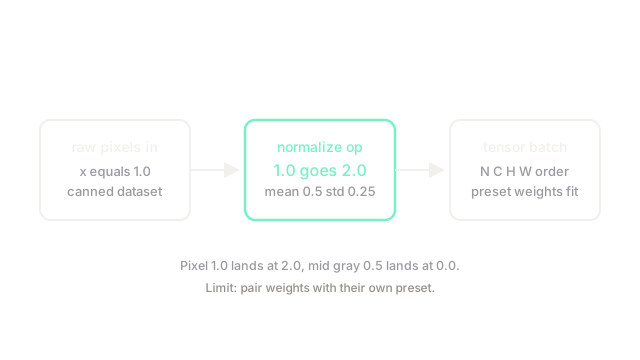
A mid-gray maps to . The diagram shows both landings, which is why mixing presets shifts every downstream score.
Code
The normalization rule in plain Python:
def normalize(x: float, mean: float, std: float) -> float: return (x - mean) / std # per-channel standardize
print(normalize(1.0, 0.5, 0.25)) # -> 2.0print(normalize(0.5, 0.5, 0.25)) # -> 0.0Bright maps to 2.0, mid-gray maps to 0.0, exactly as the transform reports.
Watch Out For
Training with one preset and evaluating with another
Canned weights expect their own mean and std. The symptom is a fine-tune that trails the published number by several points with identical code. Fix it by loading the matching weights preset and its transform together, never separately.
The Quick Version
- torchvision maps dataset names plus transform chains to normalized channels-first batches.
- Pixel 1.0 with mean 0.5 and std 0.25 lands exactly at 2.0.
- Use presets and transforms as a pair for reproducible training.
- Detection helpers keep boxes and masks aligned with the image ops.
- Measure your own statistics for non-natural imagery.