Incident Response for ML
A software bug is either broken or not. An ML incident is messier: the model is still returning responses, they're just quietly wrong for some slice of users. Incident response for ML adds the steps — rollback, replay, and blameless postmortem — that standard DevOps runbooks skip.
Why Does This Exist?
Standard incident response assumes a binary failure: a server is up or down, a query succeeds or errors. ML failures are more ambiguous. A prompt regression makes the model subtly less helpful. A model update changes behaviour on a specific language. Drift makes recommendations gradually less relevant. None of these show up as 500 errors; all of them hurt users.
ML incident response adds a layer to standard DevOps runbooks that handles the ML-specific problems: detecting subtle quality regressions, rolling back model or prompt versions instead of code deploys, replaying affected requests on the fixed model, and running postmortems that ask "why did our monitoring fail to catch this" rather than just "who wrote the bad code."
The Five Steps
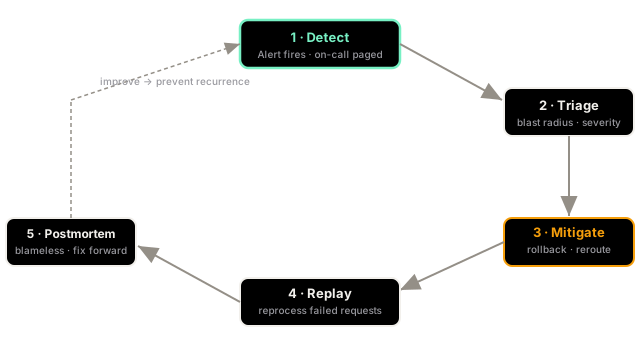
1. Detect. Your alert fires. For ML, this means one of your model-monitoring metrics crossed a threshold: online eval score dropped, refusal rate spiked, P99 latency exceeded SLA, or cost-per-request jumped. The on-call engineer is paged with a dashboard link that shows the metric timeline and the alert condition.
2. Triage. Before taking action, understand the scope. Is this affecting all users or a specific tenant/cohort? Is it a model quality issue, an infrastructure issue, or a data issue? Look at: which prompt version was active when the regression started, whether a model update was deployed in the last 24 hours, and whether the input distribution shifted (from data-drift-detection).
3. Mitigate. Get users out of the bad state as fast as possible. Two levers:
- Prompt rollback: if the issue started after a prompt deploy, roll back the active prompt version in the registry. Takes 30 seconds, no code deploy needed.
- Model reroute: redirect traffic from the degraded model endpoint to a fallback (another model version, or a different provider). Configured in the router.
If neither helps, enable degraded mode: return a cached response or a graceful "I can't help with that right now" rather than serving bad predictions.
4. Replay. Once the model or prompt is fixed, the requests that received bad responses during the incident window are gone — users already saw the wrong answer. For async workflows (batch jobs, email generation, report generation), you can replay those requests against the fixed model and send the corrected output. For real-time user interactions, replay usually isn't possible; the postmortem calculates the affected user count for business reporting.
5. Blameless postmortem. Write a structured postmortem within 48 hours. A good ML postmortem asks:
- What was the exact timeline (deploy time, alert time, mitigation time)?
- What monitoring gap let this reach users before detection?
- What prompt/model/data change was the root cause?
- What one change would have prevented this incident?
- What would catch this class of failure faster next time?
The "blameless" part matters. If postmortems assign blame, people hide incidents. If they're analytical, people write them honestly and the system improves.
The Rollback Playbook
Keep this literal playbook in your team wiki:
WHEN: eval score drops below 3.5 sustained 10 min OR error rate > 2%DO: 1. Check model-monitoring dashboard → identify which metric triggered 2. Check recent changes: git log, prompt registry, model version 3. If prompt change < 2h ago → roll back prompt to previous version 4. If model version changed < 24h ago → reroute to previous endpoint 5. If neither → enable degraded mode, escalate to ML team 6. Confirm metric recovers within 5 min of mitigation 7. Open incident ticket, assign severity (P1/P2/P3) 8. Write postmortem within 48hWatch Out For
Rolling back when the root cause is external.
The instinct in an incident is to undo the last change. But ML systems have external dependencies — provider models that update silently, data pipelines that break, APIs that change response formats. Rolling back your prompt when the actual issue is that your vector database went down wastes time and may not resolve the incident. Before rolling back, spend three minutes confirming the rollback target actually caused the regression. Check your trace logs: does the issue appear only on requests that reached the model, or before?
The Quick Version
- ML incidents are often silent quality regressions, not crashes. They need active monitoring to detect.
- Five steps: detect (alert fires), triage (scope and root cause), mitigate (rollback or reroute), replay (fix async affected requests), postmortem (prevent recurrence).
- Keep a literal rollback playbook your on-call can execute at 3 AM without thinking.
- Write blameless postmortems — they're how the system learns, not how individuals are blamed.
- Before rolling back, confirm the rollback target is actually the root cause, not an external dependency.