Model Serialization
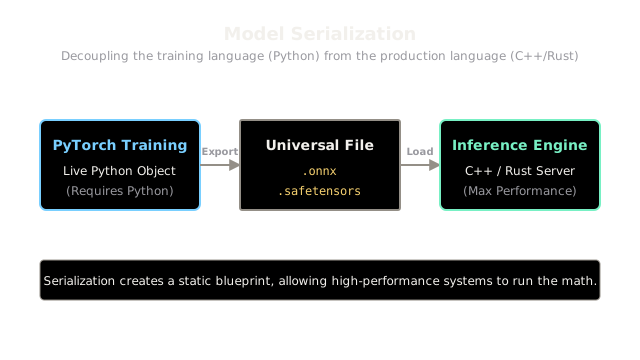
You trained a model in Python using PyTorch, but the production web server is written in C++ or Rust for maximum speed. You need a way to save the model so that any language can load it and run it.
Why Does This Exist?
When you train a machine learning model using PyTorch or TensorFlow, the model exists as a live object in the memory (RAM) of your Python process.
When you finish training, you want to shut down your expensive training server and deploy the model to a production server (like a massive cloud API, or even directly onto a user's iPhone). To do this, you must save the live Python object into a file on disk.
However, you can't just take a PyTorch Python object and hand it to an iPhone written in Swift, or a high-performance backend server written in C++. Model Serialization is the process of converting your model into a universal file format so it can be loaded, understood, and executed by completely different hardware and software environments.
Think of It Like This
Think of It Like This
Imagine an architect designing a skyscraper using specialized 3D modeling software. When it's time to actually build the skyscraper, the construction workers on site don't use the architect's 3D software.
The architect serializes the design by exporting it into a universal PDF blueprint. The blueprint contains all the exact measurements and materials (the weights) and the structural layout (the architecture). The construction workers can read the PDF anywhere, regardless of what software the architect originally used.
The Three Layers of Serialization
When you save a model, you actually need to save two distinct things:
- The Weights (Parameters): The millions of trained decimal numbers.
- The Graph (Architecture): The mathematical order of operations (e.g., "Multiply Layer 1 by Layer 2, then apply a ReLU function").
Different serialization formats handle these differently.
1. Weights-Only Formats (Safetensors, PyTorch state_dict)
These formats only save the trained decimal numbers. When you load them in production, you must first write code to manually rebuild the exact neural network architecture (the graph), and then pour these saved numbers into it.
.pt/.pth(Pickle): The default PyTorch format. Warning: It uses Python'spicklemodule, which can silently execute malicious code when loaded. Never load a.ptfile from an untrusted source.- Safetensors: Created by Hugging Face, this format is mathematically identical to
.ptbut completely removes thepicklevulnerability. It is perfectly safe, faster to load, and the modern standard for sharing LLM weights.
2. Graph + Weights Formats (ONNX, TorchScript)
These formats save both the numbers and the blueprint of the math operations. You do not need the original Python code to run them.
- ONNX (Open Neural Network Exchange): The industry standard universal format. You can train a model in PyTorch, export it to ONNX, and load it in C++, Java, Rust, or Javascript. Almost all hardware accelerators (like Apple's Neural Engine or Nvidia's TensorRT) know how to read an ONNX file.
3. Hardware-Optimized Formats (TensorRT, CoreML)
These formats are highly specialized. They take an ONNX file and rewrite the math operations specifically to run as fast as physically possible on a specific microchip.
- A TensorRT engine file is serialized specifically for a specific Nvidia GPU architecture (e.g., an H100). It will not run on an A100.
- A CoreML file is serialized specifically for Apple Silicon.
Code
Exporting a PyTorch model to the universal ONNX format is straightforward, but it requires passing a "dummy input" so the exporter can trace the mathematical graph.
import torchimport torchvision.models as models
# 1. Load the live model in PyTorchmodel = models.resnet18(pretrained=True)model.eval()
# 2. Create a dummy input matching the shape the model expects# (Batch Size: 1, Channels: 3, Height: 224, Width: 224)dummy_input = torch.randn(1, 3, 224, 224)
# 3. Serialize the model to ONNXtorch.onnx.export( model, dummy_input, "resnet18.onnx", export_params=True, input_names=['input'], output_names=['output'])
# Now "resnet18.onnx" can be sent to a C++ server for inference!Watch Out For
Dynamic Control Flow.
When you export to a static graph format like ONNX, the exporter traces what happens to your dummy input. If your Python code has an if statement (e.g., if input_length > 10: do_something()), the exporter will only record the path that the dummy input took. If your dummy input was length 5, the do_something() code is completely deleted from the ONNX file! To fix this, you must rewrite your PyTorch code to use mathematical masks instead of Python if/else statements, or use advanced tracing features like TorchScript.
The Quick Version
- Model Serialization packages a live model into a file so it can be deployed to production servers, mobile phones, or web browsers.
- Safetensors is the safest and most popular way to save model weights. It avoids the severe security risks of PyTorch's default
.pt(pickle) files. - ONNX is the universal blueprint format. It saves both the weights and the mathematical operations, allowing a PyTorch model to run in C++ or Rust.
- Hardware formats (TensorRT, CoreML) are the final step, compiling the graph to squeeze maximum speed out of a specific silicon chip.