Columnar Formats
Row formats make you read every column to get one. Columnar formats store each column together, which is why a training loop stops waiting on the disk.
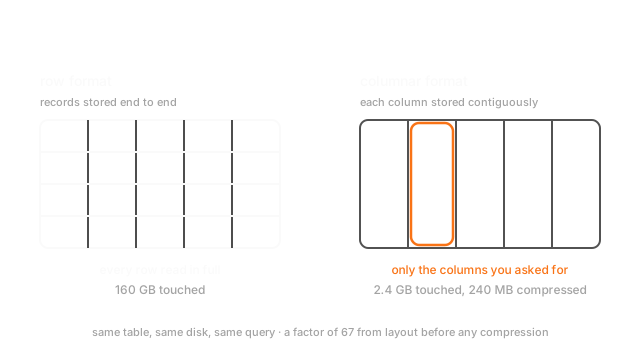
Why Does This Exist?
A feature table has 200 columns and 100 million rows, stored as CSV. Your model uses three of them, and every epoch spends eleven minutes parsing 160GB of text to get 2.4GB of numbers.
Nothing is misconfigured. It's the layout. A row-oriented file writes record one's 200 values, then record two's 200 values, and so on, so the three values you want are scattered through the file at 200-value intervals, and there is no way to reach them without walking past everything else.
A columnar format writes all 100 million values of column one, then all of column two. Now your three columns are three contiguous runs, and you read exactly those.
That's the entire idea, and it produces a factor of 67 on this example before any compression.
This page covers file layout for analytical reads and training data. Transactional writes and point lookups stay row-oriented, as the trade section explains, and the pipeline that feeds training is training data pipelines.
Basics first: a table is rows of records and columns of fields, and a CSV writes it row by row as text. If row versus column is not yet visual, structured and unstructured data sets up the shapes. Everything below assumes you know what a row, a column and a CSV parse cost.
Think of It Like This
A filing cabinet, arranged two ways
A doctors' surgery keeps one folder per patient: name, date of birth, blood type, every visit, every prescription. To find one patient's history you pull one folder. Perfect for that.
Now the health authority asks how many patients have type O blood. You open all 40,000 folders and read one line in each. The folders are rows, the question is a column query, and the work is the full scan.
The other arrangement keeps a sheet per field: one long sheet of every name, one of every date of birth, one of every blood type. The blood-type question is now one sheet, and you never touch the others. Better still, that sheet has long runs of the same value, so you can write "O x 312" instead of writing O three hundred times. The sheets are columns, and the shorthand is dictionary encoding.
Where it stops: the catch is symmetric. One patient's full record now means pulling every sheet and reading position 8,214 on each. Row layout wins for one record at a time; columnar wins for one column at a time, and the mapping holds in exactly that direction.
How It Actually Works
Parquet on disk, Arrow in memory
Two names that get conflated and shouldn't. Parquet is a storage format: compressed, on disk, built for reading columns. Arrow is an in-memory layout: uncompressed, column-oriented, and standardised so that two processes or two languages can hand each other a table without serialising it. Read Parquet, decompress into Arrow, and the array your model gets is often the same bytes the reader produced, a zero-copy read.
Why columnar compresses so much better
One column holds one type and usually a narrow range of values, so the compressor has real structure to exploit. A row holds an int, a float, three strings and a timestamp, which looks like noise.
Three encodings do most of the work. Dictionary encoding replaces a low-cardinality string column with small integer codes plus one lookup table, which is the single biggest win on real feature tables. Run-length encoding stores repeats as a value and a count. Delta encoding stores differences, which turns a sorted timestamp column into a run of tiny numbers.
That's why the 2.4GB in the opening example lands nearer 240MB in practice.
Row groups, and skipping work entirely
Parquet splits a file into row groups, horizontal blocks typically 128MB, and stores min, max and null count per column per row group.
So a filter can skip whole blocks without decompressing them. WHERE event_date = '2026-03-01' on a file sorted by date touches the two or three row groups whose min and max bracket that date and ignores the rest. That's predicate pushdown, and it only works if the data is sorted or clustered by the column you filter on. Sort order is a storage decision that determines query cost, which is why it's worth choosing deliberately.
What columnar is bad at
Be honest about the trade. Reading one full record means touching every column. Appending a single row is expensive, since each column's block has to be extended. Updating a value in place mostly isn't supported. The pattern is to write a new file, which is also why table formats like Delta and Iceberg exist on top.
So: columnar for analytical reads and training data. Row-oriented for transactional writes and point lookups. Most stacks have both, and the extract between them is where skew gets introduced.
Worked example
100 million rows, 200 columns, 8 bytes a value. Your model needs three columns.
A row format has to read 100,000,000 times 200 times 8, which is 1.6e11 bytes, so 160GB, because the columns are interleaved.
Columnar reads 100,000,000 times 3 times 8, which is 2.4e9 bytes, so 2.4GB. The ratio is 160 over 2.4, about 67x, purely from layout.
Then compression. Two of those three columns are low-cardinality categoricals, dictionary-encoded, so a realistic 10x lands you at 240MB. Against 160GB, that's a factor of about 670, and it's the difference between an input pipeline that starves the accelerator and one that doesn't.
Code
import numpy as np
rows: int = 100_000_000all_cols: int = 200needed: int = 3width: int = 8 # bytes per value
def row_format_bytes() -> int: """A row store interleaves columns, so reading one means reading all of them.""" return rows * all_cols * width
def columnar_bytes(cols: int, compression: float = 1.0) -> int: return int(rows * cols * width / compression)
print(row_format_bytes() / 1e9) # -> 160.0 gigabytes readprint(columnar_bytes(needed) / 1e9) # -> 2.4 gigabytes readprint(round(row_format_bytes() / columnar_bytes(needed))) # -> 67 layout aloneprint(round(columnar_bytes(needed, compression=10) / 1e6)) # -> 240 megabytes, compressedNote what isn't in the arithmetic: no faster disk, no more workers, no change to the model. Just which bytes sit next to which.
Watch Out For
Reading a Parquet file as if it were a CSV
pd.read_parquet(path) with no arguments, then selecting three columns from the resulting frame.
You just materialised all 200 columns in memory and threw away 197 of them, which is every cost of the row format plus the decompression. The format was capable of reading three columns; the call didn't ask it to.
Same shape of mistake elsewhere: reading the whole file then filtering rows in pandas, when passing the filter to the reader would have skipped entire row groups without decompressing them.
Pass columns=[...] and filters=[...] to the reader. On a wide table that's usually the single largest speedup available in the whole pipeline, and it's an argument rather than a rewrite.
Row groups that are tiny, or a sort order nobody chose
Two symmetric failures, and both look like the format underperforming.
Too many small files or row groups. Writing one Parquet file per hour per partition gives you hundreds of thousands of small files, each with a footer to read and a connection to open. Per-file overhead dominates and the format's advantage disappears. This is the "small files problem", and it's the most common reason a Parquet migration doesn't deliver. Compact into larger files, and aim for row groups near the default 128MB rather than 5MB.
No useful sort order. Predicate pushdown works by comparing your filter against per-row-group min and max. If the data is in arrival order, almost every row group's range spans almost every value, so nothing can be skipped and every query reads everything. Sorting by the column you filter on most, usually a date, is a one-time write cost that changes read cost permanently.
Check both: count files per partition, and print row-group statistics for the column you filter on. If the min and max are near-identical across all groups, your sort order is doing nothing.
The Quick Version
- Row formats interleave columns, so reading three of two hundred touches every byte. Columnar keeps each column contiguous.
- 100M rows by 200 columns is 160GB row-wise against 2.4GB for three columns columnar: a factor of 67 from layout alone.
- Parquet is the on-disk format; Arrow is the in-memory layout, standardised so processes can share tables without serialising.
- One type per column compresses far better than a mixed row. Dictionary encoding on low-cardinality strings is the biggest single win.
- Row groups carry min, max and null count per column, so a filter can skip whole blocks, but only if the data is sorted by the column you filter on.
- Columnar is bad at reading one whole record, appending one row, and updating in place. Use row-oriented storage for transactional work.
- Pass
columns=andfilters=to the reader, or you've paid for the format and used none of it. - Many small files destroy the advantage. Compact, and keep row groups near 128MB.