Context Budgeting
Every LLM has a maximum number of words it can 'see' at one time, and you pay for every word. Context budgeting is the math of deciding exactly how much space to allocate to the prompt, the retrieved documents, the conversation history, and the final answer.
Why Does This Exist?
Every Large Language Model (LLM) has a hard physical limit on how much text it can process in a single request, known as the Context Window.
For older models (like GPT-3), this was 4,096 tokens (~3,000 words). For modern models (like GPT-4o or Claude 3.5), it can be 128,000 or even 2 million tokens.
However, just because you can stuff 100,000 words into a prompt doesn't mean you should.
- Cost: You are billed per input token. Sending a 100,000-token prompt costs $0.50 per request. If 1,000 users do that, you just spent $500.
- Latency: Processing 100,000 tokens takes significantly longer than processing 1,000 tokens, degrading the user experience.
- Performance: Sending too much irrelevant information causes Context Degradation, where the model gets confused and hallucinates.
Context Budgeting is the architectural practice of treating the context window like a strict financial budget. You explicitly assign maximum token allocations to different parts of the prompt to guarantee the system never crashes and costs remain predictable.
Think of It Like This
Packing a suitcase
You have a suitcase (the Context Window) that can hold exactly 50 pounds.
If you just blindly throw things into it, you will hit 50 pounds, the airline will reject it, and your trip is ruined (the API throws an HTTP 413 Payload Too Large error).
Context Budgeting is making a strict packing list:
- Suit (System Prompt): 5 lbs (Always needed, non-negotiable)
- Toiletries (Chat History): Max 10 lbs (Keep the recent stuff, throw away the old stuff)
- Books (RAG Documents): Max 25 lbs (Only bring the 3 most relevant books)
- Empty Space (Generation Room): Reserve 10 lbs so you have room to bring souvenirs (the LLM's output) back home.
How It Actually Works
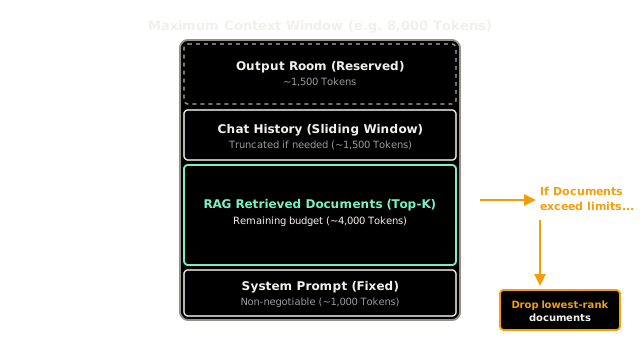
When building a RAG or Agentic application, the final string sent to the LLM is constructed dynamically from four main components. You must calculate the budget for each.
1. The System Prompt (Fixed Cost)
The instructions for the model (the persona, rules, and formatting). Budgeting Strategy: This is usually static. Count the tokens once during development. Let's say it's 1,000 tokens.
2. The Context/RAG Documents (Dynamic Cost)
The documents retrieved from the vector database.
Budgeting Strategy: You must enforce a strict top_k limit in your vector search. If you chunk your documents into 500-token blocks, and you set top_k=5, you know the context will never exceed 2,500 tokens.
3. The Conversation History (Variable Cost)
If you are building a chatbot, you must pass the previous messages back to the LLM so it remembers what was said. If a user talks to the bot for 3 hours, this history will eventually exceed the context window. Budgeting Strategy: You must implement a sliding window (e.g., only keep the last 10 messages) or a summarizer (e.g., compress old messages into a 200-token summary).
4. The Output Room (The Hidden Cost)
If you send 127,500 tokens to a model with a 128,000 limit, the model only has 500 tokens left to generate its answer. If the answer requires 600 tokens, the LLM will abruptly cut off mid-sentence.
Budgeting Strategy: You must explicitly reserve "Generation Room." You set max_tokens=2000 in the API call to guarantee the model has enough space to reply.
Code
This code demonstrates how a backend system dynamically builds a prompt while respecting a strict token budget. Note: In production, you would use a library like tiktoken to count exact tokens; we use word counts here for simplicity (1 word 1.3 tokens).
import tiktoken # Standard library for counting OpenAI tokens
def num_tokens_from_string(string: str, model_name: str = "gpt-4o") -> int: encoding = tiktoken.encoding_for_model(model_name) return len(encoding.encode(string))
def build_budgeted_prompt(system_prompt, chat_history, retrieved_docs, user_query): # --- STRICT BUDGET DEFINITION --- MAX_TOTAL_TOKENS = 8000 RESERVED_FOR_OUTPUT = 1000 AVAILABLE_PROMPT_TOKENS = MAX_TOTAL_TOKENS - RESERVED_FOR_OUTPUT # -------------------------------- current_tokens = 0 final_prompt = "" # 1. Add System Prompt (Non-negotiable) sys_tokens = num_tokens_from_string(system_prompt) final_prompt += f"{system_prompt}\n\n" current_tokens += sys_tokens # 2. Add User Query (Non-negotiable) query_tokens = num_tokens_from_string(user_query) current_tokens += query_tokens # 3. Add RAG Context (Negotiable - only add what fits) final_prompt += "--- CONTEXT ---\n" for doc in retrieved_docs: doc_tokens = num_tokens_from_string(doc) if current_tokens + doc_tokens < (AVAILABLE_PROMPT_TOKENS * 0.7): # Reserve 70% of budget for context final_prompt += f"{doc}\n" current_tokens += doc_tokens else: print("Budget reached: Dropping lower-relevance RAG documents.") break # 4. Add Chat History (Negotiable - Slide the window) final_prompt += "--- CHAT HISTORY ---\n" # Iterate backwards to keep the most recent messages first! for msg in reversed(chat_history): msg_tokens = num_tokens_from_string(msg) if current_tokens + msg_tokens < AVAILABLE_PROMPT_TOKENS: # Prepend because we are iterating backwards final_prompt = final_prompt.replace("--- CHAT HISTORY ---\n", f"--- CHAT HISTORY ---\n{msg}\n") current_tokens += msg_tokens else: print("Budget reached: Truncating older chat history.") break final_prompt += f"\nUser: {user_query}\nAssistant:" print(f"\nFinal Prompt Size: {current_tokens} tokens.") print(f"Room left for generation: {MAX_TOTAL_TOKENS - current_tokens} tokens.") return final_promptWatch Out For
Dynamic Injection Overflow
The most common cause of production LLM crashes is developers hardcoding API calls without calculating token limits on dynamic data. If your system prompt pulls in 5 API results (e.g., weather, stocks, user profile), and the user profile happens to be unusually long, the prompt will silently blow past the context window limit and return an error to the end user. You must always mathematically verify the size of dynamic inputs before calling the LLM.
The Quick Version
- The Context Window is the maximum amount of text an LLM can process in one go.
- Context Budgeting is the practice of allocating strict maximums to different parts of the prompt to control costs, latency, and prevent crashes.
- The budget usually consists of: System Prompt (fixed), RAG Context (dynamic), Chat History (sliding window), and Output Room (reserved buffer).
- You must use token-counting libraries (like
tiktoken) to mathematically construct the prompt before sending it to the API.