Document Ingestion Pipelines
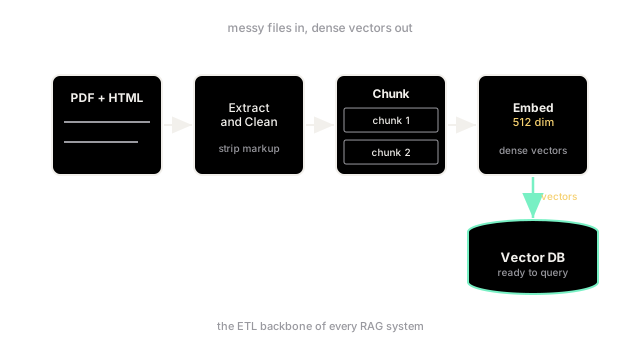
Before an LLM can answer questions about your data, the data must be extracted from its raw format, cleaned, split into chunks, embedded, and loaded into a vector database.
Why Does This Exist?
In discussions about Retrieval-Augmented Generation (RAG), most of the focus is on the exciting part: the user asks a question, the system retrieves a vector, and the LLM writes a brilliant answer.
However, none of that works if the vector database is empty or filled with garbage. The invisible workhorse of any RAG system is the Document Ingestion Pipeline. This is an ETL (Extract, Transform, Load) process specifically designed for unstructured data.
Enterprise data is messy. It lives in PDFs with weird columns, Confluence pages full of macros, Slack threads, and internal wikis. You cannot just pass a raw PDF directly into an embedding model; it must be parsed into clean text, stripped of useless navigation headers, split into coherent blocks, converted into vectors, and safely stored. The quality of your ingestion pipeline dictates the absolute ceiling of your RAG system's accuracy.
Think of It Like This
Preparing ingredients for a master chef
Imagine you hire a world-class chef (the LLM) to cook for you.
If you hand the chef a live chicken, a clump of dirt with carrots still attached, and an unopened sack of flour, the chef will be annoyed and the meal will take forever.
The ingestion pipeline is the prep cook. The prep cook takes the raw ingredients, slaughters and plucks the chicken, washes and peels the carrots, and measures out the flour into neat, usable bowls (vector embeddings). When the chef is ready to cook (answer a query), all the ingredients are perfectly prepped, allowing the chef to focus entirely on the final synthesis.
How It Actually Works
A robust document ingestion pipeline generally follows five sequential steps:
1. Extraction (Parsing)
The first step is getting the text out of the source file.
- For
.txtor.mdfiles, this is trivial. - For
.html, you must strip out the HTML tags, javascript, and CSS, ideally preserving the hierarchy indicated by<h1>and<h2>tags. - For
.pdffiles, this is notoriously difficult. Standard parsers often mangle multi-column layouts, lose tables, and include page numbers right in the middle of sentences. Modern pipelines often use Vision-Language Models (VLMs) or specialized OCR tools (like unstructured.io) to intelligently parse PDFs.
2. Cleaning and Normalization
Once you have raw text, you must clean it. If you embed garbage, you retrieve garbage.
- Remove repeating boilerplate (e.g., "Copyright 2026", "Confidential").
- Fix weird whitespace and line breaks caused by PDF column wrapping.
- Normalize Unicode characters (e.g., converting fancy curly quotes into standard straight quotes).
3. Chunking
Embedding models have strict context limits (often 512 or 8192 tokens), and retrieving an entire 50-page document doesn't help an LLM answer a specific question. Therefore, the cleaned text must be cut into smaller pieces called chunks.
- You can chunk by a fixed number of characters or tokens.
- You can chunk by semantic boundaries (paragraphs, sections).
- It is critical to include overlap between chunks so that a sentence split across two chunks doesn't lose its context.
4. Embedding Generation
Once the document is neatly divided into chunks, each chunk is sent to an embedding model (like OpenAI's text-embedding-3-small or Hugging Face's all-MiniLM-L6-v2). The model returns a high-dimensional vector representing the semantic meaning of that chunk.
5. Loading (Indexing)
Finally, the pipeline loads the data into the Vector Database (e.g., Pinecone, Qdrant, Milvus). It is vital to store not just the vector, but also the metadata:
- The original text of the chunk (so the LLM has something to read!).
- Source URL or filename.
- Document title and author.
- The chunk's location within the document (e.g.,
chunk_index: 4).
Metadata allows you to apply hard filters during retrieval (e.g., "only search documents authored by HR").
Code
This is a simplified, synchronous ingestion pipeline using standard Python libraries to demonstrate the flow from raw file to vector database.
from sentence_transformers import SentenceTransformerimport pineconeimport re
# 1. Initialize the embedding modelembedder = SentenceTransformer('all-MiniLM-L6-v2')
def extract_text_from_html(html_content): # Extremely simplified HTML extraction text = re.sub(r'<[^>]+>', ' ', html_content) return text.strip()
def clean_text(text): # Remove extra whitespace and line breaks text = re.sub(r'\s+', ' ', text) return text
def chunk_text(text, chunk_size=200, overlap=50): words = text.split() chunks = [] for i in range(0, len(words), chunk_size - overlap): chunk = " ".join(words[i:i + chunk_size]) chunks.append(chunk) return chunks
def ingest_document(html_content, document_id, title): # Step 1: Extract raw_text = extract_text_from_html(html_content) # Step 2: Clean cleaned_text = clean_text(raw_text) # Step 3: Chunk chunks = chunk_text(cleaned_text) # Step 4: Embed embeddings = embedder.encode(chunks).tolist() # Step 5: Load (Prepare payloads for a vector DB) vectors_to_upsert = [] for i, (chunk, embedding) in enumerate(zip(chunks, embeddings)): vector_id = f"{document_id}_chunk_{i}" metadata = { "text": chunk, "title": title, "chunk_index": i } vectors_to_upsert.append((vector_id, embedding, metadata)) # In a real app, you would upsert this batch to Pinecone/Qdrant here print(f"Successfully processed {len(vectors_to_upsert)} chunks for '{title}'.") return vectors_to_upsert
# Example usagehtml_doc = "<h1>Employee Handbook</h1> <p>Welcome to the company. Your PTO is 20 days...</p>"vectors = ingest_document(html_doc, doc_id="doc_123", title="Employee Handbook")# -> Successfully processed 1 chunks for 'Employee Handbook'.Watch Out For
Losing document updates (The Sync Problem)
Ingesting a document once is easy. Keeping the vector database synchronized with a living Confluence wiki is incredibly difficult. If a user edits a paragraph in Confluence, your pipeline must detect the change, find the exact chunks in the vector database that correspond to that paragraph, delete them, and insert the new chunks. Many teams ignore this and just re-ingest everything every night, which wastes massive amounts of compute and API credits.
The Quick Version
- RAG systems cannot function without a pipeline that translates messy human files into clean vector math.
- The pipeline follows an ETL structure: Extract, Clean, Chunk, Embed, Load.
- Extracting text from unstructured formats like PDFs requires specialized parsers to avoid mangling the text.
- Metadata (like titles and URLs) must be attached to the vector during the Load step, otherwise the system won't know where the information came from.