Human-in-the-Loop (HITL)
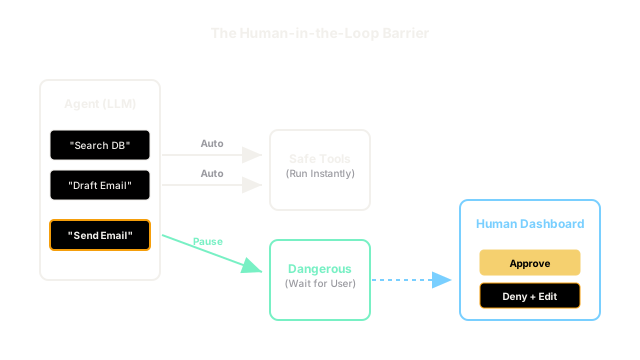
You shouldn't let an AI send emails to your investors or wipe a database without checking. Human-in-the-loop pauses the agent right before it takes a dangerous action, waits for you to click 'Approve' or 'Deny', and then resumes.
Why Does This Exist?
Autonomous agents are fantastic at planning, reasoning, and formatting data. However, they still hallucinate.
If you build a "Customer Support Agent" and give it a send_email tool and a refund_customer tool, it might misread a sarcastic complaint and issue a $500 refund to a user who was just joking.
If you let agents take irreversible, public, or financially sensitive actions autonomously, they will eventually cause a disaster.
Human-in-the-Loop (HITL) is an architectural pattern that bridges the gap between full autonomy and strict safety. The agent does 99% of the hard work (reading the complaint, looking up the user, calculating the refund, drafting the email). But right before it executes the final, irreversible action, the system pauses and asks a human for permission.
Think of It Like This
The Intern
Fully Autonomous (No HITL): You hire a brilliant 19-year-old intern. You tell them to manage the corporate Twitter account. They accidentally tweet a highly offensive joke. The company stock crashes.
Human-in-the-Loop: You hire the intern. You tell them to manage the Twitter account, but they are only allowed to draft tweets in a Google Doc. You review the Google Doc every afternoon. You approve the good ones and delete the bad ones. You get the benefit of their hard work without the catastrophic risk.
How It Actually Works
Implementing HITL requires modifying the Agent Harness (the execution loop).
1. Categorizing Tools
You must tag every tool in your system as either safe or dangerous.
search_database: Safe. The agent can run this 100 times without human input.calculate_math: Safe.execute_bank_transfer: Dangerous.send_email: Dangerous.
2. The Execution Pause
When the LLM outputs Action: send_email(), the orchestrator checks the tool's tag. Because it is marked as dangerous, the orchestrator does not execute the Python function. Instead, it pauses the loop, saves the state to a database, and sends a notification to a human dashboard.
3. The Approval/Denial
The human reviews the proposed email.
- If they click Approve, the orchestrator resumes the loop, executes the Python function, and the agent continues.
- If they click Deny, the orchestrator resumes the loop, but returns an error to the agent: "Observation: The human rejected this email. They said it was too aggressive. Please rewrite it." The agent then learns from the feedback and tries again.
Code
This code demonstrates how to implement a pause-and-resume HITL mechanism inside a tool execution loop.
def ask_human_for_approval(tool_name, arguments): """Mocks sending a notification to a human dashboard.""" print(f"\n[⚠️ HUMAN REVIEW REQUIRED]") print(f"The agent wants to execute: {tool_name}") print(f"With arguments: {arguments}") # In a real app, this would be a UI button click. Here we use terminal input. decision = input("Approve this action? (y/n/feedback): ") if decision.lower() == 'y': return "APPROVED" elif decision.lower() == 'n': return "DENIED: The human rejected this action without comment." else: # The human provides specific feedback on why it was rejected return f"DENIED: Human feedback - {decision}"
def execute_tool_with_hitl(tool_name, arguments): # 1. Categorize Tools DANGEROUS_TOOLS = ["send_email", "issue_refund", "delete_record"] # 2. Safe tools execute immediately if tool_name not in DANGEROUS_TOOLS: print(f"[System] Executing safe tool: {tool_name}") return actually_run_tool(tool_name, arguments) # 3. Dangerous tools trigger the HITL pause approval_status = ask_human_for_approval(tool_name, arguments) if approval_status == "APPROVED": print(f"[System] Human approved. Executing {tool_name}...") return actually_run_tool(tool_name, arguments) else: print("[System] Human denied. Returning feedback to Agent.") # We return the denial to the LLM so it knows it failed and why return approval_status
# --- Execution Simulation ---# Pretend the LLM just outputted this tool callagent_requested_tool = "send_email"agent_arguments = {"to": "[email protected]", "body": "We lost all the money. Oops."}
# The Harness intercepts the requestobservation = execute_tool_with_hitl(agent_requested_tool, agent_arguments)
# -> [⚠️ HUMAN REVIEW REQUIRED]# -> The agent wants to execute: send_email# -> With arguments: {'to': '[email protected]', 'body': 'We lost all the money. Oops.'}# -> Approve this action? (y/n/feedback): Be more professional!# -> # -> [System] Human denied. Returning feedback to Agent.# -> (The LLM will now receive: "DENIED: Human feedback - Be more professional!")Watch Out For
Asynchronous State Management
The simple input() script above works in a terminal, but fails in a web application. If your agent is running in an API endpoint, you cannot block the HTTP request for 3 hours waiting for a human to click a button.
To implement HITL in a production web app, your orchestrator must be able to serialize the agent's memory (the message array) to a database, shut down the execution thread entirely, and then re-hydrate the state when the human finally clicks the button 3 hours later. Frameworks like LangGraph are designed specifically to handle this complex state persistence.
The Quick Version
- Fully autonomous agents are dangerous when given tools that mutate state (emails, payments, databases).
- Human-in-the-loop (HITL) solves this by tagging specific tools as dangerous.
- When an agent tries to use a dangerous tool, the system pauses and requests human approval.
- The human can approve (the tool runs) or deny with feedback (the agent must rewrite its plan).
- This allows agents to do 99% of the drafting and prep work while guaranteeing 100% safety on execution.