Query Understanding
Users type terribly. If you take a messy, misspelled user query and embed it directly into a vector database, you will get terrible results. Query understanding fixes, expands, and structures the query before it ever hits the search engine.
Why Does This Exist?
When building a search engine or a RAG (Retrieval-Augmented Generation) system, engineers often obsess over the Vector Database, the Embedding Model, and the Re-ranker. They assume the user will type perfectly structured, well-thought-out queries like: "What are the best practices for distributed training?"
In reality, users type: "distributd tranig best"
If you pass that raw string directly into a Lexical Search engine (BM25), it will fail because the spelling is wrong. If you pass it directly into a Semantic Search engine, the embedding model will struggle to map the misspelled tokens to the correct conceptual vector space.
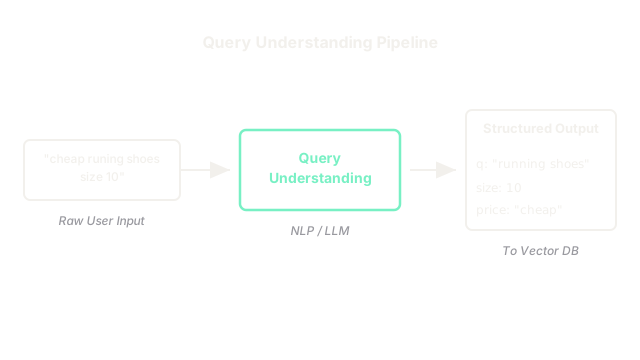
Query Understanding is a pipeline of NLP models that intercepts the user's raw text and transforms it into a clean, structured, highly-optimized query before the search engine even sees it.
Think of It Like This
Think of It Like This
Imagine a busy restaurant kitchen. A customer mumbles to the waiter: "Uh, give me the red sauce pasta, but like, no dairy, and make it fast."
If the waiter just yells that exact sentence into the kitchen, the chefs will be confused. Instead, the waiter translates the raw query into a structured ticket:
[DISH: Spaghetti Marinara]
[MODIFIER: No Cheese]
[PRIORITY: High]
Query Understanding is the waiter. It translates human mumbling into structured search tickets.
How It Actually Works
A modern Query Understanding pipeline consists of 4 distinct steps, usually running in parallel or sequence, milliseconds before the actual search happens.
1. Spell Correction & Normalization
Fixes typos and normalizes slang or abbreviations.
- Raw:
cheap runing shoes NY - Clean:
cheap running shoes new york
2. Intent Classification
Classifies why the user is searching. Is this a navigational query, an informational query, or a transactional query?
- Query:
cancel my subscription - Intent:
CUSTOMER_SUPPORT_ROUTING(We shouldn't search the knowledge base for this, we should just show them a button to cancel).
3. Named Entity Recognition (NER) & Linking
Extracts specific entities from the text to be used as hard filters, rather than soft semantic matches.
- Query:
nike running shoes size 10 under $50 - Extracted:
BRAND: Nike,CATEGORY: Running,SIZE: 10,PRICE: <50Instead of embedding "size 10" and hoping the vector math works out, we remove it from the text and pass it to the vector database as a strictMetadata Filter.
4. Query Expansion
Adds synonyms and related terms to broaden the search net, especially useful for Lexical/Hybrid search.
- Clean Query:
laptop battery life - Expanded:
(laptop OR notebook) AND (battery life OR power duration OR longevity)
Code
In the LLM era, you don't need to train four separate models (a spellchecker, a classifier, an NER tagger). You can use a fast, cheap LLM (like gpt-4o-mini or Claude 3 Haiku) to do all of this in a single pass using Structured Outputs.
import jsonfrom openai import OpenAI
client = OpenAI()
# The raw, messy query from the userraw_query = "show me iphones with good batery life under 800 bucks"
# Use an LLM to parse the query into structured JSONresponse = client.chat.completions.create( model="gpt-4o-mini", response_format={ "type": "json_object" }, messages=[ {"role": "system", "content": """ You are a query understanding engine. Fix spelling, extract entities for filtering, and rewrite the semantic query. Output JSON matching this schema: { "clean_semantic_query": "string", "filters": { "brand": "string", "max_price": "number" } } """}, {"role": "user", "content": raw_query} ])
parsed_query = json.loads(response.choices[0].message.content)
print(json.dumps(parsed_query, indent=2))# Output:# {# "clean_semantic_query": "smartphones with long battery life",# "filters": {# "brand": "Apple",# "max_price": 800# }# }
# Now you pass 'clean_semantic_query' to your Embedding Model,# and you pass 'filters' to your Vector Database as hard constraints!Watch Out For
Over-Correction and the 'Did you mean' Problem.
If you aggressively spell-correct queries, you will accidentally overwrite domain-specific jargon or brand new products. For example, when the "iPad" was first released, aggressive search engines corrected it to "pad" or "iPod", returning completely irrelevant results. Always allow users to override the correction (the classic "Showing results for X. Search instead for Y" link).
The Quick Version
- Query Understanding sits between the user's raw input and the search engine.
- It prevents garbage-in, garbage-out by cleaning the text before embedding it.
- The pipeline typically includes Spell Correction, Intent Classification, Entity Extraction (for hard filtering), and Query Expansion.
- Modern pipelines increasingly use fast LLMs to parse the raw query into a structured JSON object in a single pass.