Structured Data Agents
Instead of just generating a single SQL query, a structured data agent actively explores your database. If its first query hits an error, it reads the error and writes a new query, acting like an autonomous data analyst.
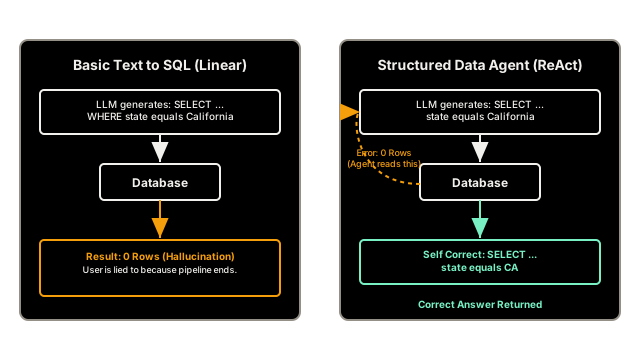
Why Does This Exist?
Basic Text-to-SQL pipelines are great, but they are incredibly fragile.
If the user asks: "What is the revenue for California?" and the LLM generates SELECT revenue FROM sales WHERE state = 'California', that seems correct.
But what if the database actually uses two-letter abbreviations (e.g., state = 'CA')?
The database will execute the query and return 0 rows. The standard Text-to-SQL pipeline will confidently tell the user, "The revenue for California is $0," which is a catastrophic hallucination.
Structured Data Agents solve this fragility. By applying the ReAct Pattern to database interactions, the LLM is given a suite of tools that allow it to actively explore the database structure before writing the final query.
Think of It Like This
Asking for directions
Basic Text-to-SQL: You ask a stranger for directions. They point down a road. You close your eyes, sprint down the road exactly as they pointed, and crash face-first into a brick wall because the road is closed for construction.
Structured Data Agent: You ask a stranger for directions. You walk down the road with your eyes open. You see the brick wall (an error). You turn around, look at a map, and find a detour. You actually reach your destination.
How It Actually Works
Instead of forcing the LLM to generate the final SQL string in a single shot, a Structured Data Agent is placed inside a loop and given three specific tools:
- Schema Inspector: A tool that allows the agent to read the table columns.
(Agent Action:
InspectTable("sales")) - Data Profiler: A tool that allows the agent to sample 5 rows from a table to see what the actual data looks like.
(Agent Action:
SampleRows("sales")) - Query Executor: A tool that executes a SQL string and returns the result (or the SQL error message).
(Agent Action:
ExecuteSQL("SELECT..."))
The Recovery Loop
Because the agent can see the SQL error messages, it can fix its own mistakes.
If the agent executes SELECT name FROM employees WHERE department = 'HR', and the database returns ERROR: column 'department' does not exist, the agent doesn't crash. It writes a new thought:
Thought: "Ah, the column doesn't exist. I should inspect the schema to see what the correct column name is."
It then calls InspectTable, realizes the column is called dept_name, and rewrites the query perfectly.
Code
You can build these agents from scratch using a while loop, but frameworks like LangChain provide pre-built agents that handle the complex tool routing.
# Conceptual example using LangChain's SQL Agentfrom langchain_community.utilities import SQLDatabasefrom langchain_community.agent_toolkits import create_sql_agentfrom langchain_openai import ChatOpenAI
# 1. Connect to the read-only databasedb = SQLDatabase.from_uri("sqlite:///corporate_data.db")llm = ChatOpenAI(model="gpt-4o", temperature=0)
# 2. Create the Agent# This automatically provisions the agent with the Inspector, Profiler, and Executor toolsagent_executor = create_sql_agent(llm, db=db, verbose=True)
# 3. Executequestion = "How many customers are in California?"agent_executor.invoke({"input": question})
# -> [AGENT LOGS]# -> Thought: I should check the schema of the customers table.# -> Action: sql_db_schema# -> Action Input: "customers"# -> Observation: CREATE TABLE customers (id INT, state VARCHAR(2)...)# -> # -> Thought: The state column is a VARCHAR(2), so 'California' won't work. # -> I need to use the abbreviation 'CA'.# -> Action: sql_db_query# -> Action Input: "SELECT COUNT(*) FROM customers WHERE state = 'CA'"# -> Observation: [(142,)]# -> # -> Final Answer: There are 142 customers in California.Watch Out For
Context Overload on Big Data
If the agent decides to execute SELECT * FROM sales, the database might return 5 million rows. The Python orchestrator will attempt to inject 5 million rows into the LLM's Observation string, immediately overflowing the context window and crashing the application. You must implement Tool Result Curation on the Query Executor tool to hard-limit all SQL results to a maximum of 100 rows, forcing the agent to write more specific WHERE or LIMIT clauses if it wants specific data.
The Quick Version
- Basic Text-to-SQL is fragile because it assumes the LLM will write the perfect SQL query on the first try.
- Structured Data Agents use the ReAct pattern to navigate databases iteratively.
- They can sample rows to understand data formatting (e.g., catching that dates are formatted
DD-MM-YYYYinstead ofYYYY-MM-DD). - If a query fails, they read the database error log and autonomously rewrite the query until it works.