Model Registry Platform: Stages to Rollback
A registry platform versions every model artifact with stage labels and lineage, so promoting v3 to Production archives v2 in the same move and rollback means repointing one alias instead of hunting files.
Why Does This Exist?
Without a registry, shipping a new model means finding the right pickle file on a shared drive and hoping nobody overwrote it. Rollback means finding the old file and hoping it was saved. The audit means asking whoever ran training what the hyperparameters were, months after they forgot.
This page covers the platform that ends that: the artifact store, the metadata database, the stage state machine, and the webhooks that redeploy serving on promotion. The run-level view in Model Registry teaches the handoff of one model from training to serving. Here you learn how a team governs hundreds of versions with approvals and audit trails. Versions start life as tracked runs, so experiment tracking is the natural prerequisite, each version pins its data through data versioning, and the Production pointer is what model serving actually loads.
The one idea you need first
A stage label is a promise about a version: Staging means it passed automated checks and awaits review, Production means it serves live traffic, Archived means it is kept for audit and rollback. The registry enforces the moves between these states, including who approved and when.
Think of It Like This
A library with a reservations desk
A library holds every edition of a book, but only one copy sits on the featured display. The catalog records which edition is displayed, who approved the swap, who checked out the old one and when, and where the old one went. Returning to the previous edition means updating the display card, not reprinting the book.
The mapping is direct. Editions are model versions. The featured display is Production. The catalog card is the metadata record with lineage. The librarian's sign-off is the approval. Updating the display card is the pointer move.
Where it stops: a library never serves two editions to the same reader at once by accident. A sloppy registry does exactly that, which is why Production must hold exactly one version at a time.
How It Actually Works
A registry stores four things per version: the artifact bytes, the metrics, the parameters and lineage, and the stage. The artifact is the serialized model. The metrics say what it scored. The lineage says which code commit, data snapshot, and training run produced it. The stage says what it is allowed to do right now.
The promotion walk
A new version lands unreviewed. Automated checks score it on a held-out set and confirm the lineage is complete. A reviewer approves it into Staging, where it serves shadow or canary traffic. If the numbers hold, one atomic move promotes it to Production and archives whatever was there. The webhook on that transition tells serving to reload, so no human copies files at midnight.
Worked example
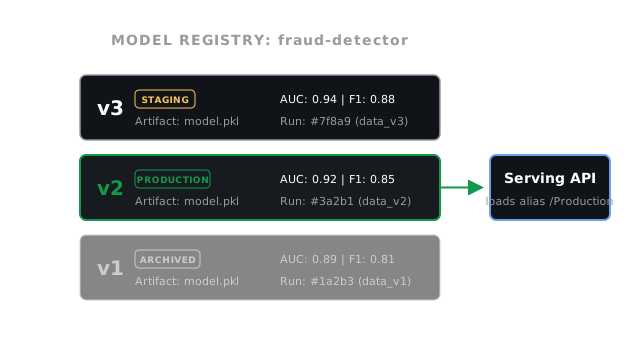
The fraud-detector has three versions. Version 1 scored AUC 0.901 and sits Archived. Version 2 scored 0.917 and serves Production. Version 3 just scored 0.923 on the same held-out set, a gain of over the incumbent, with lineage pointing at run 41 and the August data snapshot.
Promotion does two writes in one transaction: version 3 becomes Production, version 2 becomes Archived. Serving loads through the alias, not a filename, so it picks up version 3 on reload without a config change. If version 3 misbehaves on live traffic, rollback repoints the alias at version 2, a single write that takes seconds. Contrast that with the file-hunt alternative, where the team first has to prove which file version 2 even was.
Why one version in Production matters
Two versions in Production means no request can be attributed, comparison metrics turn to mush, and rollback becomes a guess. The registry enforces the invariant at the state machine level: the promote call archives the current Production version as part of the same move, so the ambiguous state cannot persist.
Code
The point of this snippet is the invariant: promotion archives the incumbent in the same move, so Production never holds two versions.
from dataclasses import dataclass, field
@dataclassclass Version: number: int auc: float stage: str = "None"
@dataclassclass Registry: versions: list[Version] = field(default_factory=list)
def register(self, auc: float) -> Version: version = Version(number=len(self.versions) + 1, auc=auc) self.versions.append(version) return version
def promote(self, number: int) -> None: for version in self.versions: if version.stage == "Production": version.stage = "Archived" self.versions[number - 1].stage = "Production"
def production(self) -> int: return next(v.number for v in self.versions if v.stage == "Production")
registry = Registry()registry.register(0.901)registry.register(0.917)registry.register(0.923)registry.promote(2)print(registry.production()) # -> 2registry.promote(3)print(registry.production()) # -> 3print([(v.number, v.stage) for v in registry.versions])# -> [(1, 'None'), (2, 'Archived'), (3, 'Production')]Version 2 is archived by the same call that promotes version 3, which is the whole trick.
Watch Out For
Running the registry as a file share with extra steps
Artifact blobs with no metadata answer nothing: not what data trained the model, not which run produced it, not who approved it. The symptom is an audit where every question ends with a shrug, even though every file is technically stored.
Fix it by logging metadata inside the training run, not after: metrics, parameters, data hash, and code commit travel with the artifact automatically. Treat a version with empty lineage as broken and block its promotion.
Two versions answering as Production
Someone promotes the challenger and forgets to archive the incumbent, so traffic splits across two versions with no record of which request went where. The symptom is a comparison dashboard that disagrees with itself and a rollback nobody can aim.
Fix it by making the atomic promote the only path to Production, with archive-on-promote built in. Then add a monitor that pages when Production count is anything but one.
The Quick Version
- A registry platform stores artifact bytes plus metrics, parameters, lineage, and a stage label per version.
- Promotion is one atomic move: the challenger enters Production while the incumbent drops to Archived.
- Serving loads through an alias, so deploys and rollbacks are pointer moves, not file copies.
- Webhooks on stage transitions trigger redeploys, closing the loop between approval and serving.
- Production holds exactly one version at all times, enforced by the state machine, not by convention.