Monitoring & Alerting
On this page
Overview
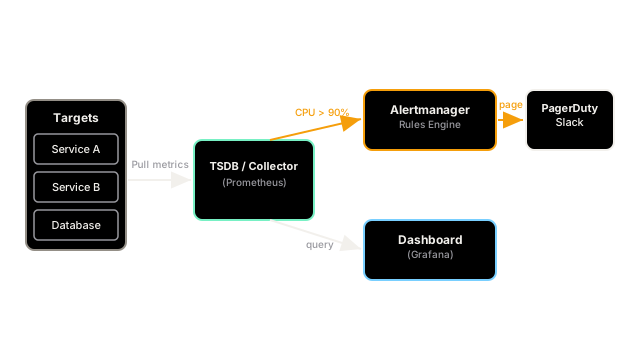
Monitoring is the continuous observation of a system's state using metrics, logs, and traces. Alerting is the automated process of notifying engineers when those observations indicate a problem. Together, they ensure that the team knows the system is broken before the customers do.
Key Concepts
Monitoring Philosophies
- White-box monitoring: Relies on internal metrics exposed by the application (e.g., JVM garbage collection time, DB connection pool size, internal queue depth).
- Black-box monitoring: Treats the system as an opaque box and tests it from the outside (e.g., pinging the public API every 10 seconds to see if it returns a 200 OK within 500ms). Also known as Synthetic Monitoring.
Effective Alerting
Alert fatigue is the biggest enemy of observability. If an engineer's phone buzzes 50 times a day for non-actionable issues, they will eventually ignore a critical alert. To prevent this, alerts should be:
- Symptom-based, not Cause-based: Alert on "User checkout latency > 5s" (the symptom), not on "Database CPU > 80%" (a potential cause). The user doesn't care about DB CPU; they care if they can't check out.
- Actionable: Every alert that pages a human should require immediate intervention. If the system can self-heal, it should just be logged.
- Linked to Runbooks: An alert should include a link to documentation (a runbook) explaining exactly what steps the on-call engineer should take to triage the issue.
Trade-offs
Setting thresholds for alerts is a delicate balance. A threshold that is too sensitive (e.g., alert if 1 request fails) causes alert fatigue and burnout. A threshold that is too loose (e.g., alert if 50% of requests fail for 10 minutes) means thousands of customers experience errors before anyone notices. The tradeoff is often managed using Service Level Objectives (SLOs) and Error Budgets to create mathematically sound alerting rules.
Interview Tips
- If asked how to know if your system is healthy, always mention both white-box (internal metrics) and black-box (external synthetic pings) monitoring.
- Use the term "Alert Fatigue" and explain how you avoid it by alerting only on user-facing symptoms, not internal resource utilization.
- Mention that modern alerting ties into an on-call rotation tool like PagerDuty or Opsgenie.
Summary
- Monitoring observes system state; Alerting notifies humans when state degrades.
- White-box monitoring looks at internal metrics; black-box monitors externally like a user.
- Alert fatigue occurs when too many unactionable alerts condition engineers to ignore them.
- Alerts should be symptom-based (user impact) rather than cause-based (resource usage).
- Every pageable alert must be actionable and ideally linked to a runbook.