Auto-scaling
On this page
Overview
Auto-scaling automatically adjusts the number of active servers or computing resources in a system based on current load. It ensures the system has enough capacity to handle traffic spikes (scale out) and saves money by shutting down idle resources during quiet periods (scale in).
Key Concepts
How it works
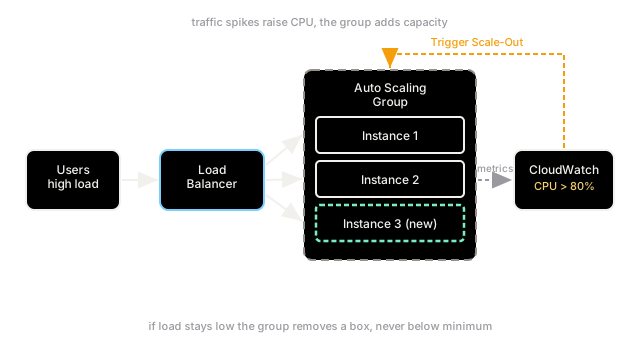
An Auto-Scaling Group (ASG) manages a pool of identical, stateless servers. It relies on a monitoring system (like AWS CloudWatch) to track a specific metric. When that metric crosses a predefined threshold, the ASG triggers a scaling policy to add or remove instances. The new instances register themselves with a Load Balancer, which begins routing traffic to them.
Scaling Triggers
- CPU/Memory Utilization: The most common metric. If average CPU > 70% for 5 minutes, add 2 instances.
- Queue Depth: Used for worker tiers. If there are 10,000 pending messages in the SQS queue, scale out the workers.
- Time-based (Scheduled): Used when traffic patterns are highly predictable (e.g., scale up at 8:00 AM every weekday for office software).
- Predictive: Uses machine learning to analyze historical traffic patterns and proactively scale up before the spike hits.
Statelessness is Required
For auto-scaling to work safely, instances must be stateless. If an instance stores user session data in its local memory and gets terminated during a scale-in event, that user is logged out. State must be externalized to a database or a distributed cache (like Redis).
Trade-offs
Auto-scaling provides elasticity and cost optimization, but it is not instantaneous. Booting a new VM or container takes time (from seconds to minutes), meaning a sudden, massive spike can overwhelm the system before new instances are ready. To mitigate this, systems often run over-provisioned (e.g., keeping capacity at 50% max) to absorb the initial shock while scaling out. Downscaling must also be careful to gracefully drain existing connections before terminating a node.
Interview Tips
- Mention that auto-scaling is for horizontal scaling (adding more machines), not vertical scaling (making existing machines bigger).
- Always pair auto-scaling with a Load Balancer in your diagrams.
- If asked how to handle a sudden, massive traffic spike (e.g., a Super Bowl ad), point out that reactive auto-scaling is too slow; you must use scheduled/predictive scaling or pre-warm the instances.
Summary
- Auto-scaling dynamically adds (scales out) or removes (scales in) resources based on load.
- It relies on metrics like CPU usage, queue depth, or scheduled times to trigger scaling policies.
- Nodes in an auto-scaling group must be stateless so they can be safely terminated.
- It saves costs during low traffic and prevents outages during high traffic.
- Reactive scaling takes time; sudden spikes require predictive scaling or pre-warming.