Blob Storage
On this page
Overview
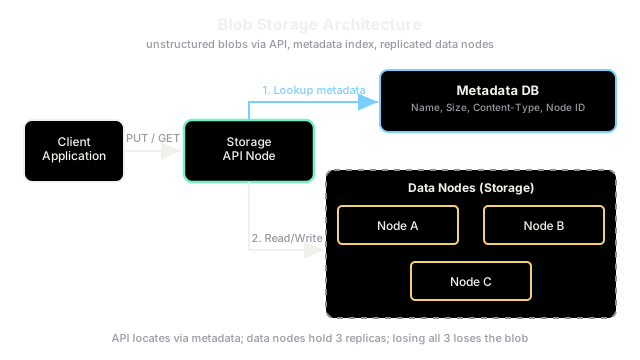
Object storage (also marketed as blob storage) keeps large, unstructured files - images, video, backups, logs - as self-contained objects in a flat namespace accessed over HTTP, rather than as rows inside a database. It is the default home for big binary data that does not need transactional queries.
Key Concepts
An object bundles the raw bytes, user-defined metadata, and a unique key, and the store exposes simple PUT, GET, and DELETE operations over HTTP against a flat namespace of buckets. There is no query engine, no joins, and no fixed schema - you retrieve an object by its key. This simplicity is what lets object storage scale to effectively unlimited size and offer very low cost per gigabyte with high durability.
When to use Object Storage
- Serving large media: storing and streaming images or video from object storage is far cheaper per gigabyte than a database and avoids bloating rows; the database keeps only a URL pointing at the object.
- Backups, archives, and logs: write-once, read-rarely data can sit in cheap tiered object storage instead of consuming primary database capacity and I/O.
- Static website assets: (JS, CSS, fonts) that never change per request and just need to be delivered.
| Aspect | Object storage | Database BLOB column |
|---|---|---|
| Cost per gigabyte | Low | High |
| Practical object size | Very large (up to terabytes) | Limited and inefficient |
| Access | HTTP fetch by key | Through the query engine |
| Best for | Media, backups, static assets | Structured, queried data |
Because objects are fetched by URL, object storage pairs naturally with a Content Delivery Network (CDN) that caches those files close to users and offloads the origin.
Trade-offs
Object storage gives cheap, durable, effectively infinite capacity, but you give up transactions, joins, and low-latency partial updates - an object is typically replaced wholesale, not edited in place. It is also eventually consistent for some operations in some providers, so it is wrong for data that needs immediate strong-consistency reads.
Interview Tips
- Say the pattern out loud: "store the file in object storage, keep the metadata and the URL in the database, and front it with a CDN."
- Mention lifecycle tiering to cut cost for cold data.
- Do not use object storage for data you must query or transactionally update.
Summary
- Object storage keeps large unstructured files as HTTP-addressable objects in a flat namespace.
- It beats a database for serving large media and for backups, archives, and logs.
- The usual pattern stores the file as an object and only its URL and metadata in the database.
- It offers cheap, durable, near-infinite capacity but no transactions, joins, or in-place edits.
- It pairs with a CDN to serve files close to users.