Distributed File Systems
On this page
Overview
A distributed file system (DFS) allows multiple clients across a network to read, write, and manage files as if they were on a single local hard drive, even though the data is physically spread across multiple servers. It provides a hierarchical namespace (directories and files) and often supports POSIX-like semantics.
Key Concepts
Architecture
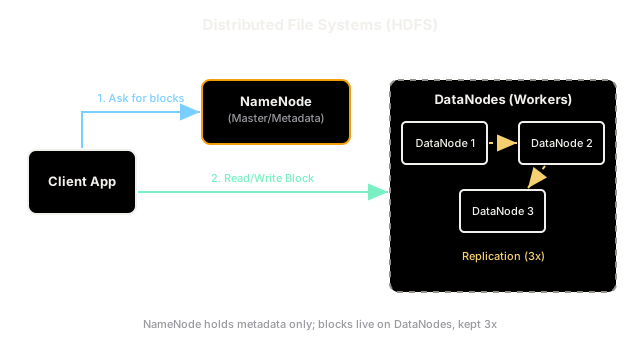
Most distributed file systems (like HDFS or GFS) split responsibilities into two parts:
- Metadata Node (NameNode/Master): Stores the directory tree, file permissions, and the mapping of which file chunks live on which data nodes. This node is usually kept entirely in memory for speed.
- Data Nodes (ChunkServers): Store the actual file contents. Files are broken into large chunks (e.g., 64MB or 128MB in HDFS) and each chunk is replicated across multiple data nodes (usually 3) for fault tolerance.
Use Cases
Distributed file systems are designed for high throughput over low latency. They are optimized for appending data and reading large files sequentially, making them the standard storage layer for Big Data workloads (like Hadoop/Spark batch processing).
Trade-offs
A DFS provides massive scalability and fault tolerance by striping and replicating data across cheap commodity hardware. However, it is poor for latency-sensitive applications, terrible for small random writes, and struggles if you store millions of tiny files (because the Metadata Node's memory becomes the bottleneck). If you need low-latency random reads/writes, you want a database; if you just want to store big blobs cheaply without a directory hierarchy, you want object storage.
Interview Tips
- Mention HDFS (Hadoop Distributed File System) as the classic example for Big Data analytics.
- Distinguish it from Object Storage: DFS has a directory hierarchy and allows partial file modifications (like appends); Object Storage is a flat namespace where files are completely overwritten.
- Point out the Metadata Node as a potential Single Point of Failure (SPOF) and explain that a standby node is used for High Availability.
Summary
- A DFS lets multiple machines access files over a network via a standard directory hierarchy.
- Files are split into large chunks and replicated across data nodes for fault tolerance.
- A central metadata node tracks the directory structure and chunk locations.
- It is optimized for high-throughput, sequential reads/writes (Big Data).
- It is a poor fit for low-latency random access or storing millions of tiny files.