Object vs Block vs File Storage
On this page
Overview
These are the three fundamental ways to store data in the cloud. Choosing the right one determines your system's performance, scalability, and cost.
🧠 Mental model:
Block Storage: A blank notebook. You can write on any page, erase any sentence, and it's fast.
File Storage: A filing cabinet. Folders inside folders, organized hierarchically.
Object Storage: A valet parking lot. You hand them a car (file), they give you a ticket (URL). You can't change the car's radio station while it's parked; you have to retrieve the whole car, change it, and park it again.
Block Storage: A blank notebook. You can write on any page, erase any sentence, and it's fast.
File Storage: A filing cabinet. Folders inside folders, organized hierarchically.
Object Storage: A valet parking lot. You hand them a car (file), they give you a ticket (URL). You can't change the car's radio station while it's parked; you have to retrieve the whole car, change it, and park it again.
Key Concepts
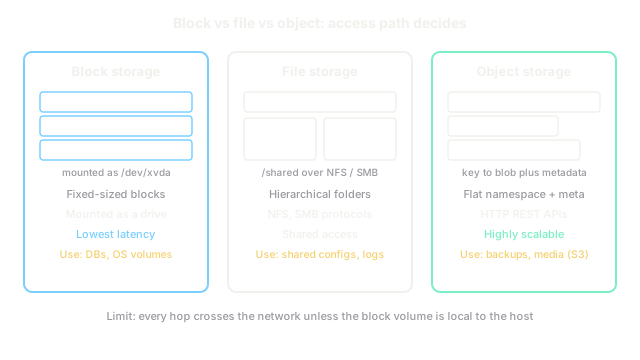
| Type | Structure | How it works | Primary Use Case | AWS Example |
|---|---|---|---|---|
| Block | Raw disk volumes | Data is split into fixed-size blocks. Allows low-latency, in-place edits. Must be attached to one compute node. | Databases (MySQL, PostgreSQL), OS boot drives. | EBS |
| File | Directory hierarchy | Files and folders accessed over a network protocol (NFS/SMB). Can be mounted by multiple nodes simultaneously. | Shared file systems, CMS, legacy app migrations. | EFS |
| Object | Flat namespace | Data + metadata + unique ID accessed via HTTP API. No in-place edits (must overwrite the whole object). | Images, videos, backups, big data lakes. | S3 |
Trade-offs
Block storage is the fastest and best for databases, but it is the most expensive and doesn't scale infinitely (you are limited by disk size). Object storage is the cheapest and scales infinitely, but it is slow and cannot be edited in place (terrible for databases). File storage sits in the middle, allowing multiple servers to read/write concurrently via standard POSIX commands, but it is often more expensive than object storage and slower than block storage.
Interview Tips
- If a system needs to store user uploads (avatars, videos), explicitly say "Object Storage."
- If you are provisioning the underlying storage for a relational database, say "Block Storage."
- Only use File Storage if the design specifically requires multiple servers to access a shared file hierarchy natively (e.g., a fleet of WordPress servers sharing an uploads folder).
Summary
- Block storage provides fast, local-disk-like performance for databases and OS drives.
- File storage provides a shared directory structure over a network for multiple concurrent servers.
- Object storage provides infinite, cheap, flat storage accessed via HTTP, ideal for media and backups.
- Block allows fast in-place edits; Object requires rewriting the entire file.
- Object storage is the default choice for user-generated content in modern cloud architectures.