Detectron2 Detection Models
A config-driven detector workbench: name a model file, and training, evaluation and prediction share one setup.
Why Does This Exist?
Detection projects repeat the same wiring: dataset registration, config, trainer loop, evaluator, predictor. Copy-pasted scripts drift until training and inference disagree. Detectron2 standardizes the loop. A config file names the model, data and schedule; the trainer, evaluator and predictor all read it, so object detection results on COCO compare fairly. Faster R-CNN is its most borrowed starting point.
This page covers the config contract, one box-and-score fixture, and appropriate use.
Think of It Like This
A theater with one script
Actors, lighting and sound all read the same script with numbered cues. The rehearsal and the live show follow identical pages, so a cue that worked Tuesday works Saturday.
Detectron2 configs are the script. Training rehearses it, prediction performs it. The analogy stops at improvisation: actors can ad-lib, but a predictor fed a mismatched config silently plays the wrong show.
How It Actually Works
Input is a config plus registered datasets: model file, weights path, batch size, schedule, score threshold. Output is boxes with scores, plus masks or keypoints when the head predicts them. Purpose is reproducible detection and segmentation training with shared evaluation. Appropriate use is standard two-stage and single-stage detectors on everyday scenes. Custom data still needs a registration function that yields dicts with file names, boxes and category ids in the expected layout.
Box and score fixture
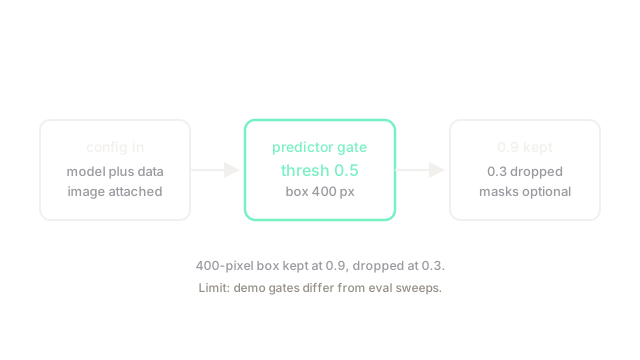
Take predicted box in form. Width is , height is , area is pixels. Two scores arrive: and against threshold . The first stays, the second drops, which is the keep rule the diagram draws.
Code
Area and keep logic in plain Python:
def box_area(x1: float, y1: float, x2: float, y2: float) -> float: return max(x2 - x1, 0.0) * max(y2 - y1, 0.0) # xyxy to pixels
def kept(score: float, thresh: float = 0.5) -> bool: return score >= thresh # threshold gate
print(box_area(10.0, 20.0, 30.0, 40.0)) # -> 400.0print([kept(0.9), kept(0.3)]) # -> [True, False]400 pixels kept at 0.9, dropped at 0.3.
Watch Out For
Evaluating with a different threshold than training assumed
The config threshold gates predictions at inference, but mAP-style scoring sweeps its own range. The symptom is a demo that looks clean and a benchmark that looks weak, or the reverse. Fix it by reporting the demo threshold beside the number and keeping eval configs identical across runs.
The Quick Version
- Detectron2 maps one config plus registered data to trained detectors and predictors.
- Box 10, 20, 30, 40 spans 20 by 20 for exactly 400 pixels.
- Scores above 0.5 stay, below drop, so 0.9 keeps and 0.3 goes.
- Use it for standard detection and segmentation with shared evaluation.
- Keep demo thresholds and eval configs explicit and identical.