Morphological Erosion Explained
Erosion keeps a foreground pixel only when a small probe fits fully inside the object. Shapes shrink, specks vanish, and thin bridges snap.
Why Does This Exist?
Binary masks arrive messy: salt specks around objects, thin bridges gluing things that should be separate, ragged borders from thresholding. Linear filters would smear the shapes while cleaning. Erosion instead probes shape directly with a structuring element, deleting exactly the pixels where the probe does not fit.
It is one of the two primitives in morphological operations, paired with dilation. Erode-then-dilate sequences build opening, the standard speck remover.
Think of It Like This
Parking a van in a lot
The structuring element is a van and foreground is legal parking space. Erosion keeps only the spots where the whole van fits without touching the lines. Spots near the lot edge fail, so the legal area shrinks inward, and a motorcycle-sized speck of space fails everywhere and disappears. The van's size decides everything: a bigger van erases more.
How It Actually Works
Slide a structuring element, often a square, over the binary image. At each position, the output center stays foreground (1) only if every 1 in the element overlaps a 1 in the image. A single background pixel under the probe flips the center to 0. On grayscale images the same idea becomes a local minimum filter, darkening each window to its dimmest pixel.
Worked example
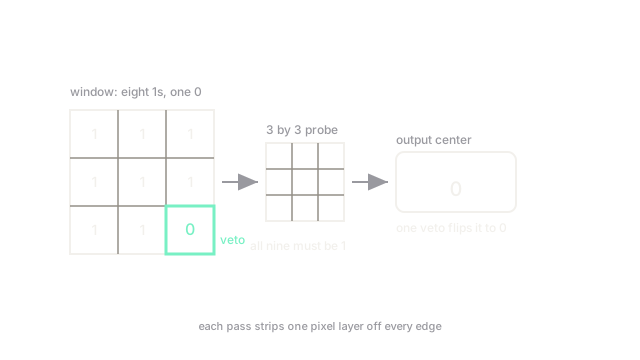
A window holds eight 1s and one 0 at the corner:
With a full probe, the corner 0 overlaps the probe, so the output center is 0. One background pixel vetoes the whole window, which is why a single pass strips a one-pixel layer off every boundary.
Watch Out For
Foreground and background swapped
Erosion shrinks whatever you call foreground, usually white. Run it on black text over a white page and the white background shrinks instead, so the text grows fatter, the opposite of the plan. The symptom is objects thickening under so-called erosion. Invert the image first so your targets are the bright foreground.
Probe larger than the target
A structuring element bigger than the objects themselves erases everything, survivors included. The symptom is an empty output after one innocent-looking pass. Size the probe to the noise you want gone, and keep it smaller than the smallest object you must keep.
The Quick Version
- Erosion keeps a pixel only when the whole probe fits on foreground.
- Objects shrink, specks vanish, and thin bridges between objects snap.
- On grayscale it acts as a local minimum filter.
- Invert first so targets are bright, or results invert too.
- Size the probe between the noise scale and the smallest kept object.