Morphological Image Operations
Morphological operations are simple, non-linear techniques that process images based on shapes, allowing you to remove noise, separate touching objects, or find edges using a small sliding template called a structuring element.
Why Does This Exist?
When working with binary or grayscale images, you often end up with imperfections: small specks of noise, holes inside an object, or overlapping objects that should be distinct. Linear filters (like blurring) can smooth out noise, but they often blur the edges of your objects, destroying their shape.
Morphological operations exist to process images based on shape and structure rather than just raw pixel intensities. They are built on set theory and allow you to "carve out" or "grow" specific structures in an image. If you need to isolate a text character from a noisy background, separate two overlapping blood cells in a medical scan, or fill in the gaps of an incomplete edge map, morphological operations are your go-to toolkit.
Think of It Like This
Cookie Cutters and Dough
Imagine your image is a layer of dough rolled out on a table (the white pixels), and you are holding a specific cookie cutter (the structuring element).
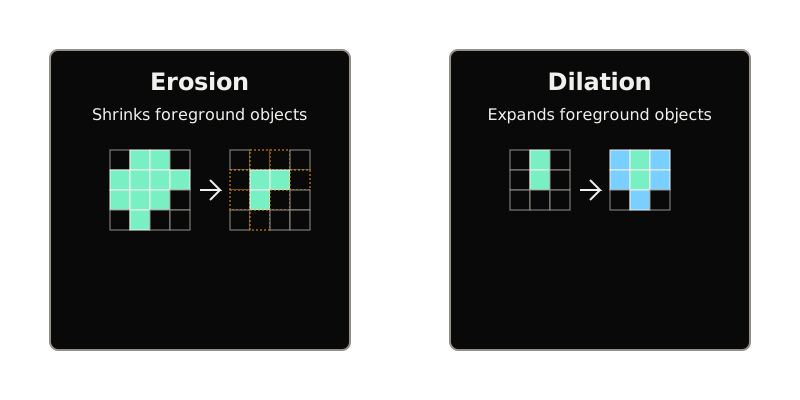
- Erosion is like taking that cookie cutter and only keeping the dough where the cutter fits completely inside the dough layer. If the cutter hangs over the edge even a little bit, you chop that edge away. This shrinks the dough.
- Dilation is the opposite. It's like taking a stamp covered in extra dough and pressing it everywhere the stamp touches any existing dough. This expands the dough and fills in small gaps.
By combining these simple actions, you can smooth out the edges of your dough or remove tiny scattered crumbs without fundamentally changing the main shape you are working with.
How It Actually Works
At the heart of all morphological operations is the structuring element (or kernel). This is a small matrix (often 3x3 or 5x5) that defines the neighborhood around a pixel. It has a defined origin (usually the center pixel).
You slide this structuring element over every pixel in the input image. For binary images (pixels are either 1 or 0), the two fundamental operations are defined as follows:
1. Erosion
During erosion, a pixel in the original image is kept as 1 only if every 1 in the structuring element overlaps with a 1 in the image. If even a single background pixel (0) overlaps with the structuring element, the center pixel is set to 0.
- Effect: Shrinks objects, removes isolated noisy pixels, and separates objects that are connected by a thin bridge.
2. Dilation
During dilation, a pixel is set to 1 if at least one 1 in the structuring element overlaps with a 1 in the image.
- Effect: Expands objects, fills in small holes, and bridges gaps between distinct objects.
Compound Operations
Because erosion and dilation are destructive (they change the size of the object), we often combine them to achieve a goal without drastically altering the object's original area:
- Opening (Erosion followed by Dilation): The erosion step removes small, isolated noise (like static). The subsequent dilation restores the surviving larger objects back to their original size. Opening is perfect for denoising.
- Closing (Dilation followed by Erosion): The dilation step fills in small holes or cracks inside an object. The subsequent erosion shrinks the outer boundary back to its original size, leaving the newly filled holes intact.
These operations extend to grayscale images as well, where erosion acts like a local minimum filter (darkening the image) and dilation acts like a local maximum filter (brightening the image).
Going deeper in this family
Each operator above has its own teachable page. Start with the primitives, erosion and dilation, then their compounds, opening for specks and closing for holes. The top-hat and black-hat transforms turn those compounds into lighting-proof detail extractors.
Code
Here is how you can apply these basic operations using OpenCV in Python:
import cv2import numpy as np
# Load a binary image (0 and 255)image = cv2.imread('noisy_binary_image.png', cv2.IMREAD_GRAYSCALE)
# Create a 3x3 rectangular structuring elementkernel = np.ones((3, 3), np.uint8)
# 1. Erosion (shrinks foreground, removes small noise)eroded = cv2.erode(image, kernel, iterations=1)
# 2. Dilation (expands foreground, fills small holes)dilated = cv2.dilate(image, kernel, iterations=1)
# 3. Opening (Erosion -> Dilation) for noise removalopened = cv2.morphologyEx(image, cv2.MORPH_OPEN, kernel)
# 4. Closing (Dilation -> Erosion) for hole fillingclosed = cv2.morphologyEx(image, cv2.MORPH_CLOSE, kernel)Watch Out For
Choosing the Wrong Kernel Size or Shape
The size and shape of your structuring element dictates what gets removed and what stays. If you use a kernel that is too large during an Opening operation, you might accidentally erase the very objects you are trying to isolate. Always tailor the kernel to the geometry of the features you care about (e.g., a vertical line kernel if you are extracting vertical strokes in text).
Foreground vs. Background Confusion
Morphological operations assume the objects of interest are the "foreground" (usually white, or 1) and the rest is "background" (black, or 0). If your image has black text on a white background, standard erosion will actually shrink the white background, making the black text appear thicker. Always invert your image if necessary so your target objects are the foreground.
The Quick Version
- Structuring Element: A small matrix used to probe the image.
- Erosion: Shrinks foreground regions; removes small noisy specs.
- Dilation: Expands foreground regions; fills small holes.
- Opening (Erosion then Dilation): Cleans up external noise without shrinking the main object.
- Closing (Dilation then Erosion): Cleans up internal holes without expanding the main object.