Face Alignment With Landmarks
Face alignment rotates and scales each detected face so the eyes and mouth always land on the same pixels before recognition starts.
Why Does This Exist?
The same person photographed tilted, turned or at different sizes looks like three different people to raw pixels. A recognition network forced to handle all that geometric noise wastes capacity on pose instead of identity. Face alignment exists to remove the easy variation up front with classical geometry, handing the network a standardized crop where the eyes and mouth sit in fixed positions. Detectors such as MTCNN and RetinaFace supply the landmarks; the pipeline around this step is in face detection and recognition.
Think of It Like This
Pinning a specimen for inspection
A naturalist pinning a butterfly straightens its wings on the board before comparing patterns. A tilted specimen would make identical wing markings look different. Alignment pins the face: the eye centers are the wing tips, stretched onto fixed pins, and the recognition network compares the flattened pattern. The analogy stops at information loss: pinning is gentle interpolation, but too aggressive a warp smears the very texture the network needs.
How It Actually Works
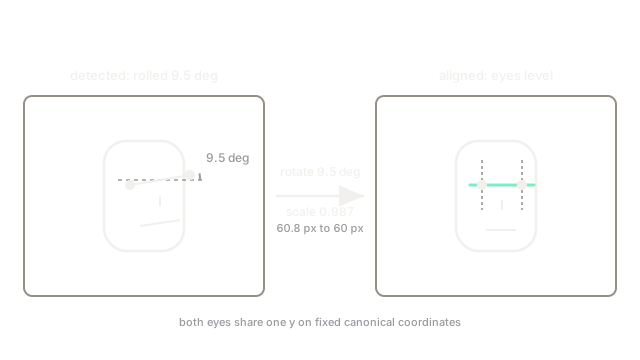
The standard routine fits a similarity transform (rotation, uniform scale, translation, no shear) mapping the detected eye centers onto canonical positions in the output crop, then warps the image with bilinear interpolation. Five-point alignment uses both eyes plus nose and mouth corners in a least-squares fit; heavier 3D alignment fits a morphable model for profile faces.
A worked warp
Suppose the left eye is detected at (80, 105) and the right eye at (140, 95). The eye-line direction is (60, -10), so the face is rolled by arctan(10 / 60), about 9.5 degrees clockwise. The warp rotates the crop 9.5 degrees counterclockwise about the eye midpoint (110, 100), placing both eyes on one horizontal line. Eye distance of sqrt(3600 + 100) = 60.8 px then scales to the canonical 60 px, a factor of 0.987, before the final crop is cut.
Watch Out For
Aligning from jittery landmarks
Landmark detectors wobble a pixel or two frame to frame, and the warp magnifies that wobble across the whole crop. The symptom is flickering embeddings on video even when the person stands still. Fix it by smoothing landmarks over a short temporal window before fitting the transform.
The Quick Version
- Alignment standardizes pose with a similarity transform fit to facial landmarks.
- Eye centers drive the common two-point version; five points add the nose and mouth.
- Warping removes rotation, scale and translation so the network studies identity.
- Landmark jitter must be smoothed or embeddings flicker on video.
- Profile faces beyond about 45 degrees need 3D alignment, not a flat warp.