Image Blending
Aligned frames still show stripes where exposures differ. Blend wide soft gradients for brightness while keeping sharp detail strictly local.
Why Does This Exist?
Stitching places every pixel correctly, yet mosaics still show quilting: one frame is warmer, another darker, vignetting darkens every corner. Geometry done, photometry remains, and naive averaging smears the detail the stitch worked to preserve. Blending resolves the conflict by treating smooth brightness and crisp texture at different scales.
Frequency thinking is the prerequisite, borrowed from frequency-domain processing: low frequencies carry illumination, high frequencies carry detail. This page covers feathering, why averaging ghosts, and multi-band blending. Aligned capture itself is the stitching page; viewable projection is panoramas.
Think of It Like This
Two paint gradients, one sharp mural
Two painters cover a wall in slightly different whites, then one paints sharp lettering across the join. Blend the whites with a wide soft roller so no line shows, but paint the lettering with a fine brush that never crosses the boundary. Wide soft tools for smooth stuff, narrow exact tools for sharp stuff, and the eye finds neither.
It stops holding where the mural itself moves. If the lettering differs between painters, no brush width reconciles two truths, the same way blending cannot fuse genuinely different content. Blend illumination, decide ownership of content.
How It Actually Works
Feathering and its limit
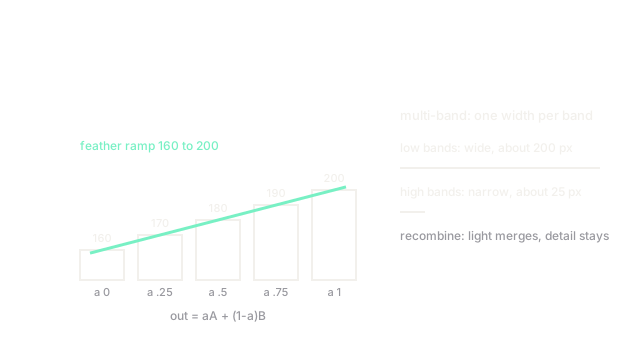
Feathering ramps a per-pixel weight from to across the overlap: output . A five-pixel ramp uses weights , hiding small exposure steps cheaply. Wide ramps erase bigger steps but smear any detail caught inside the ramp, and misaligned content doubles into ghosts, because one width serves all frequencies at once.
Multi-band blending
Burt and Adelson's answer splits each image into a Laplacian pyramid: low bands hold illumination, high bands hold edges. Each band blends with its own width, wide for low frequencies that need long transitions, narrow for high frequencies that must stay local. Recombination yields merged exposures with intact detail, the standard behind panorama tools. Three levels on a -pixel overlap might feather the coarsest band over pixels and the finest over , widths chosen per band rather than per image.
Seam cutting before blending
Blending assumes the two sides show the same content. Where they genuinely differ (pedestrians, waves), cut first: find the minimum-difference path through the overlap with dynamic programming and let each side own its territory, then blend only the residual exposure step. Graph-cut seams generalize this to arbitrary shapes.
Code
A linear alpha ramp across a five-pixel overlap:
width = 5alphas = [i / (width - 1) for i in range(width)]blended = [a * 200 + (1 - a) * 160 for a in alphas]print(f"alphas {alphas}, ramp {blended}")# -> alphas [0.0, 0.25, 0.5, 0.75, 1.0], ramp [160.0, 170.0, 180.0, 190.0, 200.0]Brightness steps evenly from to with no visible edge; multi-band blending runs one such ramp per frequency band at different widths.
Watch Out For
Ghosting moving content inside the blend
Symptom: a walker appears twice, semi-transparent, across the overlap, and wider ramps only widen the ghost. Blending averages truth with truth-plus-pedestrian. Cut the seam around motion first (minimum-difference path or one-frame ownership), then blend the exposure step that remains.
Vignetting gradients surviving the blend
Symptom: every frame contributes a dark-cornered tile and the mosaic shows a waffle pattern no ramp width removes, because the error is per-frame shading, not seam-local. Fix the cause with gain compensation or flat-field correction before compositing; blending only dissolves local steps, never global shading.
The Quick Version
- Feathering ramps weights across the overlap but forces one width on all frequencies at once.
- Multi-band blending feathers each Laplacian band at its own width: wide for illumination, narrow for detail.
- Cut seams through minimum-difference paths before blending where content genuinely differs.
- A five-pixel ramp steps , hiding small exposure steps completely.
- Ghosts need seam decisions and waffle shading needs calibration; no blend width fixes either alone.