Text Detection in Images
Text detection draws boxes around words in photos, coping with rotation, curvature and dense lines that ordinary object boxes cannot fit.
Why Does This Exist?
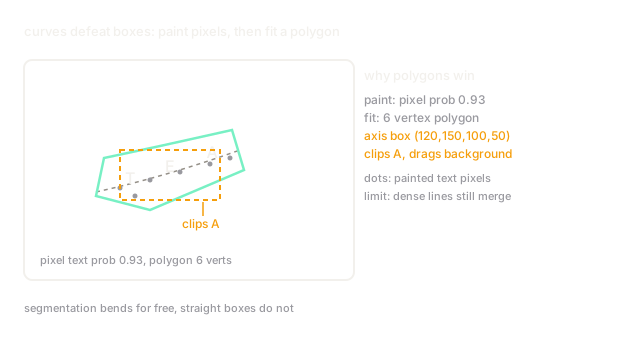
Words in the wild refuse to sit still: shop signs tilt, bottle labels curve, and receipts pack lines edge to edge. Axis-aligned boxes from standard object detection either clip letters or swallow neighbours. Text detection exists as the specialized first half of OCR, producing tight word and line regions in whatever shape they take so recognition receives clean crops.
Think of It Like This
Highlighting tape on a curved bottle
Highlighting a straight textbook line takes one swipe of a flat marker. Highlighting ingredients around a curved bottle takes flexible tape that bends with the surface and never covers two lines at once. Text detectors lay that tape: segmentation heads paint the text region pixel by pixel (bending for free), then polygon fitting cuts the tape's outline. The analogy stops at the learning: tape follows your hand, while detectors learn text texture from thousands of labelled signs.
How It Actually Works
Two families dominate. Regression detectors extend anchor-based detection with rotated boxes or corner points, which is fast on straight signage. Segmentation detectors classify each pixel as text or background, then group pixels into instances with progressive expansion (DBNet's differentiable binarization) or character affinity (CRAFT), which hugs curved and dense text. Both feed rotated or polygon crops into a rectification step before recognition.
A worked grouping
A segmentation head marks a curved sign with 1,240 text pixels at threshold 0.5. Shrunk-kernel grouping first keeps the 800 high-confidence core pixels (threshold 0.8) as two separate seeds, then expands each seed outward to the full 1,240, splitting what one loose threshold would have merged into a single blob. The two resulting polygons become two recognition crops instead of one garbled line.
Watch Out For
One threshold for both sparse signs and dense receipts
A single binarization threshold that suits isolated shop signs merges packed receipt lines into stripes. The symptom is perfect demo photos but fused lines on documents. Fix it with shrink-expand grouping or per-image adaptive thresholds rather than one global value.
The Quick Version
- Text detection feeds recognition, so its misses and merges cap the whole OCR pipeline.
- Regression heads are fast on straight text; segmentation heads win on curves and dense lines.
- Pixel grouping, not just thresholding, separates neighbouring words.
- Polygons and rotated boxes replace axis-aligned boxes for wild text.
- Tune grouping thresholds on your densest documents, not your cleanest signs.