Ultralytics YOLO Vision Runs
One package from data YAML to trained YOLO weights to exported deployment files, with tracking built into predict mode.
Why Does This Exist?
YOLO training used to mean scattered scripts for labels, training, validation, prediction and export that drifted apart. Ultralytics unifies the loop: a data YAML declares paths and names, one model object trains, validates, predicts and exports, and tracking rides along in predict mode. It serves object detection on COCO ground with YOLO architecture underneath.
This page covers the run contract, one label-math fixture, and appropriate use. The YOLO26 family was the current generation verified in-session.
Think of It Like This
A food truck with one window
Orders, cooking, payment and takeout bags all pass through one window with numbered tickets. The cook, the cashier and the driver read the same ticket rail.
Ultralytics runs are that window. Data YAML is the menu, tickets are run configs. The analogy stops at refunds: a wrong order wastes lunch, while a wrong YAML wastes a training budget.
How It Actually Works
Input is a data YAML plus a model checkpoint and a mode: train, val, predict, track, or export. Output is weights, metrics, labeled images or video, and exported files such as ONNX. Purpose is the full YOLO loop without glue scripts. Appropriate use is standard detection, segmentation and pose projects that value speed to deployment. Validate the YAML first with a label-count script, because a mispointed path trains happily on nothing.
Label fixture
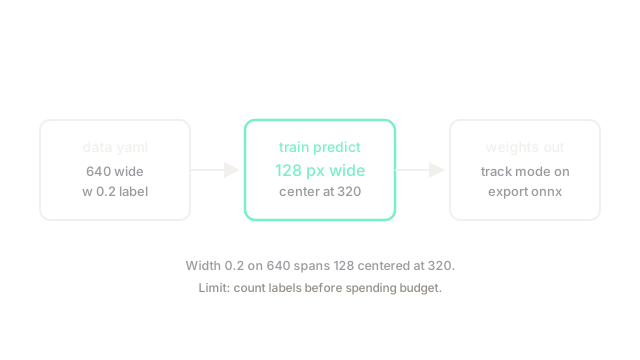
Take a YOLO label row: class , center , width , on image width . Pixel width is . Center lands at . The diagram draws that 128-pixel span centered at 320, the check to run before any training.
Code
Label math in plain Python:
def to_pixels(center: float, width: float, img_w: int) -> tuple[float, float]: return center * img_w, width * img_w # normalized to pixels
print(to_pixels(0.5, 0.2, 640)) # -> (320.0, 128.0)Center 320.0 with width 128.0, exactly the drawn box.
Watch Out For
Training on a YAML that points at empty folders
A typo in the data path yields zero images with no hard error in some setups. The symptom is instant epochs and flat metrics that look like a model bug. Fix it by printing dataset counts from the YAML before training and failing fast on zero.
The Quick Version
- Ultralytics maps one data YAML plus checkpoint to training, prediction and export.
- Width 0.2 on 640 pixels spans exactly 128 centered at 320.
- Tracking rides in predict mode without extra wiring.
- Use it for standard YOLO loops that value deployment speed.
- Count labels from the YAML before spending budget.