Grad-CAM
Basic saliency maps are too noisy because pixel-level gradients are chaotic. Grad-CAM fixes this by calculating gradients at the final convolutional layer, producing smooth, highly semantic heatmaps.
Why Does This Exist?
In the early days of deep learning explainability, researchers used basic saliency-maps to figure out what a Convolutional Neural Network (CNN) was looking at. They calculated the gradient of the prediction all the way back to the raw input pixels.
The problem with pixel-level gradients is that they are incredibly noisy. An image has millions of pixels. If you calculate the exact gradient for every single pixel, the resulting heatmap looks like television static. It might highlight the outline of a dog, but it will also highlight random pixels in the grass and sky, making it very difficult for humans to interpret.
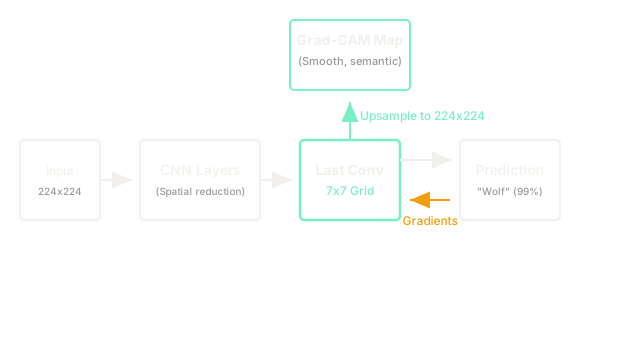
Grad-CAM (Gradient-weighted Class Activation Mapping) solves this problem. Instead of forcing the gradients all the way back to the raw pixels, it stops at the last convolutional layer of the network. This layer contains a coarse, heavily summarized, highly semantic understanding of the image. By applying the gradients to this layer, Grad-CAM generates beautiful, smooth, human-readable heatmaps that perfectly highlight the target object without the static.
Think of It Like This
Think of basic saliency maps vs. Grad-CAM like trying to figure out which employees in a massive corporation are driving profits.
A basic saliency map interviews every single entry-level employee (the pixels) and asks exactly how much money they made the company today. The resulting data is incredibly noisy and chaotic.
Grad-CAM interviews the Vice Presidents of the 10 major departments (the final convolutional layer). The VPs provide a much coarser, high-level summary of what is driving profit. You lose the microscopic detail, but you gain a clean, understandable, strategic map of where the money is coming from.
How It Actually Works
Grad-CAM exploits the architecture of modern CNNs (like ResNet, VGG, or EfficientNet). These networks usually consist of many convolutional layers (which extract spatial features) followed by a few fully connected layers (which output the final prediction).
1. The Forward Pass
You pass an image of a dog through the network. As the image travels through the convolutional layers, it is reduced in spatial resolution but increases in depth (channels). By the time it reaches the last convolutional layer, a 224x224 image might be reduced to a tiny 7x7 grid, but with 512 different "feature channels" (e.g., one channel detecting fur, one detecting eyes, etc.).
2. The Backward Pass (To the Last Conv Layer)
The network predicts "Dog." You calculate the gradient of the "Dog" score, but you stop the backward pass when you hit that 7x7 convolutional layer. You do not go all the way back to the pixels.
3. Weighting the Feature Maps
You average the gradients for each of the 512 channels. This gives you 512 weights, telling you exactly how important each channel is for the "Dog" prediction.
- The "fur detector" channel might get a massive positive weight.
- The "wheel detector" channel might get a weight of zero.
You multiply the 512 channels by their respective weights and sum them together. This squashes the 512 channels down into a single 7x7 grid (a coarse heatmap).
4. Upsampling and ReLU
Because negative values indicate areas that hurt the "Dog" prediction, Grad-CAM applies a ReLU function to throw away all negative values, leaving only the pixels that helped. Finally, you take this tiny 7x7 heatmap and mathematically stretch (upsample) it back to 224x224 to overlay it on the original image.
Code
Grad-CAM requires setting up "hooks" in PyTorch to intercept the gradients and activations at the last convolutional layer during the backward pass.
import torchimport torch.nn.functional as F
class GradCAM: def __init__(self, model, target_layer): self.model = model self.target_layer = target_layer self.activations = None self.gradients = None # Hooks to intercept data during the forward/backward pass self.target_layer.register_forward_hook(self.save_activations) self.target_layer.register_full_backward_hook(self.save_gradients)
def save_activations(self, module, input, output): self.activations = output
def save_gradients(self, module, grad_input, grad_output): self.gradients = grad_output[0]
def generate_heatmap(self, input_image, class_idx): # 1. Forward pass logits = self.model(input_image) score = logits[0, class_idx] # 2. Backward pass self.model.zero_grad() score.backward() # 3. Global average pooling of gradients to get channel weights # shape: (channels,) weights = torch.mean(self.gradients, dim=[2, 3])[0] # 4. Multiply activations by weights activations = self.activations[0] for i, w in enumerate(weights): activations[i, :, :] *= w # 5. Sum across channels and apply ReLU heatmap = torch.sum(activations, dim=0) heatmap = F.relu(heatmap) # Normalize between 0 and 1 heatmap /= torch.max(heatmap) return heatmapWatch Out For
Poor Localization on Small Objects
Because Grad-CAM generates its heatmap from a highly down-sampled convolutional layer (like 7x7 or 14x14), it is inherently coarse. If your image contains a tiny object (e.g., a microscopic tumor in an MRI), Grad-CAM might highlight a massive blob covering a quarter of the image. It is excellent for semantic understanding, but poor for pixel-perfect object boundaries.
The Quick Version
- Basic saliency maps trace gradients all the way back to raw pixels, resulting in noisy, unreadable static.
- Grad-CAM traces gradients only back to the last convolutional layer of the network.
- It uses these gradients to weight the network's high-level feature maps, producing a smooth, coarse, human-readable heatmap.
- Because it stops at a deep layer, Grad-CAM captures semantic meaning (e.g., "the model is looking at the dog's face") rather than just high-contrast edges.
- It is computationally cheap and is the standard baseline for explaining CNNs in production.