Rate Limits and Quotas
LLM providers set hard ceilings on how many requests and tokens you can send per minute. Hit the ceiling and your app gets a 429 error. The job of rate-limit engineering is to stay under the ceiling without slowing your users down.
Why Does This Exist?
OpenAI, Anthropic, and Google all enforce rate limits on their APIs: a ceiling on requests per minute (RPM), tokens per minute (TPM), and often daily token budgets. Exceed any limit and every request from your account gets a 429 response until the window resets.
For a small demo app this is rarely a problem. For a production app serving thousands of users, you will hit rate limits constantly unless you design around them deliberately. The same design applies when you're the provider: your gateway needs to enforce per-tenant limits so one noisy tenant doesn't starve everyone else.
Think of It Like This
Think of It Like This
Think of rate limits as a water pipe with a flow restrictor. The provider's infrastructure can handle a certain volume per minute. The rate limit is the valve that ensures no single customer can use all the flow at once, leaving nothing for others. If you need more flow, you pay for a bigger pipe (higher tier). If you burst past the valve, the flow stops until the pressure drops.
How Token Buckets Work
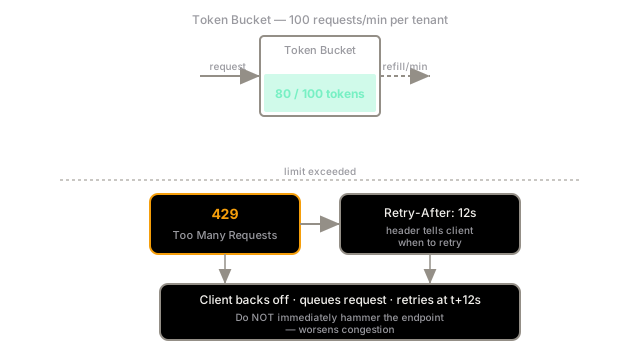
Most LLM APIs use a token bucket algorithm. You start each minute with a full bucket of, say, 100,000 tokens. Each request drains the bucket by the number of tokens it uses. The bucket refills at a steady rate (roughly 1,667 tokens per second for a 100K-TPM limit). If you drain the bucket faster than it refills, requests get a 429 until enough tokens accumulate.
The important implication: short bursts are fine. If you have 10 requests arriving simultaneously at the start of the minute, all 10 go through — the bucket is full. The rate limit is about sustained throughput, not instantaneous peaks.
Client-Side: How to Handle a 429
Read the Retry-After header. Most providers include it in the 429 response, telling you exactly how many seconds to wait before retrying. Ignoring it and immediately retrying is the most common mistake — it worsens congestion without helping throughput.
import time, randomimport openai
def call_respecting_limits(prompt: str, max_attempts: int = 5) -> str: for attempt in range(max_attempts): try: return openai.chat.completions.create( model="gpt-4o-mini-2024-07-18", messages=[{"role": "user", "content": prompt}], ).choices[0].message.content except openai.RateLimitError as e: # Parse Retry-After from the response if available retry_after = float(e.response.headers.get("retry-after", 2 ** attempt)) jitter = random.uniform(0, 0.5) time.sleep(retry_after + jitter) raise RuntimeError("Rate limit not clearing after max retries")Server-Side: Per-Tenant Fairness
If you're building a multi-tenant LLM product, you're both a consumer of the provider's rate limits and a provider of your own. Your gateway needs to enforce per-tenant limits so one enterprise customer running a batch job doesn't starve other users.
The two standard mechanisms:
- Fixed window counters: count requests per tenant per minute. Simple to implement, but allows bursting at window boundaries.
- Sliding window log: track the exact timestamp of each request. More accurate, but memory-intensive at scale.
Redis is the standard backing store for both, since it supports atomic increment-and-check operations (INCR + EXPIRE) that work correctly under concurrency.
The Request Queue
Rather than letting requests fail when limits are hit, a request queue buffers excess requests and drains them as capacity allows. This absorbs bursts without returning errors to users, at the cost of added latency.
Use a priority queue if some requests are more time-sensitive than others: a real-time user query should jump ahead of a background batch job.
Watch Out For
Quota exhaustion from logging and eval pipelines.
It's easy to forget that your eval harness, your logging pipeline that re-evaluates responses, and your background batch jobs all share the same API quota as your production traffic. A nightly eval run that processes 50,000 samples can consume your entire daily budget by 3 AM, leaving zero quota for users during business hours. Separate your quota allocation: production gets a dedicated key with its own budget; evals and batch jobs get a separate key with capped daily spend.
The Quick Version
- LLM APIs enforce requests-per-minute and tokens-per-minute limits using token buckets.
- A 429 means you've exceeded the limit. Always read and respect the Retry-After header before retrying.
- On the client side, use exponential backoff with jitter. Never retry immediately.
- On the server side, enforce per-tenant limits with Redis-backed counters plus a request queue to absorb bursts.
- Separate production and eval API keys to prevent batch jobs from eating your user-facing quota.