Data Cleaning
The same mess arrives again next week. So write every fix down as a rule the data has to pass, and your cleaning turns into something you can trust twice.
Why Does This Exist?
Friday afternoon, and the numbers finally reconcile. Twenty-two notebook cells did it: a string replace here, a dropna there, two cells run twice and one run out of order. Monday the vendor sends the next file and none of it applies.
One move changes that. Stop writing fixes and start writing assertions. Every correction taught you a rule the data has to satisfy: age between 0 and 120, currency one of three values, end time never before start time. Write the rule in code, beside the fix.
Now the script tells you when next week's file breaks a rule you already knew about. That gap between a notebook and a repeatable check is what data validation and contracts turns into a gate.
The one idea you need first
You cannot clean what you cannot see. Before any fix, profile the column: count distinct values, count missing, and look at the distribution per source system. A bimodal histogram across two feeds is the classic tell of a unit mismatch. If profiling is new, the maths behind those summaries lives in descriptive statistics. The rest of this page assumes you have those counts in front of you.
Think of It Like This
The goods-in bay at a restaurant
Two kitchens, same supplier.
In the first, the chef opens each crate, notices the lemons are limes, shrugs, and adapts the dish. Every week brings the same shrug. Nothing gets written down, so the pastry chef meets it again on Thursday and nobody can say how many crates were wrong last month.
The second kitchen has a clipboard at the bay. Weight matches the invoice. Temperature under 5 degrees. Box labelled with the crop it actually contains. Fail a line and the crate goes back with a note.
The clipboard is not more work than the shrug. It is the same knowledge, written where it runs every time.
Where it stops: a kitchen can send a crate back, while your pipeline usually cannot send rows back. Rejected rows still need a home: a quarantine table, a default, or an explicit drop with a count. The clipboard maps to the assertion. What happens after rejection is engineering the kitchen never needed.
How It Actually Works
Mess comes in a handful of shapes. Learn them and you stop meeting them one at a time.
- Type errors. A price arriving as a string carrying a currency symbol and a thousands separator. Or a signup date column holding three formats at once, with the middle one ambiguous between March and July.
- Unit inconsistency. Kilograms beside pounds, Celsius beside Fahrenheit, cents from the payments API and dollars from the CSV. No null, no error, and 70 means two things. Profile per source system. A bimodal histogram is the only tell you get.
- Representational duplicates. Six spellings of one country, including a trailing space and a lookalike character from another alphabet. Six values, one country, every group-by wrong.
- Impossible values. Ages of minus 3 and 999, timestamps at the epoch (a null integer read as a date) and at the end of 2099 (meaning no expiry), percentages of 140. Cheapest to catch, because the rule is a range.
- Contradictions across columns. End time before start time, or a total that is not the sum of its lines. Every cell plausible, the row impossible, and no single-column check finds it.
- Referential breaks. An order pointing at a customer id that no longer exists. The join drops the row silently and revenue is short until quarter end.
Order matters more than technique
Normalise before you dedupe. Two spellings of one country are not equal to any deduplication routine, so a dedupe run first finds nothing and reports success. Trim, case-fold, normalise Unicode, map synonyms, then look for duplicates. Deduplication at scale assumes you already did.
Normalise before you call anything missing. A text sentinel is not a gap. Convert it deliberately, count it, and hand only what is left to missing data.
Training and serving need identical rules
A cleaning rule that lives only in your notebook is a skew bug with a delay on it. Training saw prices stripped and converted to dollars. Serving reads the raw field from an API. Same record, different number, no warning. That is online offline skew. One implementation, imported by both paths.
Worked example
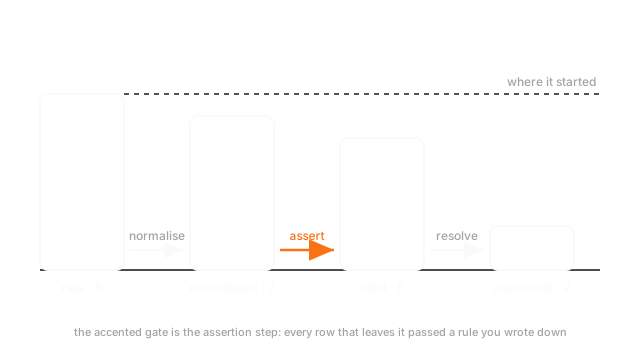
One amount column, eight rows, two upstream systems. The raw cells read: a dollar formatted 1200 with cents, a plain 1200, a comma formatted 1200, the same dollar string with a trailing space, a six digit cents value, a 980, a text sentinel, and a minus 45.
- Normalise. Trim, drop separators, move the currency symbol to its own column. Eight in, eight out.
- Sentinels. The text sentinel is neither a number nor a zero, so it becomes explicitly missing. Seven numeric.
- Units. The six digit value came from the payments feed in cents, so it is 1200.00. Count unchanged, and skipping this step silently misstates one row by a factor of a hundred.
- Assert. The rule amount above zero rejects the minus 45. Six pass.
- Resolve. Five rows now read 1200.0, so they are one order arriving twice and collapse to one. Two distinct values remain.
Eight to seven to six to two, and step 5 was impossible at step 1.
Code
import numpy as np
raw: list[str] = ["$1,200.00", "1200", "1,200.00", "$1,200.00 ", "120000", "980", "n/a", "-45"]in_cents: set[int] = {4} # the one row that arrived from the payments feed
def to_amount(cell: str, cents: bool) -> float: text = cell.strip().lstrip("$").replace(",", "") try: value = float(text) except ValueError: return float("nan") # unparseable, and about to be counted rather than hidden return value / 100 if cents else value
values: np.ndarray = np.array([to_amount(c, i in in_cents) for i, c in enumerate(raw)])print(len(values), int(np.isnan(values).sum())) # -> 8 1 one sentinel, countedclean: np.ndarray = values[~np.isnan(values)]print(len(clean), float(clean.min())) # -> 7 -45.0 one impossible row leftpassed: np.ndarray = clean[clean > 0] # the assertion, written as codeprint(len(passed), sorted(set(passed.tolist()))) # -> 6 [980.0, 1200.0]Every print is a count. Eight to seven to six tells you when the file changed shape. A tidy array tells you nothing.
Watch Out For
Cleaning interactively and never turning it into code
The fixes work. They are also spread across twenty-two cells that have to run in an order the notebook does not record.
So the number in your report cannot be reproduced, because the state that produced it is gone. And the same mess arrives in the next file, so you learn it all over again.
The fix is not discipline, it is a file: one function per rule, one test per function, a printed count at each stage.
Silent coercion turning a formatting problem into a missing-data problem
Coercing a messy column to numeric with errors set to coerce is the fastest way to make it numeric, and a trap with a friendly interface.
Every value it cannot parse becomes missing. A comma formatted number becomes missing. A typo becomes missing. You hold a clean float column, a pile of missing values that were never missing, and no count of them. Then someone imputes the median over the top.
Coercion is fine as a deliberate last step. What makes it a bug is not counting. Compare the null count before and after, then print the values you destroyed: if that list holds a comma formatted number, your problem was a separator.
The Quick Version
- Cleaning as a pile of notebook fixes is worth nothing next week. Write each fix as an assertion and the script becomes a contract.
- Six shapes of mess: types, units, representation, impossible values, cross-column contradictions, referential breaks.
- Unit inconsistency is the dangerous one. No null, no error, one number meaning two things.
- Normalise representations before you dedupe, or the duplicates stay invisible and the dedupe reports success.
- Convert sentinels before counting missing values. A text sentinel is not a gap.
- The same cleaning code runs at training and at serving. One implementation, two callers.
- Print a count at every stage, and never let silent coercion destroy values without a count.