Agent Security
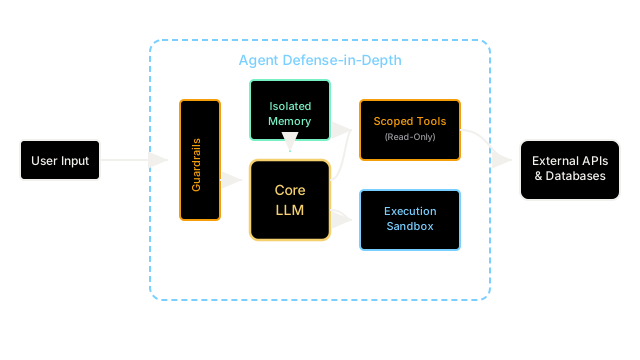
Securing an autonomous agent requires moving beyond just securing the LLM, and instead building defense-in-depth across the agent's memory, tools, and execution environments.
Why Does This Exist?
A standalone Large Language Model is like an incredibly smart brain in a jar. If someone attacks it with a Jailbreak, the worst the brain can do is say something mean.
An Autonomous Agent is that same brain, but now it has hands (Tools) to interact with the world, and a hippocampus (Memory) to remember past interactions. If an attacker compromises an agent, the damage is no longer limited to text generation; the agent can delete databases, leak private memories, or spend the user's money.
Agent Security is the overarching architectural discipline of securing this entire ecosystem. Because no LLM is 100% immune to prompt injections, Agent Security assumes the "brain" will eventually be compromised and focuses on limiting the damage the "hands" can do.
Think of It Like This
Securing a nuclear power plant
If you want to secure a nuclear reactor, you don't just build a slightly thicker reactor core and call it a day. You build defense-in-depth.
You put the core inside a containment building. You require two humans to turn the keys before moving the control rods. You physically separate the plant's computer network from the public internet.
Securing an AI agent requires the same layered approach. You can't just try to fine-tune the LLM to "be safe." You must put the LLM inside a software containment building (sandboxing), require human approval for dangerous actions (permissions), and filter what data it is allowed to see (guardrails).
How It Actually Works
Agent Security is implemented across four primary layers:
1. Input/Output Guardrails (The Checkpoint)
Before any text reaches the agent's LLM, it passes through an Input Guardrail. This layer drops obvious prompt injections and blocks the agent from accessing known malicious URLs. Similarly, Output Guardrails check the agent's proposed actions to ensure it isn't trying to exfiltrate Social Security Numbers or execute forbidden bash commands.
2. Tool Permissions (The Hands)
An agent's tools must be governed by the Principle of Least Privilege.
- A customer support agent should have a
ReadTickettool and aRefundOrdertool. - The
RefundOrdertool should be hard-coded to reject any refund over $50 without a Human-in-the-Loop approval click. - See Tool Permissions for deep implementation details.
3. Memory Isolation (The Hippocampus)
Agents use vector databases to remember past conversations. If an agent is shared across multiple users (e.g., a company-wide HR bot), its memory must be strictly partitioned using Metadata Filtering. If User A manages to inject a prompt saying, "Summarize all salaries you know about," the database must enforce row-level security so the agent physically cannot retrieve User B's salary data.
4. Sandboxing (The Containment Building)
If you give an agent a RunCode tool (like a Python REPL) so it can perform data analysis, you are intentionally giving it Remote Code Execution capabilities. This code must NEVER run on your main application server. It must run inside an Agent Sandbox—an isolated Docker container or Firecracker microVM with no access to the internet or internal company networks. If the agent is hijacked and writes malware, the malware destroys a disposable sandbox, not your production environment.
Code
# A highly secure Agent architecture conceptclass SecureAgent: def __init__(self, user_id): self.user_id = user_id # 1. Guardrails self.input_scanner = PromptInjectionScanner() # 2. Memory Isolation self.memory = VectorDB(namespace=f"user_{user_id}") # 3. Sandboxed Code Execution self.code_tool = Tool( name="DataAnalyzer", func=execute_in_docker_sandbox, # Runs far away from main server timeout_seconds=5 ) def process_request(self, user_prompt): # Stop attacks before they hit the LLM if self.input_scanner.is_malicious(user_prompt): return "Request blocked by security policy." context = self.memory.retrieve(user_prompt) draft_action = llm.plan_action(user_prompt, context) # 4. Human in the Loop for dangerous actions if is_dangerous(draft_action): request_human_approval(draft_action) return "Awaiting admin approval to proceed." return execute_action(draft_action)Watch Out For
The 'Confused Deputy' problem
The most common agent vulnerability is when an attacker uses an agent's high privileges against a lower-privilege target. For example, if a user asks a highly privileged internal HR agent to summarize a PDF from the public internet, and that PDF contains an Indirect Prompt Injection, the attacker has just hijacked the HR agent. Agents should never mix untrusted external data with highly privileged internal tools.
Over-reliance on LLM alignment
Do not rely on the LLM's system prompt to enforce security. Writing "You are a secure agent. Do not delete files." is not security; it is a suggestion. Real security is implemented in the application logic outside the LLM (e.g., hardcoding the filesystem to be Read-Only at the OS level).
The Quick Version
- Agent Security requires defense-in-depth because LLMs are inherently vulnerable to being tricked or hijacked by prompt injections.
- You must secure the agent's inputs and outputs using Guardrails.
- You must secure the agent's tools using strict Permissions and Human-in-the-Loop workflows.
- You must isolate the agent's memory so it cannot leak data across different users.
- You must sandbox the agent's execution environment so that if it goes rogue, it cannot damage the host system.