Document Understanding
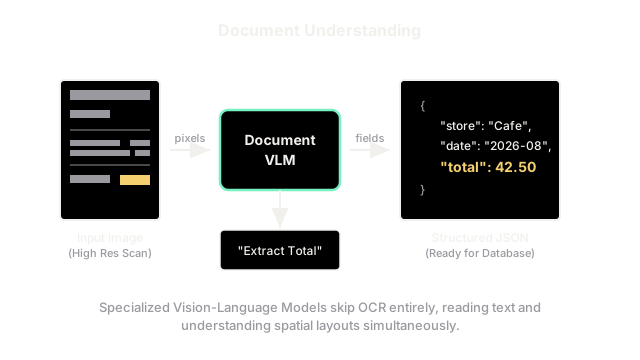
Instead of using old OCR software to transcribe a receipt into a messy wall of text, Document Understanding VLMs read the image directly, perfectly capturing the relationship between columns, rows, and totals.
Why Does This Exist?
For decades, if a company wanted to automate data entry for physical invoices, they used Optical Character Recognition (OCR). OCR algorithms slide across an image from left to right, top to bottom, converting printed letters into a digital text file.
The problem? OCR destroys the visual layout of the document. If you scan a restaurant receipt, the OCR just outputs a massive wall of text. It has no idea that the number "42.50" was sitting in the "Total" column, because the concept of "columns" was lost the moment the image was turned into a 1D string of text.
Modern Document Understanding Models (like Meta's Nougat or Naver's Donut) are specialized Vision-Language Models that bypass OCR entirely. They ingest the raw image of the document and output perfectly structured JSON databases, because they understand the visual layout just as well as the text.
Think of It Like This
Reading a Map vs. Reading a List
If you want to find the capital of a country, you can either:
- Use OCR (Reading a List): Read a massive alphabetical list of 10,000 cities in a book until you find the right one.
- Use Document Understanding (Reading a Map): Look at a visual map. Your eyes instantly scan to the star symbol in the center of the country.
Layout matters. By keeping the document as an image rather than converting it to a text list, the AI can use visual cues (bold text, dividing lines, indented columns) to instantly understand what the data means.
How It Actually Works
Document Understanding Models are structurally identical to standard Vision-Language Models, but they solve two major engineering challenges.
1. The High-Resolution Problem
Standard VLMs use CLIP to encode images. CLIP was trained on low-resolution internet photos (typically pixels). If you shrink a massive A4 medical invoice down to 224 pixels, the text becomes a blurry, unreadable smudge. Document VLMs replace CLIP with specialized Vision Encoders (like Swin Transformers) that are trained to process massively high-resolution images (e.g., ) without running out of memory.
2. End-to-End JSON Extraction
Instead of outputting conversational English (like ChatGPT), these models are fine-tuned to output structured data formats like JSON or Markdown.
During training, the model is shown an image of a receipt and the target text: {"store": "Cafe", "total": 42.50}. The model learns to act as an end-to-end extraction pipeline. You feed it a JPEG, and it immediately prints out a database entry.
3. Understanding Math and Charts
Because they are multimodal, these models can perform tasks that text-only models cannot. If a scientific paper contains a complex bar chart, a Document VLM can "read" the heights of the bars and answer questions like, "Which year had the highest revenue?" It can also read complex mathematical formulas (like those written in LaTeX) and convert them directly into code, something traditional OCR completely fails at.
Code
This pseudocode shows how you can use a Document VLM to bypass the messy, multi-step OCR pipelines of the past.
def extract_invoice_data(document_vlm, invoice_image_path): """ Extracts structured data directly from an image without OCR. """ # 1. Load the high-resolution image image = load_image_at_high_res(invoice_image_path) # 2. Define the exact JSON schema we want back prompt = """ Extract the data from this invoice into the following JSON format: { "vendor_name": "", "invoice_number": "", "line_items": [{"item": "", "price": 0.00}], "total_amount": 0.00 } """ # 3. The model processes the image visually and outputs the JSON # No OCR engine was used! extracted_json = document_vlm.generate(image=image, text=prompt) return extracted_jsonWatch Out For
The Hallucinated Number Problem
Because these models are generative LLMs (not deterministic OCR scanners), they are prone to hallucination. If a receipt is slightly blurry and the total is $42.50, the model might confidently generate the text $42.58 because the '0' looked slightly like an '8'. If this data is pumped automatically into a corporate accounting database, these subtle hallucinations can cause massive financial reconciliation errors. Many enterprises still run traditional OCR alongside Document VLMs as a double-check mechanism.
The Quick Version
- Traditional OCR (Optical Character Recognition) converts images to text, but destroys the visual layout (columns, tables, headers) in the process.
- Document Understanding Models (like Donut and Nougat) are specialized Vision-Language Models that read the raw image directly.
- They use high-resolution Vision Encoders to ensure small text remains readable.
- Because they process the image visually, they understand tables, charts, and spatial relationships perfectly.
- They are typically fine-tuned to output structured data (like JSON or Markdown), allowing for fully automated, end-to-end data entry pipelines.