Model Context Protocol
MCP is like USB-C for AI. Instead of writing custom API wrappers for every tool you want your agent to use, MCP provides a universal standard so agents can instantly plug into databases, file systems, and SaaS apps without custom code.
Why Does This Exist?
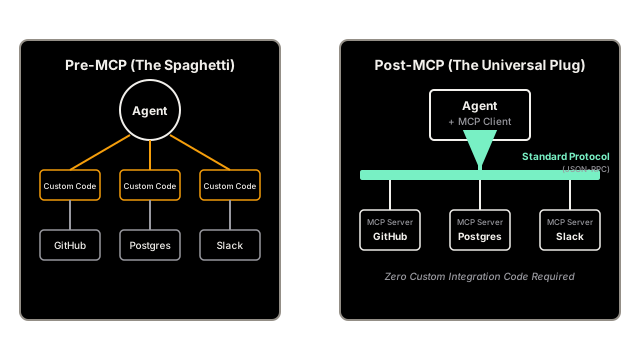
To give an AI Agent access to tools (like searching GitHub, reading a local file, or querying Postgres), a developer usually has to write custom Python code for each tool.
- Read the GitHub API documentation.
- Write a Python function
search_github(). - Map the Python function into a JSON schema that OpenAI/Anthropic expects.
- Inject that JSON schema into the prompt.
- Catch the LLM's response, execute the Python function, and format the output.
If you want your agent to talk to 50 different applications, you have to write, maintain, and debug 50 custom API wrappers. It is exhausting.
Model Context Protocol (MCP) is an open standard (introduced by Anthropic) that solves this. It acts like a "USB-C" cable for AI. If an application provides an "MCP Server," any AI agent running an "MCP Client" can instantly plug into it, discover all its tools, and execute them securely—without you writing a single line of custom integration code.
Think of It Like This
The Universal Adapter
Pre-MCP: You travel the world. In the UK, you have to buy a special three-prong adapter for your phone. In Europe, you buy a two-prong adapter. In Australia, you buy a weird angled adapter.
Post-MCP (USB-C): Every country in the world agrees to put USB-C ports directly in the wall. You just carry one cable. You plug it into any wall in any country, and your phone charges instantly.
How It Actually Works
The architecture of MCP is a classic Client-Server model, operating over standard transport layers (like Stdio for local tools, or HTTP/SSE for remote tools).
1. The MCP Server (The Tool Provider)
A company (or open-source developer) writes a lightweight server for their application. For example, a Postgres MCP Server.
This server exposes standard MCP endpoints:
ListTools()-> Returns the JSON schemas of what it can do.CallTool(name, args)-> Actually executes the SQL query.
2. The MCP Client (The AI Agent)
Your AI application (like Claude Desktop, or your custom LangChain agent) runs an MCP Client.
You tell the client: "Connect to the Postgres MCP Server."
The client automatically calls ListTools(), grabs the schemas, and injects them into the LLM's prompt.
3. Execution
When the LLM decides to use the query_database tool, the MCP Client automatically formats the request, sends it to the MCP Server, catches the result, and hands it back to the LLM.
You, the developer, wrote zero code to make this happen.
Show Me the Ecosystem
Because MCP is an open standard, you don't have to write the servers yourself. You just install them. A standard configuration file for an MCP Client looks like this:
{ "mcpServers": { "postgres": { "command": "npx", "args": ["-y", "@modelcontextprotocol/server-postgres", "postgresql://localhost/mydb"] }, "github": { "command": "npx", "args": ["-y", "@modelcontextprotocol/server-github"], "env": { "GITHUB_PERSONAL_ACCESS_TOKEN": "your-token" } }, "filesystem": { "command": "npx", "args": ["-y", "@modelcontextprotocol/server-filesystem", "/Users/alice/projects"] } }}By simply saving this JSON file, your AI Agent instantly gains the ability to query your local database, read your code on GitHub, and edit files on your hard drive.
Watch Out For
Security and Autonomous Actions
MCP makes it incredibly easy to connect an AI to powerful systems. If you connect an MCP Server that has write access to your production database, and the LLM decides to execute DROP TABLE users;, the MCP Client will happily pass that command to the Server and execute it.
Because the connection is so seamless, you must be extremely diligent about configuring the Server with read-only credentials, or implementing "Human-in-the-Loop" approval steps before the MCP Client is allowed to execute destructive tools.
The Quick Version
- Building custom API integrations for every tool an agent needs is unscalable.
- Model Context Protocol (MCP) is an open standard (like USB-C) for connecting AI agents to data sources.
- MCP Servers expose tools, resources, and prompts in a standardized format.
- MCP Clients (the AI agents) connect to these servers, discover the tools, and use them automatically.
- This allows the AI ecosystem to build "plug-and-play" tools that work across any framework (LangChain, LlamaIndex) and any UI (Claude Desktop, Cursor).