Tool Use & Function Calling
Function calling lets a model request a real action by naming a tool and filling in its arguments, while ordinary code checks the request and runs it. The model writes the request; it never runs anything itself.
Why Does This Exist?
You ask for Saturday's weather in Lisbon and the model answers instantly, confidently, with a number it cannot possibly know. Its weights froze months ago. Weather changes by the hour, so anything it says about Saturday is a guess wearing a fact's clothes. That is the gap this page closes.
Here is the move: instead of answering from memory, the model emits a structured request naming a real lookup, get_weather, with typed arguments for city and date. A separate program, the harness, checks that request against a schema, runs the actual lookup, and pastes the result back into the conversation. The model still writes the final sentence. It just isn't inventing the number inside it anymore.
Two terms before the mechanism, since everything below stands on them. A tool is an ordinary function your code can run: a weather lookup, a database query, a booking endpoint. A schema is the written contract for calling it: the function's name, a description of when it applies, and the names and types of its arguments, usually expressed as JSON Schema. If shaped model output is new to you, start with structured outputs; this page puts that idea to work by aiming it at requests instead of answers. The program that executes the calls gets its own treatment in agent harness design.
Think of It Like This
A concierge who phones the specialist
You ask a hotel concierge for tomorrow's ferry times to an island you have never visited. A good concierge does not recite times from memory to avoid an awkward pause. They pick up the phone, give the ferry office the exact route and date, and read back whatever the office says. The request is precise enough that someone else can act on it, and the answer comes from the party that actually knows.
A model with tools plays the concierge, never the ferry office. It names the lookup and supplies the arguments, then waits for the real answer instead of filling the silence with a guess.
Where the comparison stops: you trust the ferry office because you dialled the number yourself. Never extend that trust to the model. The harness checks every call against the schema before anything runs, because the concierge in this story is a fluent guesser with a phone.
How It Actually Works
The tool declaration is a contract
Nothing works until the harness tells the model what exists. Each tool is declared with three parts: a name (get_weather), a description in plain language ("current forecast for a city on a date"), and a parameters object giving each argument's name and type (city: string, date: string). That declaration shapes the request the way structured outputs shapes the answer: the model fills in a fixed form instead of writing free text about what it wants.
The description does more work than you would expect. It is the only thing the model reads when deciding whether a tool fits the moment. Write "weather stuff" and you will watch the model skip the tool when it needs it and call it when nobody asked. Write what the tool does and when it applies, the way you would brief a new teammate, and the timing improves without any other change.
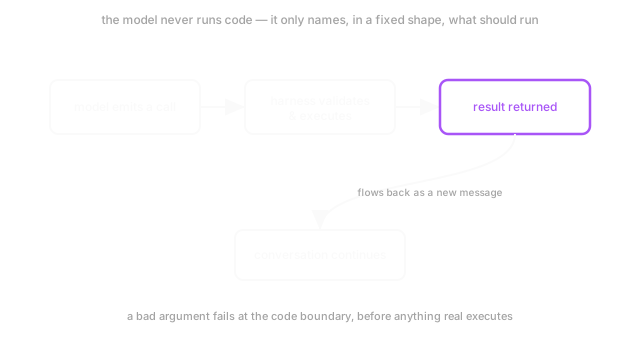
The round trip takes three handoffs
Call the model's output C, a pair of (name, arguments). Call the check against the declaration V, which returns either ok or an error string. In plain words: C is what the model wants to happen, and V is the gate that decides whether it may.
The trip runs like this. First, the model emits C as data, not as code, so nothing executes. Second, the harness runs V(C): every required field present, every value the right type. On failure it sends the error back as conversation text and the model retries. On success it runs the real function, outside the model, with exactly those arguments. Third, the function's return value is appended to the conversation as a new message, and the model continues with the fact in front of it. You see one turn. Underneath, three handoffs just happened.
Worked example: one Lisbon forecast
You ask: "What will the weather be in Lisbon on 2026-08-14?" The model emits:
get_weather(city="Lisbon", date="2026-08-14")
The harness runs its two type checks: city is a string, date is a string. Two checks, two passes, so it runs the lookup. Back comes the observation:
{"temp_c": 24, "condition": "clear"}
That message lands in the conversation and the model answers with the real number: 24°C, which converts as 24 × 9/5 + 32 = 75.2°F. The arithmetic is ordinary unit conversion, and that is the point. The model never measured anything. It asked, the harness fetched, and the sentence it now writes carries a checked fact: clear skies, 24°C (75.2°F).
Why validation lives outside the model
The model cannot be its own gatekeeper. It produces text; it has no idea which strings delete databases. So the boundary sits in your code: no call executes without passing V first, every time, with no exceptions for calls that look fine. Constrained decoding can force the shape at generation time, but the harness check still runs, because generation-time shaping and execution-time permission are two different jobs.
That placement names the trade-off. Each tool call buys freshness and real effects, and pays in latency plus the tokens spent sending schemas and results back and forth. Skip tools for anything the weights already hold. Reaching for a lookup to answer a question the model knows cold is slower, pricier, and adds a failure point for nothing.
It also names the assumption everything rests on: the declaration tells the truth and the arguments describe the user's actual request. When the declaration drifts from the implementation, the model calls the tool you documented instead of the one you run. When the user says "the coast" and the model fills city with "Lisbon" anyway, the schema passes a lie it cannot see. Shape errors fail at the boundary. Invented values need a different check, and that is the second pitfall below.
Code
The check below is the boundary drawn in code. It validates arguments against the schema before anything runs, then converts the returned temperature so the final answer can quote both units.
from typing import Any
SCHEMA: dict[str, type] = {"city": str, "date": str}
def validate_call(args: dict[str, Any]) -> str | None: """Return None when args are safe to execute, else the error to send back.""" for field, kind in SCHEMA.items(): if field not in args: return f"missing required field: {field}" if not isinstance(args[field], kind): return f"{field} should be {kind.__name__}, got {type(args[field]).__name__}" return None
def c_to_f(temp_c: float) -> float: """Celsius to Fahrenheit, for quoting the tool result both ways.""" return temp_c * 9 / 5 + 32
good = {"city": "Lisbon", "date": "2026-08-14"}bad = {"city": "Lisbon", "date": 20260814}print(validate_call(good)) # -> Noneprint(validate_call(bad)) # -> date should be str, got intprint(c_to_f(24)) # -> 75.2The good call passes and returns None, the signal for "safe to execute." The bad call fails on date, and the harness would hand that string back to the model for a retry. The last line reproduces the worked example's conversion: 75.2.
Watch Out For
Running a side effect on a call you never validated
The symptom is a booking, email, or payment firing with arguments nobody checked, usually on a path someone marked "trusted" to save a round trip. A schema check that runs only sometimes is no check at all: the one skipped call is the one carrying the hallucinated argument.
Route every call, read-only or not, through a single choke point that runs V before the function underneath it executes. Validate every time, not just when the call looks suspicious.
Trusting a call because the shape is right
The symptom is subtler: every type check passes and the answer is still wrong. The user said "the coast," the model filled city with "Lisbon," and the harness had nothing to reject because a string is a string. Shape validation cannot see invention.
Ground arguments against the transcript before any side effect: every value the call carries should trace to something the user actually said. When a required argument is missing, ask for it or confirm it. Never let the model guess it quietly.
The Quick Version
- Function calling lets a model emit a typed request naming a tool and its arguments. The model runs nothing; only the harness executes.
- Each tool is declared as a contract: a name, a plain-language description the model uses to time the call, and a typed parameter schema.
- The round trip is three handoffs: the model emits the call, the harness validates and runs it, and the result returns as a new message.
- Shape errors fail at the code boundary before anything runs, and the error goes back as text the model can retry from.
- A valid shape can still carry an invented value, so ground arguments against the conversation and confirm before side effects.