Promptable Segmentation
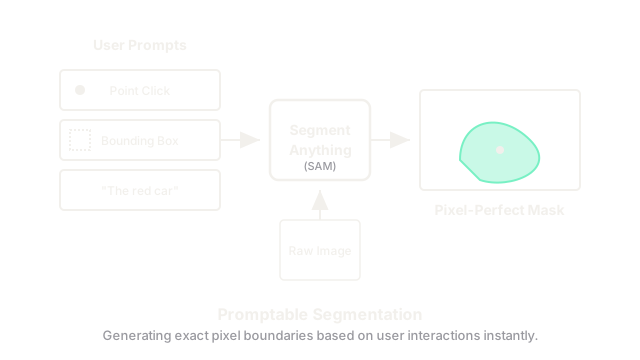
Instead of training a vision model that can only detect 80 specific objects (like cars or people), we can build a model that can perfectly trace the outline of ANY object in the world simply by clicking on it or typing its name.
Why Does This Exist?
In classic Computer Vision, Segmentation is the task of assigning a label to every single pixel in an image. If there is a dog in a photo, the model must output a pixel-perfect "mask" outlining the exact shape of the dog, ignoring the background.
Historically, segmentation models (like Mask R-CNN) were highly specialized. If you trained a model to segment medical tumors, it couldn't segment cars. If you wanted to segment a new object, you had to manually trace the outlines of thousands of objects by hand to train a new model.
In 2023, Meta released the Segment Anything Model (SAM). It was the first "Foundation Model" for segmentation. Just like ChatGPT can write an essay about a topic it wasn't explicitly programmed for, SAM can generate a pixel-perfect mask for any object in the world, even objects it has never seen before, simply by taking a "prompt" from the user.
Think of It Like This
The Magic Wand Tool
If you've ever used Photoshop, you might be familiar with the "Magic Wand" tool. You click on a blue shirt, and the software tries to highlight the whole shirt. However, it usually relies on simple color differences, so it often highlights the blue sky in the background by mistake.
SAM is like a Magic Wand with a PhD in physics and object permanence. You can click on the steering wheel of a car, and the AI understands the concept of a steering wheel. It will instantly highlight the entire wheel perfectly, ignoring the dashboard behind it, even if they are the exact same color.
How It Actually Works
The architecture of a Promptable Segmentation model requires three distinct parts.
1. The Heavy Image Encoder
When you upload an image, it passes through a massive Vision Transformer (ViT). This encoder analyzes the image and outputs a rich, mathematical embedding of the scene. Because this step is computationally heavy, it only runs once per image.
2. The Prompt Encoder
The model can accept three types of user prompts:
- Points: The user clicks a single pixel on the object they want.
- Boxes: The user draws a rough rectangle around the object.
- Text: The user types "The red car." These prompts are converted into mathematical embeddings (using techniques similar to CLIP for text). This step is extremely lightweight.
3. The Lightweight Mask Decoder
The heavy image embedding and the lightweight prompt embedding are fed into a small Mask Decoder network. The Decoder uses Cross-Attention to fuse them together, essentially asking: "Based on where the user clicked, which pixels in the image embedding belong to that object?" The Decoder instantly generates a pixel-perfect mask. Because the Image Encoder only ran once, the Decoder can run in milliseconds in the web browser, updating the mask in real-time as the user moves their mouse around the screen.
Code
This pseudocode demonstrates why SAM is so fast for interactive use. Notice how the heavy image embedding is calculated once, while the prompt encoder and decoder can be run in a fast while loop.
import torch
def interactive_segmentation(sam_model, image): """ Simulates a user clicking on an image to segment objects in real-time. """ # 1. HEAVY OPERATION (Run Once) # The image is processed by the massive Vision Transformer # This might take a second to run. image_embedding = sam_model.image_encoder(image) while user_is_clicking: # 2. Get the X, Y coordinates of the user's mouse click click_x, click_y = get_user_click() # 3. LIGHTWEIGHT OPERATION (Run many times) # Convert the click into a mathematical prompt prompt_embedding = sam_model.prompt_encoder(click_x, click_y) # 4. LIGHTWEIGHT OPERATION (Run many times) # The small decoder fuses the heavy image with the click prompt # to generate the mask instantly. predicted_mask = sam_model.mask_decoder(image_embedding, prompt_embedding) # Display the highlighted mask on the screen render_mask_to_screen(predicted_mask)Watch Out For
The Ambiguity Problem
If you click perfectly in the center of a person's shirt, what do you want the model to segment? Do you want a mask of just the shirt? Do you want a mask of the entire person? Do you want a mask of the logo on the shirt? A single point is inherently ambiguous. To solve this, SAM's architecture was explicitly designed to output three valid masks for every click (Sub-part, Part, and Whole Object), allowing the user to simply choose the one they intended.
The Quick Version
- Historic segmentation models were highly specialized and required thousands of hand-drawn masks to learn new objects.
- SAM (Segment Anything Model) introduced the concept of Promptable Segmentation, allowing zero-shot segmentation of any object.
- Users can prompt the model by clicking points, drawing bounding boxes, or typing text.
- The architecture uses a heavy Image Encoder (which runs once) and a lightweight Mask Decoder (which runs in milliseconds), allowing for real-time, interactive object selection in web browsers and photo editing software.