Tool Retrieval
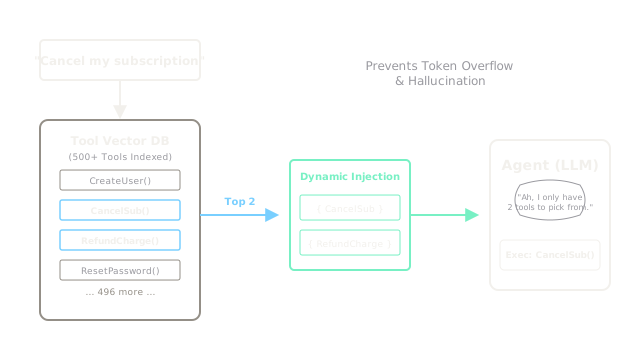
Instead of overwhelming the LLM by listing 5,000 available tools in the system prompt, you use a Vector Database to search for only the 5 most relevant tools for the current query, and inject those into the prompt.
Why Does This Exist?
When building autonomous agents (using the ReAct Pattern), you define tools by placing their descriptions in the System Prompt:
"You have access to the tool Weather(city). You have access to the tool Calculator(math)..."
This works great if you have 5 tools. But what if you are building an Enterprise Agent for a massive corporation that has 500 different internal APIs?
UpdateUserEmail(id, email)FetchBillingHistory(id, start_date)TriggerJenkinsPipeline(repo, branch)- ... and 497 more.
If you put the descriptions, JSON schemas, and arguments for 500 tools into the System Prompt, you will destroy your Context Budget. Even worse, the LLM will suffer massive Context Degradation; it will get confused by the hundreds of options and frequently hallucinate tool names or call the wrong API.
Tool Retrieval solves this by applying the exact logic of RAG, but instead of retrieving documents, you retrieve tools.
Think of It Like This
The Mechanic's Toolbox
Standard Agent: A mechanic is trying to change a spark plug. They lay out all 500 tools they own (wrenches, saws, drills, blowtorches) on the floor. They spend 20 minutes looking at all the tools before finally picking up the wrench. It's distracting and inefficient.
Tool Retrieval: The mechanic has a smart assistant. When the mechanic says, "I need to change a spark plug," the assistant instantly hands them exactly 3 tools: a spark plug socket, an extension bar, and a ratchet. The mechanic immediately gets to work.
How It Actually Works
The architecture is nearly identical to a standard RAG pipeline, just with a different payload in the Vector Database.
1. Embedding the Tools
You take the descriptions of all 500 tools and embed them into a Vector Database.
Payload: {"name": "FetchBillingHistory", "description": "Returns the history of invoices for a customer."} [0.1, -0.4, ...]
2. Semantic Search
When the user asks a question (e.g., "Why did my credit card get charged twice?"), you embed the user's question. You search the Vector Database to find the top 5 tools whose descriptions are semantically similar to the user's question.
The database returns FetchBillingHistory, RefundCharge, and LookupUser.
3. Dynamic Injection
Your Python backend dynamically constructs the System Prompt. Instead of listing 500 tools, it only lists the 3 retrieved tools.
The LLM reads the prompt, thinks "Ah, I only have 3 tools to choose from," and confidently selects FetchBillingHistory.
Code
This code demonstrates the logic of fetching tools dynamically before executing the LLM call.
import openaifrom some_vector_db import ToolDatabase # Conceptual wrapper
def dynamic_tool_agent(user_query): # 1. We search the vector database for tools relevant to the query db = ToolDatabase() relevant_tools = db.search_tools(query=user_query, top_k=3) # relevant_tools now contains a list of JSON schemas for the 3 best tools # e.g., [{"type": "function", "function": {"name": "RefundCharge"...}}] # 2. We inject ONLY those 3 tools into the OpenAI API call response = openai.chat.completions.create( model="gpt-4o", messages=[{"role": "user", "content": user_query}], tools=relevant_tools, # We pass the dynamic list here! tool_choice="auto" ) # 3. The LLM decides which of the 3 tools to use if response.choices[0].message.tool_calls: tool_call = response.choices[0].message.tool_calls[0] print(f"LLM decided to call: {tool_call.function.name}") # ... execute the tool ... else: print("LLM just answered directly.")
# --- Execution ---query = "Can you cancel my subscription and refund my last month?"dynamic_tool_agent(query)
# -> LLM decided to call: RefundChargeWatch Out For
Semantic Mismatch
If a tool's description is written poorly, the vector database will never retrieve it.
For example, if you have a tool named calculate_amortization and its description is just "Calculates amortization," a user asking "How much are my monthly car payments?" will not retrieve the tool, because the words "car payment" and "amortization" are not semantically close enough in the vector space.
You must enrich tool descriptions with keyword synonyms (e.g., "Calculates amortization. Use this for car payments, loans, mortgages") so the vector search can find them.
The Quick Version
- Listing hundreds of tools in a System Prompt breaks token limits and confuses the LLM.
- Tool Retrieval treats tools exactly like RAG documents.
- The descriptions of all tools are stored in a Vector Database.
- When a user asks a question, the system retrieves only the top 3 to 5 most relevant tools.
- Those specific tools are dynamically injected into the prompt, giving the LLM a clean, focused workspace.