Voice Agent Architecture
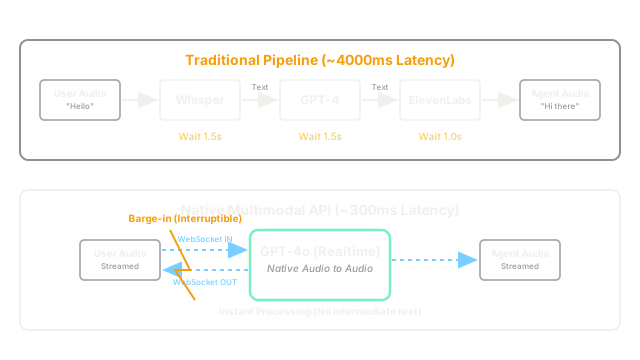
Instead of piping Speech-to-Text into an LLM and then piping the output into Text-to-Speech (which is very slow), modern Voice Agents use natively multimodal models that 'hear' and 'speak' directly in audio, enabling sub-second conversational latency.
Why Does This Exist?
For years, developers built "Voice Agents" using a pipeline architecture:
- User Speaks: "What's the weather?"
- Model 1 (STT): Whisper converts the audio into text (Wait 1.5s).
- Model 2 (LLM): GPT-4 reads the text and generates a text answer (Wait 1.5s).
- Model 3 (TTS): ElevenLabs converts the text answer back into audio (Wait 1.0s).
- User Hears: "It is sunny."
The problem: This pipeline takes ~4 seconds. Human conversation relies on sub-second latency. If a user has to wait 4 seconds after every sentence, the agent feels robotic, frustrating, and unusable. Furthermore, by converting the user's audio into text, the LLM loses all acoustic information (emotion, tone, sarcasm).
Native Voice Agent Architecture (like OpenAI's Realtime API) solves this by training a single Multimodal LLM to natively process audio inputs and generate audio outputs.
Think of It Like This
The Translator
Pipeline (Slow): You speak English. A translator writes it down in French. He hands the paper to a Spanish translator. The Spanish translator writes it in Spanish. He hands it to an announcer, who reads it out loud.
Native Voice (Fast): You speak English directly to a bilingual person, who instantly responds to you in Spanish.
How It Actually Works
To achieve true conversational latency (under 500ms), you cannot use standard HTTP API requests. The architecture must use persistent, bidirectional socket connections.
1. WebRTC or WebSockets
Instead of sending a chunk of audio, waiting, and getting a chunk back, the client establishes a persistent WebSocket or WebRTC connection to the LLM provider.
2. Audio Streaming
The client streams the user's raw microphone audio (usually PCM format) to the server in tiny chunks (e.g., 20ms of audio at a time) continuously.
3. Native Processing
The LLM continuously listens to the stream. Because it natively understands audio tokens (not just text), it can hear the tone of the user's voice. When the user stops talking (detected by Voice Activity Detection or VAD), the LLM immediately begins streaming audio tokens back to the client.
4. Interruption (Barge-in)
Because the connection is bidirectional, the user can interrupt the agent. If the agent is halfway through a 30-second speech, and the user suddenly says "Wait, stop!", the audio stream hits the server instantly, the server halts generation, clears its audio buffer, and listens to the new instruction.
Code
This conceptual snippet shows the architecture of connecting to a Realtime WebSocket API, vastly different from a standard REST API call.
// Conceptual Architecture for a Realtime Voice Agent (Node.js/Browser)import { WebSocket } from 'ws';
// 1. Establish persistent bidirectional connectionconst ws = new WebSocket('wss://api.openai.com/v1/realtime', { headers: { 'Authorization': `Bearer ${API_KEY}` }});
ws.on('open', () => { console.log("Connected to Realtime Voice Agent."); // Configure the session ws.send(JSON.stringify({ type: 'session.update', session: { voice: 'alloy', // Choose the voice turn_detection: 'server_vad' // Auto-detect when user stops speaking } }));});
// 2. Stream user microphone to the server continuouslynavigator.mediaDevices.getUserMedia({ audio: true }).then((stream) => { const audioContext = new AudioContext(); const source = audioContext.createMediaStreamSource(stream); const processor = audioContext.createScriptProcessor(1024, 1, 1); source.connect(processor); processor.connect(audioContext.destination); processor.onaudioprocess = (e) => { // Grab raw PCM audio and send it over the websocket const audioData = e.inputBuffer.getChannelData(0); const base64Audio = convertToBase64(audioData); ws.send(JSON.stringify({ type: 'input_audio_buffer.append', audio: base64Audio })); };});
// 3. Receive agent audio streaming backws.on('message', (message) => { const event = JSON.parse(message); if (event.type === 'response.audio.delta') { // The LLM is speaking! Play this chunk immediately. playAudioChunk(event.delta); } else if (event.type === 'input_audio_buffer.speech_started') { // The user interrupted the agent! Stop playing the current audio. stopPlayingAudio(); }});Watch Out For
Bandwidth and Cost
Streaming raw PCM audio 60 times a second over WebSockets requires highly stable internet connections. Furthermore, Native Voice LLMs are incredibly expensive. You are billed for every millisecond of audio processed, and if the user leaves their microphone open while watching TV in the background, the LLM is constantly processing that background noise, destroying your API budget. You must implement aggressive client-side muting or "Push-to-Talk" if you want to control costs.
The Quick Version
- Traditional Voice Agents use a 3-step pipeline: Speech-to-Text LLM Text-to-Speech. This causes unacceptable 4-second delays.
- Native Voice Agents use a single Multimodal LLM that processes audio in and audio out.
- This requires persistent WebSocket or WebRTC connections, streaming tiny chunks of audio in real-time.
- It enables sub-second latency, natural interruptions (barge-in), and allows the AI to hear emotion and tone.