Containerization for ML
A container packs a model with its exact libraries and system tools, so the same image answers identically on a laptop and in production.
Why Does This Exist?
A model never runs alone. It needs a Python version, PyTorch and NumPy builds, CUDA drivers, and system libraries, all mutually compatible. Install by hand on each server and two machines drift: one team's laptop trains against CUDA 11.8 while production silently runs 12.0, and predictions differ with no error anywhere.
The container freezes the whole stack into one sealed image: operating system, drivers, packages, code, and weights. Whatever the host carries becomes irrelevant, because the model only ever sees its own interior. This page covers that seal and its limits. Running sealed images to answer users is model serving, declaring the hosts themselves as versioned files is infrastructure as code, and rebuilding those images on every change is CI/CD pipelines.
Basics first: an image is the frozen blueprint, a read-only bundle of layers you can copy anywhere. A container is one running instance of that image, fenced off from the host by kernel features called namespaces and control groups. Ten containers from one image behave identically because they share the same frozen interior.
Think of It Like This
A sealed kitchen in a shipping container
A chef's dish depends on her oven's true temperature, her knives, and her flour brand. Cooking in a stranger's kitchen changes all three, so the dish changes too.
Instead she ships a container holding her oven, her tools, her ingredients, and the recipe card. At each venue she plugs into power and water and cooks inside her own box. The venue's kitchen can be chaos; her results stay constant because nothing inside her container changed.
Where it stops: the venue still supplies power, water, and floor space. A container likewise borrows the host kernel, CPU, RAM, and GPUs. If the host has no GPU, the sealed kitchen cannot conjure one.
How It Actually Works
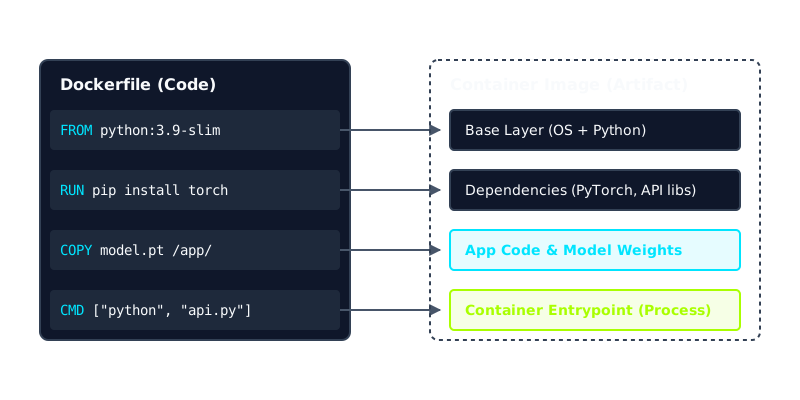
A build file, usually called a Dockerfile, stacks immutable layers into the image.
- Base layer. Start from an operating system image, often one already carrying the right CUDA libraries, such as Ubuntu 22.04 with CUDA 11.8.
- System and language layers. Add OS tools, then pin Python and install exact package versions, such as PyTorch 2.0.1 with its matching NumPy. Each instruction adds one cached layer.
- Model and code layers. Copy the inference server and the weight file, such as model weights plus a small API. Rebuilding after a code edit reuses every unchanged lower layer.
- Run sealed. The runtime starts containers from the image, each fenced by namespaces with CPU and memory caps from control groups. Orchestrators copy the same image to every machine and replace crashed containers with fresh identical ones.
Worked example
Take an image holding Ubuntu 22.04 with CUDA 11.8, Python 3.9 with PyTorch 2.0.1, and a 4 GB weight file, totaling about 8 GB on disk. Pulling it to a fresh server over a 100 MB per second link takes about 8 times 1,024 divided by 100, roughly 82 seconds before the first prediction. That wait is why teams slim images and why three replicas asking 2 vCPUs each reserve 6 vCPUs the moment they land. The diagram shows this same nesting: pinned interior, indifferent host, requests in and answers out.
Code
Locks only work if something checks them. This startup probe compares the running environment against the pinned versions and refuses to serve on mismatch.
locked = {"python": "3.9.18", "torch": "2.0.1", "cuda": "11.8"}running = {"python": "3.9.18", "torch": "2.0.1", "cuda": "11.8"}
mismatch = [k for k in locked if locked[k] != running.get(k)]print("mismatch:", mismatch)# -> mismatch: []print("env pinned" if not mismatch else "rebuild image")# -> env pinnedprint(f"8 GiB pull at 100 MB/s takes {round((8 * 1024) / 100)}s")# -> 8 GiB pull at 100 MB/s takes 82sAll three outputs match the worked example: no drift across the pinned versions, and the 82 second pull estimate from the same arithmetic.
Watch Out For
Images so fat they miss the traffic spike
ML images bloat fast: full CUDA toolkits, build tools, and package caches can push an image past 8 GB. When traffic spikes, each new machine downloads the whole thing before serving, so autoscaling lags by minutes and requests queue or drop.
Slim the base, install GPU libraries only where inference needs a GPU, and clear caches in the same layer that creates them. Measure pull-to-ready time as a release metric, because an image that cannot arrive cannot help.
Secrets baked into the layers
Copying API keys or database passwords into the build file bakes them into a layer forever. Images travel to registries and caches you half control, and every layer is retrievable, so rotation means rebuilding history, not just changing a setting.
Inject secrets at runtime through environment variables or your orchestrator's secret store. If a key ever entered a layer, rotate it and rebuild from a clean history.
The Quick Version
- A container seals the model with its exact operating system, drivers, libraries, code, and weights into one portable image.
- Images are frozen blueprints and containers are fenced running instances, isolated by namespaces and capped by control groups.
- The worked image pulls in about 82 seconds at 100 MB per second, and three 2 vCPU replicas reserve 6 vCPUs.
- Identical images on any host give identical answers, which ends works-on-my-machine failures.
- Keep images slim for fast scaling and never bake secrets into layers.