Infrastructure as Code for ML
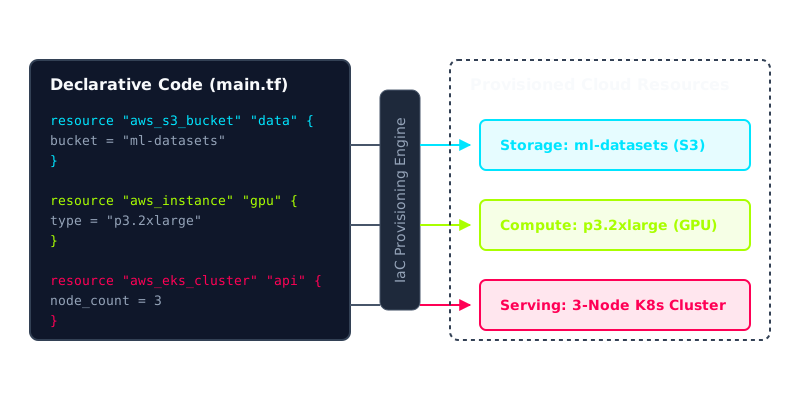
You declare your GPU clusters, buckets, and serving endpoints in version-controlled files, and a tool builds them identically every time, so staging matches production instead of merely resembling it.
Why Does This Exist?
Every ML system beyond a laptop lives on infrastructure someone had to create: GPU machines for training, buckets for datasets, queues between pipeline steps, endpoints for serving. The default way to create all that is clicking through a cloud console. It works once. Then you need a second environment for staging, a third region for latency, or a rebuild after someone deletes the wrong thing, and nothing matches anymore. The training cluster has a driver the serving cluster lacks. The staging bucket has versioning on; production does not. You spend days diffing settings by eye.
Infrastructure as Code fixes this by writing down the desired cloud in files, under version control, and letting a tool do the creating. The file says what should exist. The tool compares that wish against reality, shows you the difference, and only then makes changes. Rebuilding an environment stops being archaeology and becomes a rerun.
This page covers provisioning the cloud around your code: machines, networks, buckets, permissions. Packing the code itself into a portable image is the neighbouring job of containerization for ML. Running tests and retraining on every change is CI/CD for ML. If the full lifecycle is new, start with the MLOps overview first.
Basics first: declarative means you describe the destination, not the route. You write "there is a bucket called ml-datasets with versioning on" instead of a script of clicks: open console, click create, tick the box. Because the wish is written down, the tool can compare it against the cloud as it actually is and tell you the gap before touching anything. That preview is the whole safety story, and it only works because you stated the end state.
Think of It Like This
A building blueprint on file with the city
A contractor building three identical clinics from one approved blueprint gets three identical clinics. The inspector compares each building against the same filed drawing, and any deviation is visible because the drawing never changed. Hand each crew a verbal description instead and you get three cousins of a clinic.
IaC is the filed blueprint for your cloud. The template is the drawing, the plan preview is the inspection, and the state file is the city's record of what was actually built from which revision.
Where it stops: a blueprint faithfully reproduces a bad design too. If your architecture is wrong, IaC gives you three identical copies of the wrong thing, faster. It guarantees sameness, not wisdom.
How It Actually Works
Four pieces move in a loop: a template, a plan, an apply, and a state record.
Declare. You write resources as data: a bucket, four GPU nodes, a serving endpoint, two alarms. Each block names its type and its settings. Variables fill in the parts that differ per environment, like the region or the machine size, while everything else stays shared.
Plan. Before anything changes, the tool reads the cloud as it is and diffs it against the template. Call the wish (desired bindings) and reality (actual bindings); the plan is the gap , reported as counts to add, change, and destroy. You read those three numbers before approving anything.
Apply. Approval runs the cloud APIs in dependency order: network before machines, bucket before the training job that reads it. Independent resources go in parallel. Templates get tested like any code before they run against production.
Record. Every created object is written into a state file that maps template blocks to real cloud IDs. Next plan starts from this record, so a change made by hand in the console shows up as an unexpected difference rather than silently passing.
Worked example
One template holds 5 resource blocks: 1 bucket, 2 GPU nodes, 1 serving endpoint, 1 alarm. You render it for 3 environments (dev, staging, prod):
The state record says 14 exist, because someone deleted the staging alarm by hand last Tuesday. The plan is therefore to add, 0 to change, 0 to destroy. You approve, the tool recreates exactly the missing alarm, and the next plan reads everywhere. One number told you the whole story before a single API call ran.
Code
The point of this snippet is the counting, not the cloud. It renders one template across three environments and diffs the wish against a state record, printing the same three numbers a real plan preview shows.
template = {"s3_bucket": 1, "gpu_node": 2, "api_service": 1, "alarm": 1}envs = ["dev", "staging", "prod"]
desired = sum(template.values()) * len(envs) # (1+2+1+1)*3state_record = desired - 1 # someone deleted the staging alarm by hand
print(f"desired={desired} actual={state_record}")# -> desired=15 actual=14print(f"plan: {desired - state_record} to add, 0 to change, 0 to destroy")# -> plan: 1 to add, 0 to change, 0 to destroyFifteen bindings from five lines of template, and the gap of one names the exact repair. That is the daily experience: small integers, read before anything moves.
Watch Out For
Committing secrets alongside the template
Templates live in git, so a database password or registry token pasted into a resource block is now in history forever, copied to every clone. The symptom is a working apply followed months later by a leaked credential you cannot unshare. Keep secrets in a manager (the cloud one or Vault) and pass only references through the template. Scan history once if you suspect this already happened, because deleting the line does not delete the commit.
Fixing production in the console during an incident
At 2am someone opens the console and widens a security rule to restore serving. It works, everyone sleeps, and the template still says the old rule. The next apply sees reality differ from the wish and reverts the fix, reopening the outage. The symptom is an apply that "breaks something nobody changed." Treat the console as read-only: make the emergency edit, then write the same edit into the template as the first follow-up, before the next run.
The Quick Version
- IaC declares cloud resources in version-controlled files, so environments are rebuilt by rerunning instead of by remembering.
- The plan step diffs desired bindings against actual ones and reports counts to add, change, and destroy before anything moves.
- A state file maps template blocks to real cloud IDs, which is what makes hand-made console edits visible as drift.
- Five template blocks across three environments means fifteen bindings, and a gap of one names the exact repair.
- Secrets go in a manager and are referenced, never pasted, because templates live in git history.
- The console is read-only by discipline: every real change flows through the file, or the next apply reverts it.