Visual explainer
Image Formation and Digital Images
Follow scene projection into spatial samples, RGB channels and HSV coordinates, then see what clipping permanently loses.
Light Becomes An Image
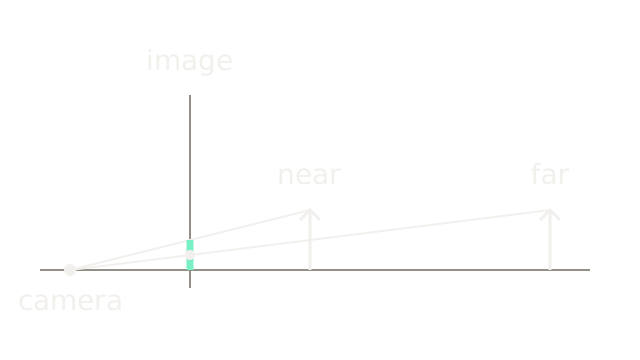
A digital image is a spatial array of measured values. A camera first projects light from a scene, then samples and quantizes those measurements; a processed color image commonly stores several channels at each location.
The drawing is a side view, with depth increasing rightward and scene height upward. On a virtual image plane in front of the camera, similar triangles give x = fX/Z. With focal length 2 and height 1, depths 4 and 8 project to heights 0.5 and 0.25. The mint segment is the nearer projection; the white dot marks the farther one. A real sensor behind the aperture receives an inverted image. MIT's imaging chapter explains this ideal pinhole model; real lenses add blur and distortion.
Sample Space, Quantize Values
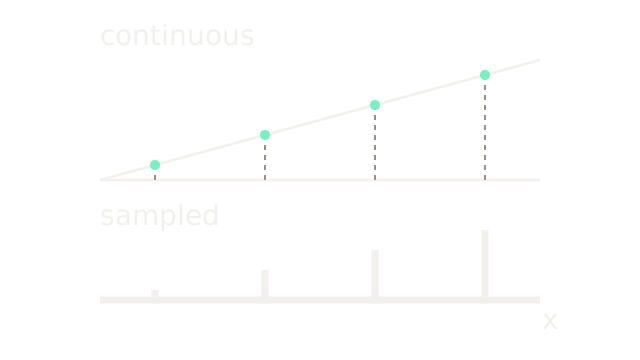
Follow the dashed stems from four evenly spaced positions on a continuous brightness ramp to four stored locations. Their normalized measurements are 0.125, 0.375, 0.625 and 0.875; the lower stem heights use a separate, explicitly smaller vertical display scale.
Sampling chooses spatial locations. Quantization restricts their values: rounding 255 × value to the nearest integer gives 8-bit values 32, 96, 159 and 223. Eight bits permit 256 codes, from 0 through 255. Actual sensor pixels collect light over an area and exposure interval; the point samples here isolate the spatial idea. Detail finer than the sampling grid can alias, as MIT's sampling chapter shows. More output pixels cannot recreate measurements never captured.
One Location, Several Channels
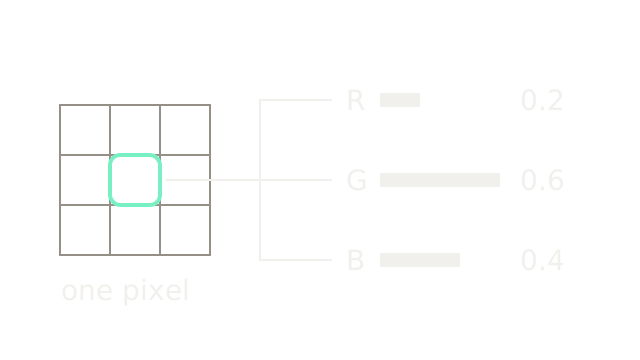
The outlined cell is one location; its three labelled bars encode (R,G,B) = (0.2,0.6,0.4) on a common length scale. The bars deliberately use neutral paint: channel names, not diagram hues, identify the values. A height-by-width RGB array has three values per location. Many raw camera sensors instead measure one filtered component per photosite and reconstruct RGB through demosaicing.
Coordinates and storage conventions matter. Image arrays commonly index [row, column, channel], with row increasing downward, unlike the scene-height axis in the first drawing. OpenCV commonly loads color images in BGR order. Swapping channel interpretation changes the represented color even though the stored numbers stay fixed.
Change The Color Coordinates
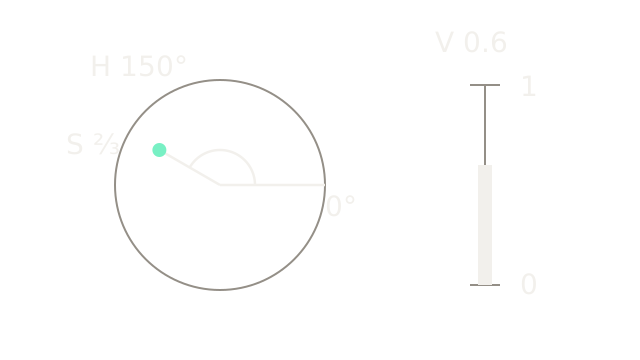
The circle is a coordinate guide, not a painted color wheel. Angle encodes hue, radius encodes saturation, and the separate bar encodes value. For our RGB triple, maximum 0.6 and minimum 0.2 give V = 0.6 and S = (0.6 − 0.2)/0.6 = 2/3. Green is largest, so H = 120° + 60°(B − R)/(max − min) = 150°.
These are the OpenCV RGB-to-HSV equations. Float HSV uses degrees for hue; ordinary 8-bit OpenCV HSV scales hue by one half, giving approximately (75,170,153) here. HSV value is the maximum RGB component, not physical luminance. Gray has zero saturation and no meaningful hue. Color spaces rearrange information for a purpose; conversion is not a repair for missing measurements.
Locate A Pixel
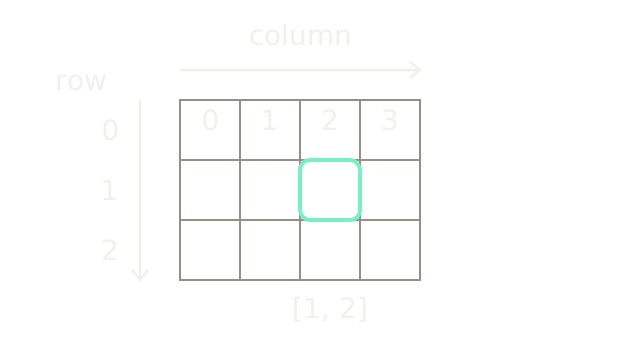
This three-row, four-column crop uses zero-based indices. [1,2] selects the second row and third column, outlined in mint. The downward arrow is row direction; the rightward arrow is column direction. Numbers across the first row label column indices, not pixel intensities. Distinguish an array access image[row,column] from a geometry point (x,y): the corresponding geometry coordinate is (2,1) when x means column and y means row.
See Quantization Merge Values
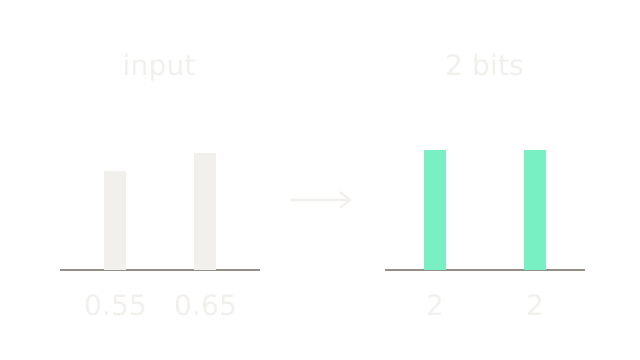
Keep the spatial locations fixed and reduce precision to two bits, permitting codes 0, 1, 2 and 3. With q=round(3v), inputs 0.55 and 0.65 give round(1.65)=2 and round(1.95)=2. Both reconstructed values are q/3=2/3. The bars share a normalized amplitude scale; the output labels are integer codes. Their different input values have become indistinguishable even without clipping. More bits reduce quantization steps; they do not increase spatial resolution.
Reduce RGB To Gray
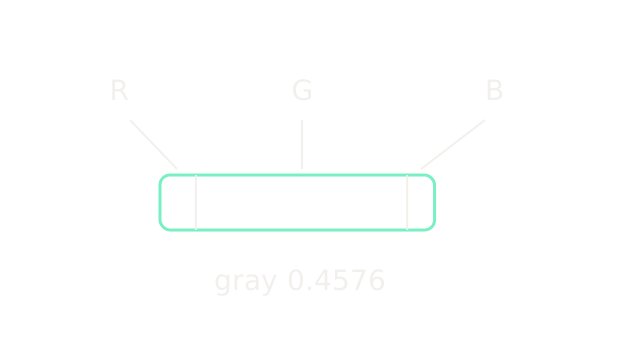
Return to RGB (0.2,0.6,0.4). OpenCV's conventional gray conversion gives 0.299R + 0.587G + 0.114B = 0.0598 + 0.3522 + 0.0456 = 0.4576. The three adjacent bar segments encode those contributions on one scale; green contributes the longest segment. This reduction cannot uniquely recover three inputs from one result. These coefficients applied to encoded RGB produce a brightness-related gray value; do not interpret it as a calibrated measurement of physical luminance.
Separate Brightness And Chroma
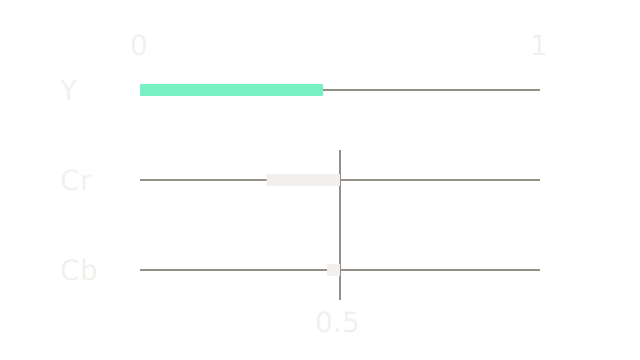
The OpenCV color-conversion reference also specifies YCrCb. For normalized float data, Y=0.4576, Cr=(R−Y)×0.713+0.5=0.3163312, and Cb=(B−Y)×0.564+0.5=0.4675136. The Y bar starts at zero; the two chroma marks show signed departures from the neutral value 0.5 on identical 0–1 axes. Both departures point left for this pixel. Integer encodings use different offsets. Keeping three channels changes representation; discarding or coarsening chroma is a separate information-loss decision.
Recognize Spatial Aliasing
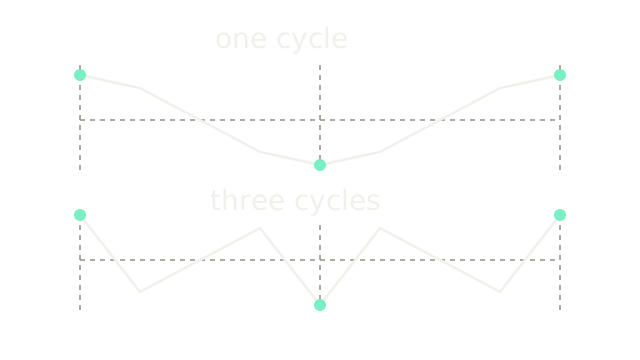
The two traces sketch cos(2πx) and cos(6πx) over x=0…1. At the three marked sample positions 0, 0.5, 1, both produce [1,−1,1]. Extra line vertices only sketch the signals between sensor samples. A reconstruction using those three measurements cannot distinguish one cycle from three cycles. This is spatial aliasing, distinct from quantizing amplitudes. Optical or digital low-pass filtering before downsampling suppresses frequencies the new grid cannot represent; it trades detail for reduced aliasing.
Where It Breaks
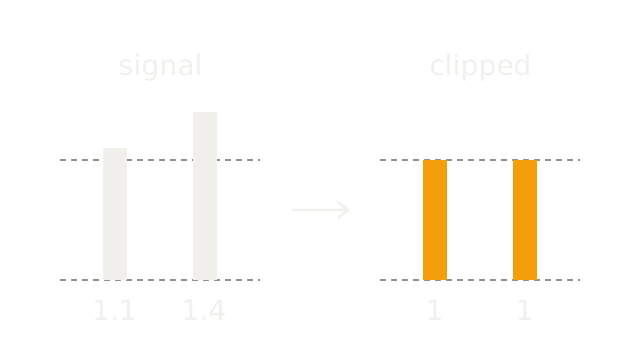
This final example changes to two normalized linear signals, 1.1 and 1.4. On the same vertical scale, the dashed line marks a storage ceiling of 1. Both values clamp to 1, or 255 in an 8-bit output. Their 0.3 difference disappears. No later RGB-to-HSV conversion can infer that difference uniquely. Exposure, dynamic range, blur, sampling and encoding all limit what an image can tell you; a pixel value is a measurement shaped by that pipeline.
The Quick Version
- Perspective makes equal objects project smaller at greater depth.
- Sampling chooses locations; quantization restricts stored values.
- RGB stores three channel values at each image location.
- HSV changes coordinates without recovering missing image information.
- Row and column indices locate pixels independently of their channel values.
- Limited bit depth can merge distinct measurements without clipping.
- Grayscale reduces three weighted channel values to one.
- YCrCb separates brightness-related information from color differences.
- Different spatial frequencies can produce identical sampled measurements.
- Clipping merges distinct signals into indistinguishable stored values.