Albumentations Augment Flow
A compose box for image augmentations that moves boxes and masks with the pixels, so labels never drift from the picture.
Why Does This Exist?
Random crops and flips are easy; keeping every box, mask and keypoint glued to the moved pixels is not. Hand-rolled augmentation silently detaches labels: the image flips, the box stays, and the model learns the wrong corner. Albumentations fixes the composition. One Compose lists pixel ops plus label handlers, and every sample returns image, boxes and masks transformed together. It plugs into image augmentation practice for both geometric and color ops.
This page covers the compose contract, one flip fixture, and appropriate use.
Think of It Like This
A printing press with tracing paper
An artist stacks tracing paper over a drawing. When the press flips the sheet, every tracing layer flips stapled together: ink, outlines and notes land mirrored as one bundle.
Albumentations staples labels to pixels the same way. The press is the compose chain, the staple is the shared geometry. The analogy stops at randomness: the press flips every copy identically, while training rolls fresh dice per sample.
How It Actually Works
Input is an image plus optional boxes, masks and keypoints in declared formats. Output is the same bundle transformed: pixels resampled, boxes reprojected, masks warped with nearest sampling. Purpose is fast, reproducible augmentation that never desynchronizes supervision. Appropriate use is detection and segmentation training where labels must track geometry. Declare every label format up front, because an undeclared box array is treated as pixels and warped into noise.
Flip fixture
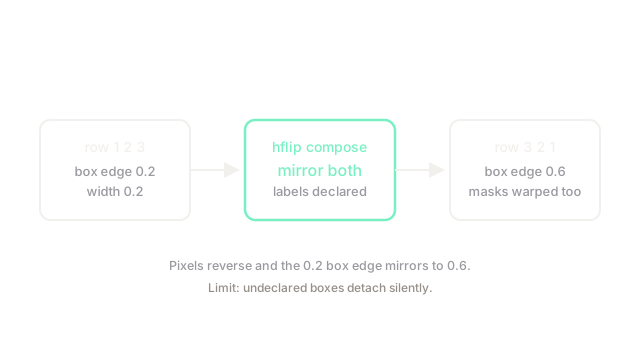
Take row pixels with a box left edge at normalized and width . A horizontal flip reverses the row to . The box mirrors to , keeping its width. The diagram shows both moves together, which is the whole contract.
Code
The mirror rule in plain Python:
def hflip_row(row: list[int]) -> list[int]: return row[::-1] # pixels reverse left to right
def hflip_box(x_min: float, width: float) -> float: return 1.0 - x_min - width # box mirrors with the pixels
print(hflip_row([1, 2, 3])) # -> [3, 2, 1]print(hflip_box(0.2, 0.2)) # -> 0.6Pixels reverse and the box edge lands at 0.6, still 0.2 wide.
Watch Out For
Augmenting without declaring the box format
An undeclared box list passes through pixel ops untouched or, worse, gets interpolated as an image. The symptom is training loss that falls while boxes drift off objects. Fix it by declaring box and mask params in the compose call and asserting one sample visually before launching.
The Quick Version
- Albumentations maps image-plus-labels bundles through one composed chain.
- Row 1, 2, 3 flips to 3, 2, 1 while a 0.2 box edge mirrors to 0.6.
- Use it whenever geometry ops meet boxes, masks or keypoints.
- Declare every label format or labels detach silently.
- Check one augmented sample by eye before training.