Image Augmentation
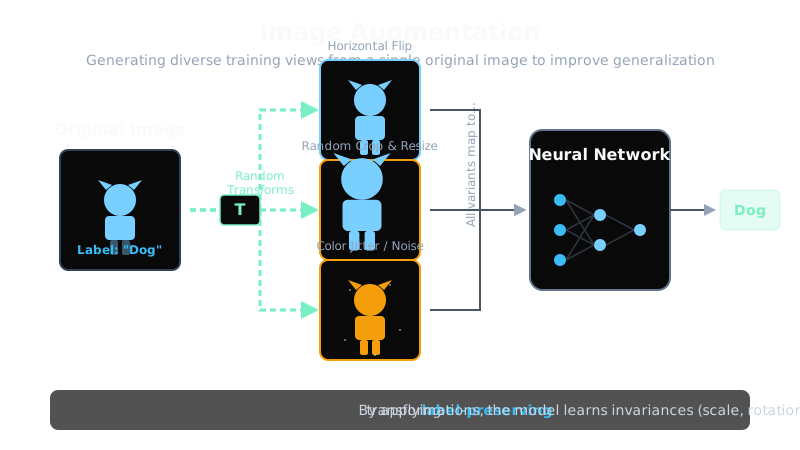
Image augmentation artificially expands the training set by applying random label-preserving transformations, teaching the model that these variations do not change the label and reducing overfitting.
Why Does This Exist?
Deep vision models are hungry for data. A ResNet-50 has about 25 million parameters, and learning them well takes far more labeled images than most teams can afford, especially in medical, satellite, and industrial domains. Augmentation multiplies the effective dataset by generating diverse views of each labeled example, as practiced in image classification pipelines.
This page covers geometric, photometric, and mixing transforms plus their guardrails. Searched policies live in RandAugment, region mixing in CutMix, and blending in MixUp.
Think of It Like This
Teaching a child to recognize dogs
A child who only ever sees one golden retriever sitting still, photographed head-on in good light, will not recognize a running sheepdog photographed from behind at dusk. A child who sees the same dog from many angles, in many lights, running and sitting, indoors and outdoors, learns what dog really means. Augmentation gives the model the same breadth without new labels.
Where it stops: showing the child a photo with the head cut off teaches nothing about heads. Transforms that destroy the object or change its meaning stop teaching invariance and start teaching confusion.
How It Actually Works
Geometric transforms change spatial structure while keeping the label: horizontal flips mirror left and right, random crops keep a sub-region such as from pixels, rotations and scales teach position and size invariance, and perspective warps mimic document scanning. Each has a task limit: flips break text and lateral medical findings, and large rotations break upright objects.
Photometric transforms change pixel values while keeping geometry: color jitter shifts brightness, contrast, saturation, and hue within bounds, grayscale trains color invariance with probability , blur mimics defocus, and sensor noise mimics low light. Erasing methods such as Cutout drop one rectangle, around on a CIFAR image or about percent of the area, forcing the network off a single patch; beyond a third of the image small objects vanish. Mixing methods blend images and labels: CutMix pastes a region and mixes labels by area, MixUp interpolates pixels and labels with weight , and RandAugment applies random operations at magnitude instead of searching policies.
Worked example
Take a photo cropped to . Kept fraction is , about percent of pixels, and the crop offset ranges over positions per side, giving possible crops. A horizontal flip maps column to , so a nose at moves to . A Cutout of on covers , exactly percent. One photo becomes crops times flip states, over distinct training views before color jitter.
Code
Crop offsets, flip mapping, and kept fraction with only the standard library:
size, crop = 256, 224kept = (crop / size) ** 2offsets = size - crop # 32 positions of slack per sideviews = (offsets + 1) ** 2 * 2 # crops times flip statesprint(f"kept {round(kept * 100, 1)}%, crops {(offsets + 1)}x{(offsets + 1)}, views {views}")# -> kept 76.6%, crops 33x33, views 2178
w = 256nose = 180print(f"flipped nose {w - 1 - nose}")# -> flipped nose 75
cut, img = 16, 32print(f"cutout fraction {(cut * cut) / (img * img)}")# -> cutout fraction 0.25One photo yields crop-flip views keeping percent of pixels each, and the cutout covers percent.
Watch Out For
Augmenting in ways that change the label
Symptom: accuracy climbs on the training split but the model learns nonsense, because flipped characters, mirrored scans, or 180-degree digits changed meaning. A lateral chest finding moves sides, and a 6 becomes a 9. Fix: review each transform against the task and gate directional ones behind task checks before training.
Augmenting at inference without averaging
Symptom: production predictions flicker between calls on the same input because random flips or crops run at serving time. Augmentation is a training regularizer with fixed preprocessing at inference. Fix: serve a deterministic resize plus center crop, and use test-time augmentation only with explicit averaging plus a latency budget.
The Quick Version
- Augmentation multiplies training data by generating label-preserving views of each image.
- Geometric transforms teach spatial invariance and photometric ones teach appearance invariance.
- The fixture to crop keeps percent of pixels with crop-flip views.
- Mixing methods blend images and labels for stronger regularization with area-weighted targets.
- Verify every transform preserves the label, and keep inference deterministic.