Color Augmentation in Vision
Keep every edge where it is and change how bright or colorful it looks. The model then learns shape instead of memorizing one lighting setup.
Why Does This Exist?
Models trained under one lamp fail under another. A defect detector tuned on bright morning photos misses the same scratch at dusk, because it tied the decision to exact pixel values instead of the scratch shape. Collecting photos under every lighting, camera and season costs months.
Color augmentation fakes that variety in the loader. It jitters brightness, contrast, saturation and hue, and sometimes adds blur or sensor noise, while leaving every coordinate untouched. Boxes and masks stay valid for free, which is why photometric warps are the safest first augmentation for detection. Spatial warps that move pixels live in geometric augmentation. The joint setup lives in image augmentation.
You need one idea first. Pixel value and pixel position are separate. This page changes values only.
Think of It Like This
Sunglasses on the same street
You know your street with clear glasses, dark sunglasses and at dusk. Houses do not move, only their brightness and tint change, and you still find your door.
Brightness and hue jitter are those glasses. The network sees the same scene through many tints, so it stops trusting one exact shade. Where the analogy stops: glasses never blur the street signs, while augmentation sometimes must, to mimic motion and focus.
How It Actually Works
What changes and what is fixed
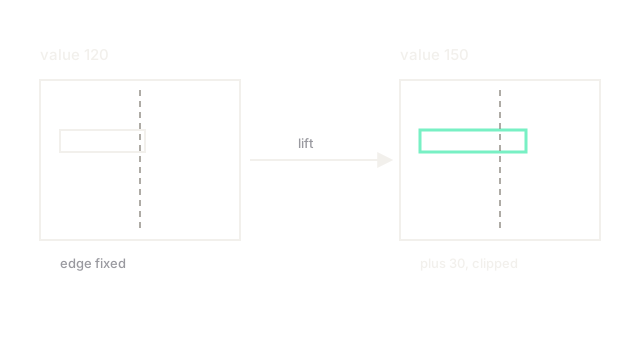
Brightness adds a constant to every channel, then clips to . Contrast scales distance from the mean. Saturation and hue shifts work in HSV, which color spaces covers. Gaussian blur averages neighbours, and Gaussian noise adds a random draw per pixel. Geometry, boxes and masks never move.
A worked brightness lift
Pixel value , lift :
A triplet becomes . Edges stay at the same coordinates because no or entered the math. Contrast with factor on gives , on gives , and on clips to , which shows why strong jitter washes highlights first.
Safe ranges
Brightness , contrast to , saturation to and hue suit natural photos. Medical, satellite and manufacturing images with subtle tints need tighter bounds, sometimes half of these, or the signal itself gets jittered away.
Code
import numpy as np
def jitter_brightness(img: np.ndarray, delta: float) -> np.ndarray: """Add delta to a uint8 image with clipping. Keeps shape and dtype.""" out = img.astype(np.float32) + delta # work in float so 250 + 30 does not wrap return np.clip(out, 0, 255).astype(np.uint8)
px = np.array([[[120, 80, 200]]], dtype=np.uint8)print(jitter_brightness(px, 30).tolist()) # -> [[[150, 110, 230]]]Watch Out For
Jittering away the signal itself
In pathology or defect detection the tint is the label. Strong hue shifts turn a stained cell into a different class while keeping the old tag. The symptom is training loss that falls while expert review rejects the outputs. Cap hue near zero on color critical tasks and jitter brightness only.
Mismatch between train jitter and test reality
Heavy blur and noise that never appear at deployment teach tolerance nobody needs, while real auto white balance shifts go unmodeled. Match the jitter family to the deployment camera, then verify with dusk and indoor test slices.
The Quick Version
- Color augmentation changes pixel values while fixing every coordinate, so boxes stay valid.
- Adding 30 brightness lifts 120 to 150 with clipping at 255.
- Use modest ranges first, and near zero hue on color critical tasks.
- Match blur and noise to the deployment camera instead of stacking every effect.