Box Filter Image Blurring
A box filter replaces each pixel with the plain mean of its window. It is the fastest blur you can run, and the roughest on edges.
Why Does This Exist?
Sometimes you need blur in a hurry: downsampling a preview, building an image pyramid, or taming mild noise on weak hardware. The box filter is the cheapest option, a plain mean over a square window, and it runs in constant time per pixel with running sums no matter how large the window grows.
It belongs to the smoothing family as the speed pick. Reach for the Gaussian when quality matters, because equal weighting is exactly what makes box blur look blocky on gradients.
Think of It Like This
Splitting a bill evenly
Nine diners split the bill evenly no matter who ordered lobster. That is the box filter: every neighbour pays the same share of the output. The Gaussian instead splits by appetite, weighting close neighbours most. Even splits are fast to compute and feel unfair at the extremes, which is why box blur flattens bright specks into dull smudges rather than erasing them.
How It Actually Works
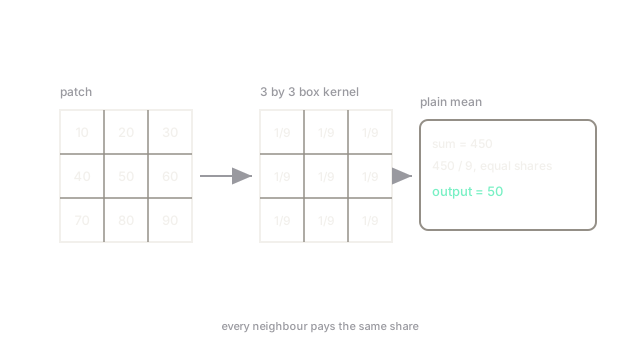
A box kernel holds in every cell. Centering it on a pixel sums the covered values and divides by , the plain arithmetic mean. Because every row is identical, the 2D pass splits into a horizontal 1D mean followed by a vertical 1D mean, and with integral images each output costs a fixed few operations regardless of window size.
Worked example
Center a box on this patch:
The sum is , and . The output center is 50, the exact mean, with no neighbour favoured.
Watch Out For
Dark borders from zero padding
With zero padding, windows hanging off the image edge average in zeros, so a bright border fades to a dark frame one half-window wide. The symptom is a vignette that was never in the scene. Use reflected or replicated borders when edge brightness must survive.
Banding on smooth gradients
Equal weights quantize gentle gradients into visible steps, since every window in a ramp returns a slightly different flat mean. The symptom is poster-like bands across skies. Prefer a Gaussian for display-quality blur and keep the box for previews and pyramids.
The Quick Version
- A box filter outputs the plain mean of its square window.
- It is separable and runs in constant time per pixel with running sums.
- Equal weights blur fast but soften edges and band smooth gradients.
- Pad with reflection, not zeros, to protect border brightness.
- Upgrade to Gaussian when the blur itself will be seen.