CLAHE Adaptive Equalization
CLAHE caps each tile histogram at a clip limit and redistributes the excess before equalizing, raising local contrast without blowing out regions.
Why Does This Exist?
Global histogram equalization forces one curve on the whole frame, so a bright window dictates the mapping and faces turn to chalk. Real scenes mix lighting: shadows and glare coexist. CLAHE (Contrast Limited Adaptive Histogram Equalization) equalizes small tiles independently so each neighborhood gets its own curve, then caps every tile histogram at a clip limit so no region over-amplifies. It is the default enhancement for medical slices, underwater frames and night driving, where local detail matters more than global consistency.
This page covers tiling, the clip-and-redistribute step with a worked example, and the two knobs. For evenly lit images, global equalization is simpler and steadier; for display nonlinearity, see gamma.
Think of It Like This
One thermostat per room with a power cap
A single house thermostat set for the sunny living room freezes the shaded bedroom. Giving each room its own thermostat (tiles) fixes comfort locally. But an uncapped thermostat in a tiny bathroom overheats it fast; the clip limit is the power cap that stops any one room from blasting. Bilinear blending between tiles is the hallway that smooths the temperature steps at doorways.
The analogy stops at seams. Even with blending, strong settings leave faint tile-grid texture in flat skies, a signature no thermostat house shows.
How It Actually Works
Tiles, clip, redistribute
cv2.createCLAHE(clipLimit=2.0, tileGridSize=(8, 8)) splits the image into an 8 by 8 tile grid. Inside each tile it builds a histogram, clips every bin above the limit, and shares the clipped excess evenly across all bins before running standard equalization on the result. Neighboring tile mappings blend bilinearly at boundaries so seams stay invisible. The clipLimit is a multiple of the tile average: 1.0 means no clipping (plain adaptive equalization), higher values allow stronger contrast, and OpenCV defaults to 2.0.
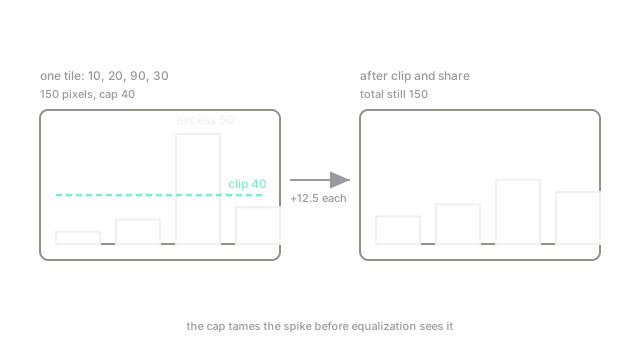
Worked clip example on a 4-bin tile histogram (150 pixels) with a hard cap of 40: the third bin overshoots by . Cap it at 40 and deal the 50 excess evenly, per bin: . The total stays 150 (nothing created or destroyed), but the spike is tamed before equalization sees it.
Tuning the two knobs
Raise clipLimit toward 3 to 4 for punchier detail in genuinely flat tiles; lower it toward 1.5 when skies or walls turn grainy. Shrink tiles (toward 4 by 4) when lighting changes slowly across the frame; grow them (toward 16 by 16) to follow rapid local changes like mixed shadow edges. As with all histogram methods, apply to the luminance channel for color images.
Code
h = [10.0, 20.0, 90.0, 30.0] # one tile histogram, 150 pixelscap = 40.0excess = sum(v - cap for v in h if v > cap)redistributed = [min(v, cap) + excess / len(h) for v in h]print(excess, redistributed)# -> 50.0 [22.5, 32.5, 52.5, 42.5]Watch Out For
Noise blooming in flat tiles
In near-uniform tiles every small fluctuation is "contrast" to be amplified, so high clip limits turn smooth walls and skies to sandpaper. The symptom is grain appearing only in flat areas after enhancement. Lower the clip limit first; enlarge tiles second so flat regions share statistics with textured neighbors.
Faint tile-grid seams
Aggressive settings plus sharp lighting boundaries leave a visible grid quilt in the output. The symptom is rectangular patchiness at exactly the tile period. Confirm by differencing against a globally equalized version, then reduce the clip limit or grow the tiles until the quilt fades.
The Quick Version
- CLAHE equalizes per tile, so each neighborhood gets its own contrast curve.
- The clip limit caps tile bins; excess pixels redistribute evenly before equalization.
- Example: histogram capped at 40 becomes .
- Defaults
clipLimit=2.0,tileGridSize=(8,8)suit most images; lower the limit for grain. - Apply to luminance channels for color; expect faint seams if pushed too hard.