Color Spaces in Vision
Why raw RGB pixels are brittle under changing light, and how spaces like HSV or YCbCr separate color from brightness for robust vision.
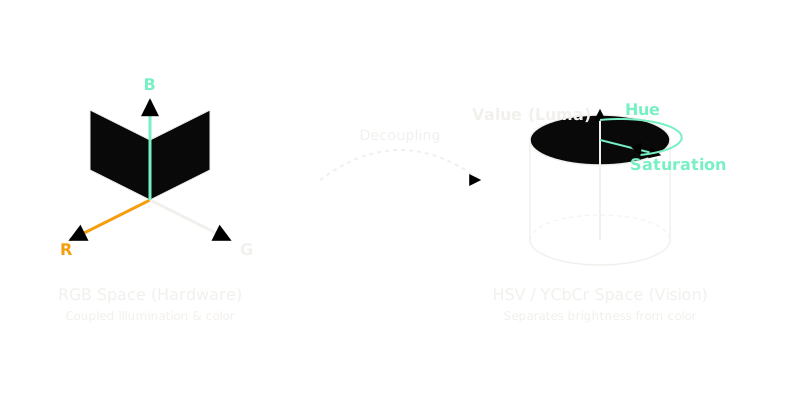
Why Does This Exist?
Cameras and screens speak RGB because human eyes have three cone types, so every photo starts as RGB triples. The trap is that RGB tangles color with brightness: when a cloud passes over the sun above a stop sign, the red, green, and blue readings all plunge together, and the raw vector looks like a different object even though nothing changed but the light.
Vision pipelines therefore convert RGB into spaces that answer one question cleanly: what color is it regardless of lighting, what is just brightness, or what looks different to a human eye. The channel model underneath is RGB; the brightness-only companion is grayscale. This page covers when to leave RGB and which space to reach for.
Think of It Like This
Separating the paint from the flashlight
Shine a flashlight on a bucket of yellow paint in a dark room. Turn the flashlight down and the paint's RGB score drops across red, green, and blue together, so RGB treats dim yellow and bright yellow as distant points.
In HSV the paint's hue (yellow) and saturation (vivid) stay fixed while only the value dial (brightness) moves. Thresholding the hue dial finds the paint at any flashlight setting.
The analogy stops at sensors: real cameras add noise and clip in the dark, so no color space recovers detail the sensor never recorded.
How It Actually Works
A color space is a coordinate remap of the same pixel. Instead of in a cube, each space chooses axes that isolate the property one task cares about.
HSV: hue apart from lighting
Hue ( to degrees) names the dominant wavelength family, saturation ( to ) names vividness with meaning pure gray, and value names brightness. Thresholding a hue band finds a green tennis ball across sun and shade where RGB bounds would need retuning per frame. The circular catch: hue degree and hue degrees are near twins, so distances on hue need circular math (see the pitfalls).
YCbCr: brightness apart from color
Human eyes forgive color errors but punish brightness errors, so video stores luma at full resolution and compresses the chroma channels and hard (chroma subsampling discards roughly three-quarters of the color detail). JPEG and MP4 are built on this split.
LAB: distances that match the eye
In RGB, 20 units of green gap can look identical while 20 units of red gap look like different colors. CIELAB spaces colors so one Euclidean unit approximates one just-noticeable difference anywhere, which makes it the right space for measuring perceptual similarity between images.
Worked example: one pixel, three readings
Take a rust-orange pixel . Maximum channel , minimum , spread :
- Hue: the max is red, so degrees, firmly orange.
- Saturation: . Value: .
- Packed into byte ranges the same pixel reads about : hue halved to –, the rest scaled to –.
- Broadcast luma: , stored as . Naive averaging gives , stored as , a worse brightness because it ignores how eyes weight green over blue.
One pixel, three honest answers: hue for identity, bytes for storage, weighted luma for brightness.
Code
Compare the two brightness answers on the worked pixel with plain NumPy:
import numpy as np
def brightness(rgb: np.ndarray) -> tuple[float, float]: luma = 0.299 * rgb[0] + 0.587 * rgb[1] + 0.114 * rgb[2] return round(float(luma), 1), round(float(rgb.mean()), 1)
print(brightness(np.array([200.0, 100.0, 50.0])))# -> (124.2, 116.7)The weighted luma reads against naive averaging at : same pixel, and the broadcast mix is the one compression and enhancement pipelines trust.
Watch Out For
Library color order (RGB vs BGR)
Symptom: a model trained on web photos scores far below expectations on OpenCV-loaded frames, with no error anywhere. OpenCV loads images blue-green-red from old hardware habits while files, cameras, PyTorch, and Matplotlib speak RGB. Convert once at load time and assert a known patch reads high in channel before anything else.
Hue wraparound mathematics
Symptom: averaging hue and hue returns , a cyan that appears nowhere in the input. Hue is a circle, so the two near-twin reds sit units apart numerically and their plain mean lands opposite. Use circular statistics (sine and cosine projections) for any distance or average on the hue channel.
The Quick Version
- RGB entangles color with brightness, so one cloud turns every channel reading into a stranger.
- HSV isolates hue from lighting, which makes hue bands the standard tool for color thresholding.
- YCbCr isolates full-resolution brightness from compressible color, the backbone of JPEG and MP4.
- CIELAB spaces colors so unit distances match human just-noticeable differences.
- The pixel reads hue degrees, byte triple about , and luma versus naive .
- Convert BGR to RGB at load time, and never average hue with plain arithmetic.