Image Enhancement
Image enhancement remaps pixel values to raise contrast and visibility without adding information, grouping point operations, histograms and filtering.
Why Does This Exist?
Cameras capture more than screens and eyes reveal: night shots bunch pixels near black, haze compresses everything into a gray middle, and backlit faces drown in shadow. Enhancement remaps values so the existing information becomes visible or machine-readable. It is preprocessing, not restoration: it changes presentation, and downstream steps like thresholding and edge detection work dramatically better on enhanced input.
This page is the map of the family. The members each get their own mechanism page: brightness and contrast for the linear fix, histogram equalization and CLAHE for distribution fixes, and gamma for display nonlinearity. Filtering-based denoising belongs to spatial filtering instead.
Think of It Like This
Adjusting blinds in a dim room
A dim room hides furniture in shadow; opening the blinds does not add furniture, it redistributes the light so what was there becomes visible. Enhancement is that blind adjustment for pixel values: stretch the occupied range wider, lift the shadows, compress the glare.
The analogy stops at noise. Opening blinds also brightens the dust in the air. Likewise, every enhancement amplifies whatever noise sat in the stretched range, so enhancing before denoising bakes grain into the result permanently.
How It Actually Works
Three mechanism families
- Point operations map each pixel alone: , where is the input level and the output. Brightness-contrast scaling and gamma curves live here. They are order-independent, trivially fast (a 256-entry lookup table handles any 8-bit mapping), and cannot use neighborhood context.
- Histogram methods derive from the image's own distribution: equalization flattens it globally, CLAHE equalizes locally with a clip guard. They adapt per image, which is both their power and their unpredictability across a batch.
- Filtering methods use neighborhoods: unsharp masking, already covered under spatial filtering, sharpens by adding back high frequencies.
Worked contrast-stretch example
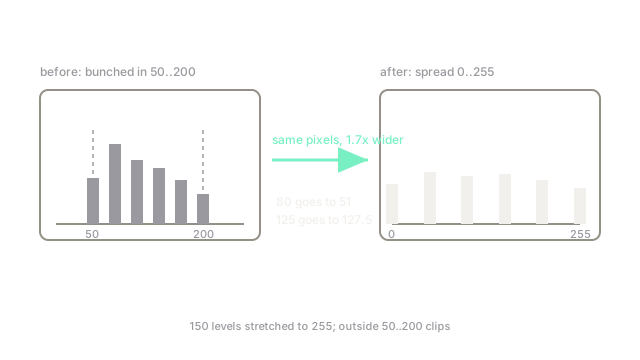
Suppose usable content sits in and you stretch it to with . A pixel at maps to . A pixel at the range middle would land at 127.5. Detail that occupied 150 levels now spans 255: contrast nearly doubles, while anything below 50 crushes to black and above 200 burns to white. That clipping is the price of every stretch.
The enhancement contract
Enhancement never adds information; at best it spends the display budget where it matters. So judge it by the downstream task (detection recall, OCR accuracy), not by looks. Prefer the weakest method that fixes the actual defect: linear scaling for uniform dullness, gamma for shadow-heavy scenes, equalization for bunched histograms, CLAHE for mixed lighting. And denoise first when grain is visible, because stretches amplify noise exactly as much as signal.
Code
r = 80.0s = 255.0 * (r - 50.0) / 150.0 # stretch [50, 200] to [0, 255]print(s)# -> 51.0Watch Out For
Enhancing noise into signal
Stretching a range multiplies its noise along with its detail. The symptom is grainy, speckled output that segments worse than the dull original. Inspect dark regions at full zoom first; if grain is visible, denoise before enhancing, never after.
Per-image methods break batch consistency
Histogram-derived mappings differ per frame, so identical objects get different values across a dataset or video. The symptom is flicker in video and unstable features in training. For batches, fit the mapping on a reference frame or use fixed point operations instead.
The Quick Version
- Enhancement remaps values for visibility; it never adds information.
- Point operations are fixed per-pixel maps; histogram methods adapt to each image.
- Contrast stretch example: range to sends 80 to 51.
- Pick the weakest method that fixes the defect; denoise before stretching.
- Judge by downstream task accuracy, not by how punchy the image looks.