Grayscale
Grayscale keeps one brightness number per pixel and throws the color away. The standard recipe weights green most, because human eyes respond to green light best.
Why Does This Exist?
Most classical vision never needed color. Edges, corners, motion and texture all live in brightness changes, and one channel means a third of the memory and far simpler math. Detectors for corners and edges take grayscale input by design, and many pipelines convert first thing after loading.
The conversion is not "delete two channels". Brightness must be estimated from the triple, and the weights matter: green dominates because eyes are most sensitive to it. Done wrong, a bright green sign and a dim red one merge into one gray and the detector downstream goes blind.
Think of It Like This
A charcoal sketch of a color scene
An artist sketching a street in charcoal has one tool: how dark each patch is. A yellow taxi and a gray road can end up the same smudge if they reflect equal light, even though nothing alike in color. But every curb edge, window frame and shadow boundary survives perfectly, because edges are brightness news.
Grayscale conversion is that sketch: keep the light, lose the hue, trust that shape lives in shading.
The analogy stops here: charcoal is the artist's judgment, while code applies one fixed formula everywhere, with no eye for what matters.
How It Actually Works
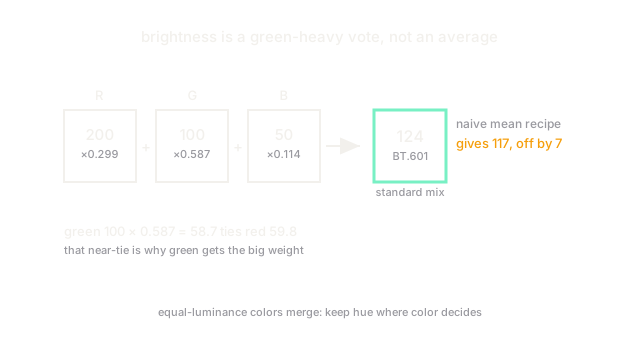
Grayscale maps each triple to one luminance value . The broadcast standard mix (ITU-R BT.601) is , with channels in – and rounded to the nearest integer. Green gets nearly of the vote, red , blue , mirroring cone sensitivity. The result is a single-channel image: same grid, one number per pixel instead of three.
Averaging the channels () is the common wrong recipe. It over-weights blue, under-weights green, and shifts every brightness downstream: exposures, thresholds and histograms all skew.
Worked example: one rust pixel goes gray
Take . The standard mix gives , stored as . The naive mean gives , stored as . Seven levels apart on a – scale: enough to flip a tight threshold. Notice green contributes against red's despite the smaller channel value, which is exactly why the weights exist.
Code
r, g, b = 200, 100, 50luma = 0.299 * r + 0.587 * g + 0.114 * b # BT.601, green-heavymean = (r + g + b) / 3 # the naive recipe, shown for contrastprint(round(luma, 1), round(luma))print(round(mean, 2), round(mean))# -> 124.2 124# -> 116.67 117Watch Out For
Equal-brightness colors become one gray
Colors with equal luminance are indistinguishable after conversion. A red traffic light and a green one can map to sibling grays, so a detector watching brightness alone cannot tell stop from go. Convert for shape tasks; keep color channels for any decision where hue carries the signal.
Single-channel input breaks three-channel models
A grayscale array has shape while pretrained networks expect , and the mismatch fails deep in the stack trace. Stack the gray plane three times or adapt the first layer, and say which you did: the two choices train differently.
The Quick Version
- Grayscale keeps one brightness number per pixel and drops color, cutting data to a third.
- The BT.601 mix is 0.299 red plus 0.587 green plus 0.114 blue, mirroring eye sensitivity.
- Our rust pixel converts to 124 by the standard mix but 117 by naive averaging.
- Edges and texture survive conversion; color-coded meaning does not.
- Pretrained color models need the gray plane stacked to three channels before input.