Pixels
A pixel is one cell of the image grid holding a single light measurement. Millions of them tile into rows and columns, and their spacing sets the finest detail any image can carry.
Why Does This Exist?
Everything downstream reads pixels: filters slide over them, detectors draw boxes in their coordinates, and networks ingest them as tensor entries. When a bounding box lands one cell off or a crop coordinate flips, the bug is always in pixel addressing, never in the model.
A pixel is the smallest addressable unit of a digital image: one grid position holding one measurement per channel. This page covers addressing, size, and what a pixel is not. The grid as a whole, with its resolution and channel promises, lives in image fundamentals.
Think of It Like This
Squares on graph paper
Take a sheet of graph paper and fill each square with a single crayon shade. From across the room the squares merge into a drawing. Up close there is nothing but flat squares with hard edges.
That is a pixel: one square, one shade, addressed by column and row. Zooming an image on screen is just drawing each square bigger.
The analogy stops here: sensor pixels have gaps between them and uneven sensitivity, so a real pixel is a small light bucket with dead borders, not a perfect square of color.
How It Actually Works
A pixel at column and row stores a vector with one entry per channel. In an 8-bit RGB image that vector is with each entry an integer from to . In a grayscale image it is a single brightness value. The pixel has no width in world units: it is a sample, and its footprint on the scene depends on the optics and distance (see image formation).
Coordinates start top-left and y grows down
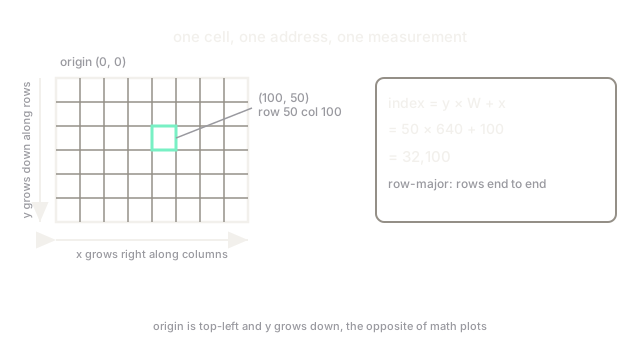
Image coordinates put the origin at the top-left corner, with running right along columns and running down along rows. So pixel is row , column . This is upside down relative to math plots, and every flipped overlay you have ever debugged came from forgetting it.
Memory lays rows end to end. In a row-major array of width , pixel sits at linear index .
Worked example: finding one pixel in memory
Take a grayscale image with . The pixel at , is the 100th entry of the 50th row, at index . Change that one entry and exactly one dot on screen changes.
Pixels are not dots of paint
On a display, one image pixel typically drives three colored subpixels (red, green, blue stripes) whose light blends in your eye. On a sensor, one pixel is a photosite that counts photons through a color filter. The stored number is a measurement with noise, not a fact about the world.
Code
width = 640 # row length in pixelsx, y = 100, 50index = y * width + x # row-major address of pixel (x, y)print(index)# -> 32100Watch Out For
Y-down coordinates flip your overlays
Math libraries plot growing upward; images store growing downward. Drawing a detection box with math convention on an image puts it mirrored about the horizontal middle. Convert once at the boundary: .
Off-by-one crops from confusing corners with sizes
A box stored as needs slice img[y:y+h, x:x+w], not img[y:y+h-1, x:x+w-1]: Python slices already exclude the end. The minus-one habit silently shaves a row and column off every training crop.
The Quick Version
- A pixel is one grid cell holding one measurement per channel: a triple in RGB, a single value in grayscale.
- Coordinates start at the top-left with growing downward, opposite to math plots.
- In row-major memory, pixel of a width- image sits at index .
- Display subpixels and sensor photosites are physical hardware; the stored pixel is just their number.
- Pixel (100, 50) of a 640-wide image lives at index 32,100.