HSV
HSV describes color the way people talk about it. Which hue it is, how strong, and how bright. Splitting brightness off its own dial lets one hue range find an object in sun and in shade.
Why Does This Exist?
Thresholding RGB triples breaks the moment a cloud moves: dimmer light shifts all three channels, so the "red" box you tuned at noon misses at dusk. HSV exists to give lighting its own dial. Hue names the color, saturation its purity, and value its brightness, so a detector can watch hue and ignore the weather.
It is the workhorse of classical color segmentation: find the tennis ball, mask the lane markings, pull out skin tones. For the full map of when to use it versus YCbCr or LAB, see color spaces.
Think of It Like This
Paint name, paint mix, and room lighting
Walk into a paint shop and pick a color three ways. First the swatch name on the wheel: yellow, teal, crimson. That is hue. Then how much white the mixer stirs in: pure pigment or washed-out pastel. That is saturation. Finally the dimmer on the shop ceiling: the same painted wall at noon and at closing time. That is value.
An HSV threshold is telling the clerk the swatch name and accepting the wall under any ceiling light.
The analogy stops here: hue is a circle, not a shelf row, so the first and last swatches are neighbours and ordinary averaging breaks across the seam.
How It Actually Works
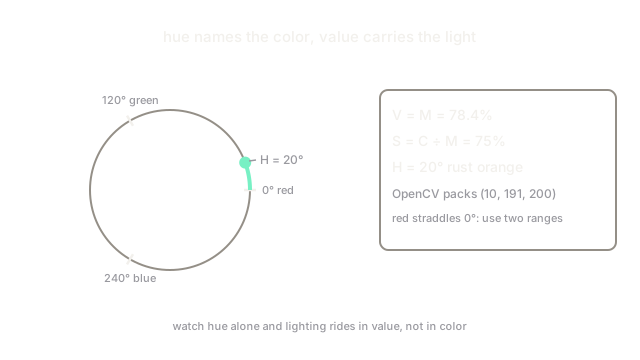
HSV remaps one triple to . (hue) is an angle around the color circle, to degrees, with red, green and blue. (saturation) runs for gray to (or ) for the purest color. (value) is the brightness: the largest of the three normalized channels, to .
Let be the largest of , the smallest, and the chroma range. Then , (or when ), and is the sector position of the dominant channel scaled to degrees. All three symbols are fractions of full intensity, so convert – bytes to – first.
Worked example: one rust-orange pixel
Take the pixel . Normalized, that is . , , . Then (about ), (), and red dominates with green partway up, landing at degrees: a rust orange. In OpenCV's packed ranges ( halved to –, and to –) the same pixel reads about .
Red wraps around the seam
Pure red sits at both and degrees, so one interval can never catch all reds. Threshold red as two ranges (low reds near , high reds near ) and OR the masks. In OpenCV halves that is roughly – plus –.
Code
import colorsys
r, g, b = 200 / 255, 100 / 255, 50 / 255h, s, v = colorsys.rgb_to_hsv(r, g, b)print(round(h * 360, 1), round(s * 100, 1), round(v * 100, 2))print(round(h * 179), round(s * 255), round(v * 255)) # OpenCV packing# -> 20.0 75.0 78.43# -> 10 191 200Watch Out For
Averaging hues across the red seam gives cyan
The mean of and degrees is , a cyan no input was near. Hue is circular: average with sine and cosine components, or work on the wrapped distance, whenever you cluster or smooth the channel.
Mixing degree formulas with OpenCV's halved hue
Textbook HSV puts hue at –, but OpenCV packs it into – to fit a byte, with and in –. Copying a – threshold from a tutorial into cv2.inRange selects the wrong colors entirely. Halve degree bounds (or convert the image to float first) before thresholding.
The Quick Version
- HSV splits a pixel into hue (which color), saturation (how pure) and value (how bright).
- Watching hue alone finds an object across lighting changes that break RGB thresholds.
- Our rust pixel (200, 100, 50) reads hue 20 degrees, saturation 75 percent, value 78.4 percent.
- Red straddles the 0 and 360 degree seam, so threshold it as two ranges ORed together.
- OpenCV packs hue into 0 to 179: halve textbook bounds before using them there.