LAB
LAB spaces color so that equal steps in numbers look like equal steps to your eyes. Lightness gets its own axis, so measuring color distance finally matches what people actually see.
Why Does This Exist?
RGB steps lie. Twenty units between two greens can look identical while twenty units between two reds look like different colors, so "nearest color" searches in RGB return answers humans disagree with. CIELAB, drawn up by the International Commission on Illumination in 1976, was engineered the other way around: warp the coordinates until Euclidean distance tracks perceived difference.
Use it when the question is "how different do these look": print inspection, paint matching, grading segmentation quality, picking visibly distinct label colors. For finding one color under changing light, HSV is usually simpler; the tradeoff map is in color spaces.
Think of It Like This
A surveyed map versus a stretched tourist map
A tourist map stretches the center: one centimeter downtown covers two blocks while one centimeter in the suburbs covers ten. Measuring with a ruler on that map lies about real walking distance.
CIELAB is the surveyed map. Cartographers stretched and squeezed the color territory until one ruler centimeter means one "just noticeable difference" everywhere. RGB is the tourist map: ruler-true nowhere in particular.
The analogy stops here: the survey assumed one standard daylight (D65) and average viewing conditions, so under exotic lighting the ruler drifts.
How It Actually Works
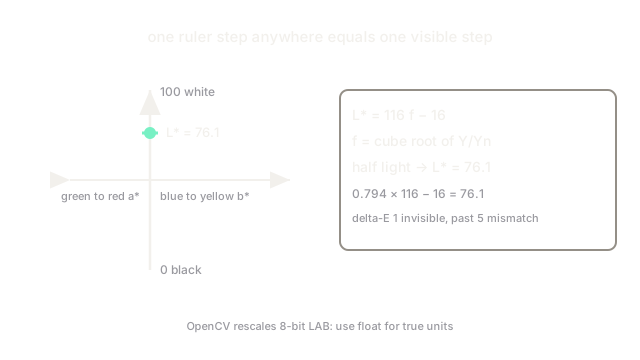
CIELAB has three axes. (lightness) runs (black) to (white). runs green (negative) to red (positive) and runs blue (negative) to yellow (positive), each roughly spanning to . The star marks that these are the 1976 revision, not Hunter's older Lab.
Conversion goes RGB to XYZ tristimulus values first (a linear remix fixed by the standard), then each XYZ ratio against the D65 reference white passes through a cube-root-ish curve . Lightness is . The cube root mimics human vision: we resolve shadows finely and highlights coarsely, so dark-end steps get stretched apart.
Worked example: mid-gray is not halfway down
Take a surface reflecting half the reference light, . Then , and . Half the physical light reads as lightness , not : the scale spends most of its numbers where eyes see best. Full white () gives exactly .
Color distance is just Euclidean distance
Because the space is near-uniform, the plain distance approximates visible difference. A near is barely noticeable; past nobody argues the colors match. No lookup tables, no weights: that single property is the whole point of the space.
Code
def lightness(yn): # yn: luminance relative to the D65 reference white, 0..1 f = yn ** (1 / 3) if yn > 0.008856 else 7.787 * yn + 16 / 116 return 116 * f - 16
print(round(lightness(0.5), 1)) # half the light, not half the lightnessprint(round(lightness(1.0), 1)) # reference white pins the top# -> 76.1# -> 100.0Watch Out For
OpenCV's 8-bit LAB is rescaled, not the textbook range
In 8-bit OpenCV images is squeezed from – into – and are shifted by so negatives fit a byte. Reading channel values as textbook numbers (or thresholding with literature bounds) misses every target. Convert to float for real units, or rescale the bounds to match.
Forgetting the white point invalidates comparisons
values are ratios against the D65 reference white. Two LAB triples computed under different assumed illuminants are not comparable, and their is meaningless. Fix one white point for the whole pipeline before comparing across cameras or datasets.
The Quick Version
- CIELAB warps color coordinates so Euclidean distance tracks visible difference.
- is lightness from 0 to 100; and are green-red and blue-yellow opponent axes.
- Half the physical light reads as lightness 76, because the cube-root curve favors shadow detail.
- A delta-E near 1 is barely visible; past 5 the colors clearly differ.
- OpenCV rescales 8-bit LAB, so use float images when you need true textbook units.