I3D Inflates Image Nets Into Video
I3D stretches a proven image network along time, so video training starts from strong image weights instead of random cubes.
Why Does This Exist?
Training 3D networks from scratch needs huge video data. Image networks already know edges, textures, and shapes from millions of photos, but their kernels have no time axis to read motion.
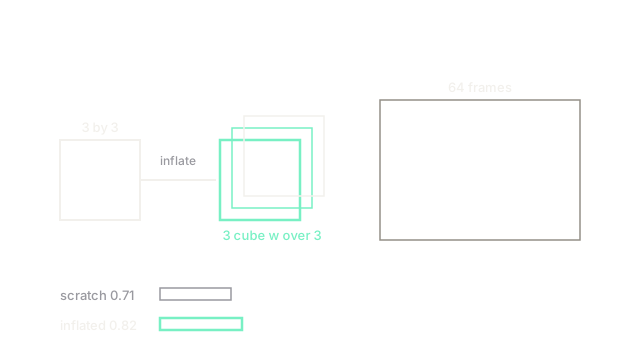
I3D inflates each kernel into by copying along time, where the copy keeps image knowledge and adds temporal reach. It builds on video understanding, scores clips for action recognition, and stays leaner than long-clip designs like SlowFast by starting inflated.
Think of It Like This
Photocopying a stamp into a rolling seal
A square rubber stamp prints one image. Copy it around a rolling cylinder and one roll prints a moving strip with the same artwork.
It fails when the artwork needs true depth. A rolled stamp repeats flat art well but cannot carve new 3D structure the original never had.
How It Actually Works
Let be with weights , where holds learned image filters. Inflation builds of shape with along time , where dividing by 3 keeps activations on the same scale. A 64-frame clip then trains from image initialization instead of random noise.
Worked example
From scratch, a 3D net reaches 0.71 on a Kinetics split after fixed epochs. Inflated from image weights, the same net reaches 0.82, a gain of 0.11. The only change is initialization: repeated three times sums back to on static video, so day one already matches the image net before motion learning starts.
Watch Out For
Inflating without enough video data
Inflated weights still hold millions of free temporal parameters. The symptom is fast training accuracy with flat validation on small sets. Freeze early layers first and unfreeze gradually, or the image prior washes out.
The Quick Version
- I3D copies kernels into with along time.
- Static video still sums to , so image skill carries over on day one.
- The fixture gains 0.71 to 0.82 from inflation alone.
- Large clips plus big models still overfit small video sets.
- Freeze early, then unfreeze, to keep the image prior.